Hi, I’ve been using Krita for years, but today I’m not even sure what I did, I was drawing as per usual, and then I must’ve clicked somewhere I wasn’t supposed to. My advanced colour selector became huge and I couldn’t move it, and my brushes were tucked at the bottom. At first I thought I just couldn’t see them because the window is small, but when I changed the workspace back to Big_Paint and made the Brush Preset bigger I realised they were still gone. Not only custom brushes but all brushes. Please help me ;-;
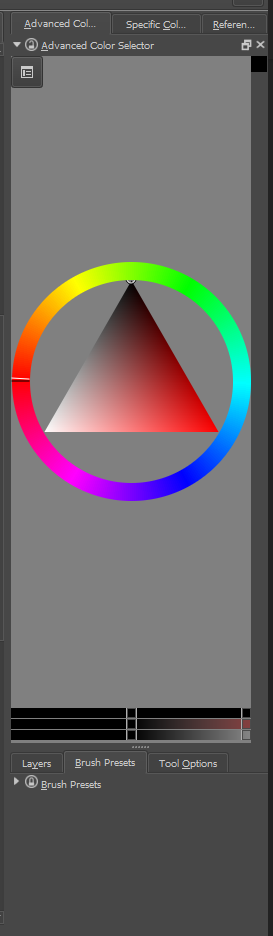
It seems that you are using an old version of Krita. I request you to update your installation.
To reduce the height of the advanced colour selector docker, grab the three dots and drag it towards the top. To show your brush presets, click on the small arrow besides the lock icon in the docker title bar. I have highlighted these in your screenshot below:
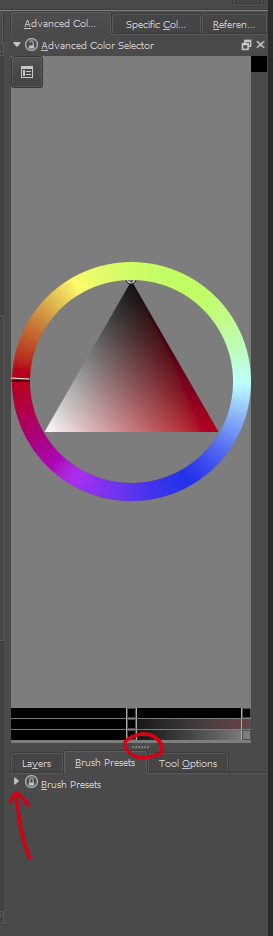
The arrow is removed from recent versions of Krita to avoid such mistakes.
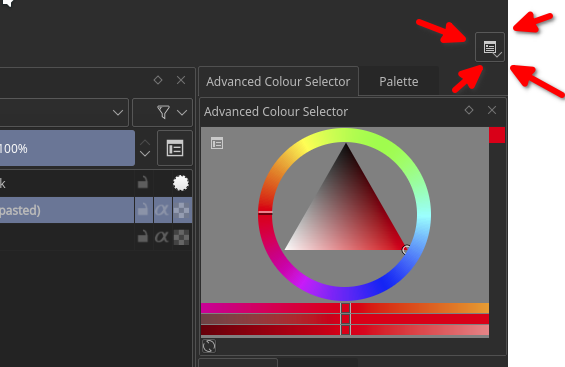
Also, you can reset the workspace from the workspace switcher dropdown at the top most corner of the Krita window
Thanks a lot, I didn’t notice the arrow before. Yea I know my version is very outdated, I had the newest version installed, but it felt very different so I just got the older one again.