Hi, I created my brush presets but when I select them from the “Pop up palette” the active tool does not change to a freehand brush, it remains the one previously chosen which is really uncomfortable.
For example: I have the rectangle tool currently selected, but now I want to use a brush from my presets to make a drawing > I open the pop up palette > select my brush preset > and bam! I am still with the rectangle tool.
This seems so nonsensical to me that i’m thinking to a bug. If I select brushes presets I want to use brushes and not other tools…
So… Is there somewhere an option to force krita to use freehand brush tools when selecting brush presets?
Thanks
The rectangle tool uses the brush preset to make the outline of the rectangle. Switching to a different brush preset while keeping the rectangle tool active, tells Krita you wish to make a rectangle but this time, use this new brush you just selected.
Yes, there is. You select the freehand brush tool from the toolbox.
I am not sure you can do this with the popup palette. However, if you choose to use keyboard shortcuts to switch brushes instead, then you can achieve this behaviour.
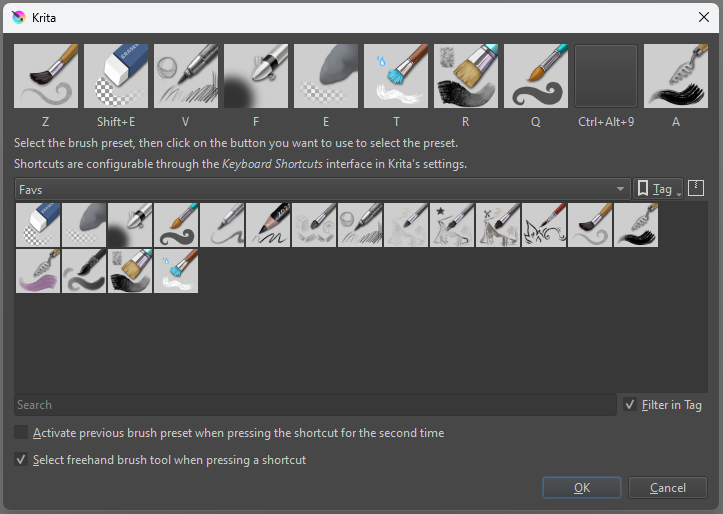
You can do this using the “Ten Brushes” script found in Tools → Scripts → Ten Brushes. Remember to check the “Select freehand brush tool when pressing a shortcut” as shown below:
@franksisco There is currently work going on to add functionality to the pop-up palette, especially by volunteer coders. Lots of posts about that if you time to stick around and read.