Brush Sound Effects

About Linux, I tested this [wonderful] plugin on Zorin OS 18 Core krita-5.2.13-x86_64.AppImage and unfortunately I have to confirm that Brush SFX doesn’t work, the plugin is always greyed out in Settings/Configure Krita/Pyyhon Plugin Manager.

Here a part of messages generated launching the AppImage from the Terminal, I hope this helps to fix :slight_smile:

[BrushSfx] Checking for dependencies
Try to load numpy
Failed module 'os' has no attribute 'add_dll_directory'
Try to load sounddevice
Ok!
Collecting numpy==2.2.6
  Using cached numpy-2.2.6-cp310-cp310-manylinux_2_17_x86_64.manylinux2014_x86_64.whl.metadata (62 kB)
Using cached numpy-2.2.6-cp310-cp310-manylinux_2_17_x86_64.manylinux2014_x86_64.whl (16.8 MB)
Installing collected packages: numpy
Successfully installed numpy-2.2.6
WARNING: Target directory /home/user/.local/share/krita/pykrita/piplib/numpy-2.2.6.dist-info already exists. Specify --upgrade to force replacement.
WARNING: Target directory /home/user/.local/share/krita/pykrita/piplib/numpy already exists. Specify --upgrade to force replacement.
WARNING: Target directory /home/user/.local/share/krita/pykrita/piplib/numpy.libs already exists. Specify --upgrade to force replacement.
WARNING: Target directory /home/user/.local/share/krita/pykrita/piplib/bin already exists. Specify --upgrade to force replacement.
krita.scripting: "Traceback (most recent call last):"
krita.scripting: "  File \"/home/user/.local/share/krita/pykrita/BrushSfx/__init__.py\", line 16, in <module>"
krita.scripting: "    from .brush_sfx import *"
krita.scripting: "  File \"/home/user/.local/share/krita/pykrita/BrushSfx/brush_sfx.py\", line 11, in <module>"
krita.scripting: "    import numpy as np"
krita.scripting: "  File \"/home/user/.local/share/krita/pykrita/piplib/numpy/__init__.py\", line 97, in <module>"
krita.scripting: "    _delvewheel_patch_1_10_1()"
krita.scripting: "  File \"/home/user/.local/share/krita/pykrita/piplib/numpy/__init__.py\", line 94, in _delvewheel_patch_1_10_1"
krita.scripting: "    os.add_dll_directory(libs_dir)"
krita.scripting: "AttributeError: module 'os' has no attribute 'add_dll_directory'"
krita.scripting: "Could not import BrushSfx"
krita.scripting: Error loading plugin "BrushSfx"
Begin.
Warning: requested data for unknown action "path-break-at-selection"
window being created: <PyQt5.QtCore.QObject object at 0x76ed14941b40> (MainWindow#1)
1 Like

I installed Zorin OS on virutal box and unfortunely this error didn’t happen in my freshly installed OS. Apparently numpy is trying to use the method os.add_dll_directory(), but this method only exists on Windows, so it shouldn’t be trying to use that. I have no idea what is causing the problem.

2 Likes

YAY! Managed to fix thanks to your hint (Windows related)!


THE MISTAKE
I made the (big) mistake of not installing from the zip file the plugin but copied from my Windows Krita install the BrushSfx folder and the BrushSfx.desktop file (both in Krita resource folder > pykrita folder).

(@paper_sun, maybe the same issue occurred also to you?)


THE FIX

  • deleted BrushSfx folder and BrushSfx.desktop file - in Krita resource folder > pykrita folder

  • fundamental (after reading the following WARNING) also delete piplib folder - in Krita resource folder > pykrita folder

WARNING - After deleting piplib folder I think all the custom plugins have to be reinstalled from official zip files - in case someone is reading this and wants to fix the plugin install. If you don’t want/can reinstall other plugins, don’t delete piplib folder even if I think BrushSfx will not work.

  • installed BrushSfx from the official zip file

@davi133, thank you so so much for your help, and apologies for this false alarm and for the time you had to put to try this thing :folded_hands:

(I wanted to try Krita on Linux and your plugin was almost indispensable :slight_smile: )

1 Like

Glad to hear it is working

1 Like

Thanks for the suggestion. Erm I believe I used the zip file installer script. I can try to reinstall after deleting those and let you know. I’m on fedora linux so it might be different. But i have the same issue its grayed out in both versions for me.

1 Like

…as mentioned before - since I’d like not cause damage - if you have other plugins installed, deleting piplib folder may have consequences.

If you launch Krita AppImage from Terminal you can see BrushSFX errors that can help to understand the issue.

And …another not requested advice :stuck_out_tongue: , make sure you are in the right Krita resources folder (I mean not the Flatpak one).

(I tried also Krita Flatpak version too, yes, always greyed out)

Good luck, hope you succeed and sorry for all the unrequested advices :rofl:

1 Like

I actually tought about something like this! haha, i have to give it a try, nice work :heart:

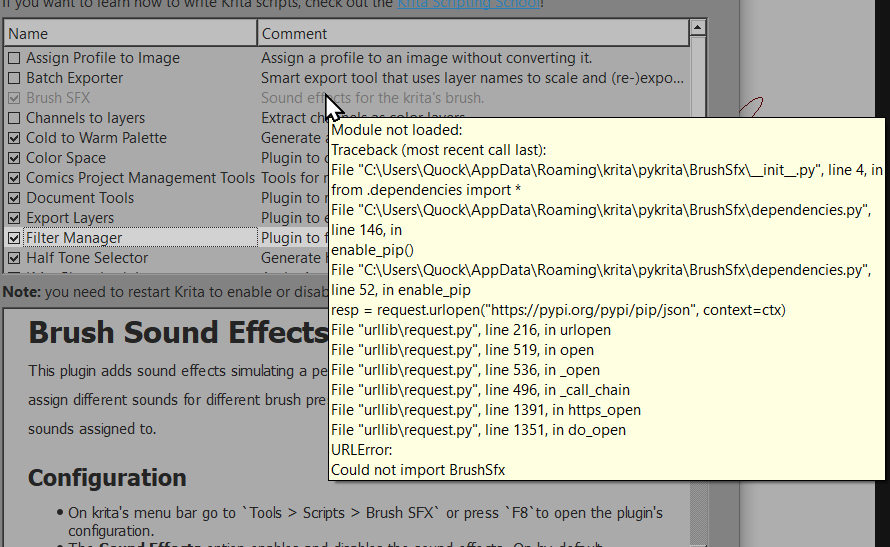
Thanks for the plugin but I could not get it to work, after installing the zip file, the plugin appears greyed out with this error message, what could i do to fix this ?

I had the same problem and my solution was to just uncheck some other plugins and after closing and opening Krita again, it worked. It seems to have issues with other plugins, as well as the amount of plugins there would be installed in Krita.

1 Like

It doesn’t work with Krita UI Redesign script :pensive_face:

Any way to make the two work?

1 Like

I have commented in the video in Youtube. Nice idea, and be sure i have thought about this desiring something like this. ASMR in Krita?. Cool!

2 Likes

Fixed now. This plugin used the UI to detect if the user is using a brush tool or other tool and the Krita UI Redesign broke that. That is why ideally we should separate application logic from UI. Now the sound effects should be working with that plugin, and if another plugin changes the UI too much there is an option to disable the UI based tool detection, if you disable, the difference will be that sound effects will also play when using tools that I think shouldn’t make sound, like the selection tool or the transform tool

3 Likes

Thank you, speedy work!

1 Like

Thanks for this awesome plugin … working great in older appimage on Linux, but have just downloaded yesterday’s nightly, after trying last week too, and brushSfx doesn’t run. Ran the appimage through terminal, so was able to crop out the brushSfx section … was surprised the plugin went online, and, although am not tech at all, seems it’s downloaded what was already there? Always start krita offline usually, as don’t like anything pinging online. Don’t know where to disable UI detection, as brushSfx is greyed out/can’t access anything. Other plugins are very configured, so removing them all as a possible workaround can’t happen. Would be worried anyway, incase happened to briefly forget network was on, and numpy made it’s bid to overwrite things again, and then going in circles removing plugins again etc.

[BrushSfx] Checking for dependencies
Try to load numpy
Failed Error importing numpy: you should not try to import numpy from
        its source directory; please exit the numpy source tree, and relaunch
        your python interpreter from there.
Try to load sounddevice
Failed No module named '_cffi_backend'
Collecting numpy==2.2.6
  Downloading numpy-2.2.6-cp313-cp313-manylinux_2_17_x86_64.manylinux2014_x86_64.whl.metadata (62 kB)
Collecting sounddevice==0.5.2
  Downloading sounddevice-0.5.2-py3-none-any.whl.metadata (1.6 kB)
Collecting CFFI>=1.0 (from sounddevice==0.5.2)
  Downloading cffi-2.0.0-cp313-cp313-manylinux2014_x86_64.manylinux_2_17_x86_64.whl.metadata (2.6 kB)
Collecting pycparser (from CFFI>=1.0->sounddevice==0.5.2)
  Downloading pycparser-2.23-py3-none-any.whl.metadata (993 bytes)
Downloading numpy-2.2.6-cp313-cp313-manylinux_2_17_x86_64.manylinux2014_x86_64.whl (16.5 MB)
   ━━━━━━━━━━━━━━━━━━━━━━━━━━━━━━━━━━━━━━━━ 16.5/16.5 MB 2.0 MB/s  0:00:08
Downloading sounddevice-0.5.2-py3-none-any.whl (32 kB)
Downloading cffi-2.0.0-cp313-cp313-manylinux2014_x86_64.manylinux_2_17_x86_64.whl (219 kB)
Downloading pycparser-2.23-py3-none-any.whl (118 kB)
Installing collected packages: pycparser, numpy, CFFI, sounddevice
Successfully installed CFFI-2.0.0 numpy-2.2.6 pycparser-2.23 sounddevice-0.5.2
WARNING: Target directory /home/*********/.local/share/krita/pykrita/piplib/sounddevice.py already exists. Specify --upgrade to force replacement.
WARNING: Target directory /home/*********/.local/share/krita/pykrita/piplib/__pycache__ already exists. Specify --upgrade to force replacement.
WARNING: Target directory /home/*********/.local/share/krita/pykrita/piplib/pycparser-2.23.dist-info already exists. Specify --upgrade to force replacement.
WARNING: Target directory /home/*********/.local/share/krita/pykrita/piplib/numpy already exists. Specify --upgrade to force replacement.
WARNING: Target directory /home/*********/.local/share/krita/pykrita/piplib/pycparser already exists. Specify --upgrade to force replacement.
WARNING: Target directory /home/*********/.local/share/krita/pykrita/piplib/cffi-2.0.0.dist-info already exists. Specify --upgrade to force replacement.
WARNING: Target directory /home/*********/.local/share/krita/pykrita/piplib/_sounddevice.py already exists. Specify --upgrade to force replacement.
WARNING: Target directory /home/*********/.local/share/krita/pykrita/piplib/sounddevice-0.5.2.dist-info already exists. Specify --upgrade to force replacement.
WARNING: Target directory /home/*********/.local/share/krita/pykrita/piplib/cffi already exists. Specify --upgrade to force replacement.
WARNING: Target directory /home/*********/.local/share/krita/pykrita/piplib/numpy-2.2.6.dist-info already exists. Specify --upgrade to force replacement.
WARNING: Target directory /home/*********/.local/share/krita/pykrita/piplib/numpy.libs already exists. Specify --upgrade to force replacement.
WARNING: Target directory /home/*********/.local/share/krita/pykrita/piplib/bin already exists. Specify --upgrade to force replacement.
krita.scripting: "Traceback (most recent call last):"
krita.scripting: "  File \"/home/*********/.local/share/krita/pykrita/BrushSfx/__init__.py\", line 16, in <module>"
krita.scripting: "    from .brush_sfx import *"
krita.scripting: "  File \"/home/*********/.local/share/krita/pykrita/BrushSfx/brush_sfx.py\", line 11, in <module>"
krita.scripting: "    import numpy as np"
krita.scripting: "  File \"/home/*********/.local/share/krita/pykrita/piplib/numpy/__init__.py\", line 119, in <module>"
krita.scripting: "    raise ImportError(msg) from e"
krita.scripting: "ImportError: Error importing numpy: you should not try to import numpy from"
krita.scripting: "        its source directory; please exit the numpy source tree, and relaunch"
krita.scripting: "        your python interpreter from there."
krita.scripting: "Could not import BrushSfx"
krita.scripting: Error loading plugin "BrushSfx"

Just reverted to older appimage usually use … unfortunately finding all resources broken and krita unable to start … but had again run it via terminal, so saw this about brushSfx:

[BrushSfx] Checking for dependencies
Try to load numpy
Ok!
Try to load sounddevice
Ok!
[BrushSfx] Module initialized without erros

Don’t know what’s changed about latest krita (thank goodness for backups!) but doesn’t seem to be an online check going on previously regarding brushSfx, and it runs absolutely great in older appimage. Not sure if all of this feedback is useful, but hopefully something is, lol.

1 Like

Just tested on krita’s latest version ( 5.2.14), on Ubuntu 24.04.3, unfortunely it worked just fine. What other plugins are you using? this could help me investigate the problem.

Explanation: If the dependencies import fails, my plugins assumes they are not installed and tries to install it, but the import is failing because of something else and the plugin is assuming it is not installed and tries to download it again.
Try to delete the folder (...)/pykrita/piplib and see if something changes.

Hi @davi133 and thanks for responding. :+1: Latest nightlies are 5.3, which I believe krita is moving into soon? alongside releasing v6? That’s why I downloaded the latest nightly ie most recent stuff included, to test if things keep working, as my system is a qt5 system, plus wanted to take a look at any changes …

Other plugins are … kanvasbuddy, oughtasave, reference docker, shortcut composer, tf easy colours map, theme creator, and 10 minutes ago added the preset groups plugin.

Just to note also that I saw an alsa sound error when closing pc down yesterday too. Was a bit worrying, but, on rebooting, sound is playing fine. Not keen on things being downloaded, especially when the procedure isn’t detecting things correctly, and causing extra errors. I’m offline 99.9% of the time anyway. Much prefer if the right dependencies are part of the install itself and not pinging out each time krita starts. BrushSfx was working perfectly fine previously, when not doing dependency checks etc, so if it’s at all possible to make it as it was before that would be really great.

Can’t delete piplib … there are clear warnings here that doing that means needing to reinstall all plugins. It’s getting onto a couple of years since I’ve messed with some plugins, and tbh a plugin needs to not force a situation where all other plugins must be removed and entirely set up again.

As long as dependency checks and downloads are happening, probably the same issue would happen any time I try a nightly? … jumping between current older 5.3 pre-alpha (where brushSfx works fine) and testing in the latest nightly breaks current older 5.3 and requires backup copied over, so I’m not sure I can do lots of tests unless it was a change such as no dependency check/downloads.

EDIT: just tried running latest nightly, but offline, to see if brushSfx wouldn’t try to do anything different to how it used to work, and if it would work, but unfortunately it still doesn’t. Maybe this points to something in the latest nightly? but still need to say that basically I don’t run plugins that ping online or run downloads when open krita. Not being tech-minded, I’m crossing my fingers it isn’t an internal krita thing, where it’s krita pinging online checking every plugin? Don’t know of any such changes, but am rarely online/on the forum. Didn’t see any other plugins checked though, so am thinking that isn’t happening. Hopefully something in the text below can be helpful? Can’t do further tests, as doing this test has broken current install and needing backup to restore things!

[BrushSfx] Checking for dependencies
Try to load numpy
Failed Error importing numpy: you should not try to import numpy from
        its source directory; please exit the numpy source tree, and relaunch
        your python interpreter from there.
Try to load sounddevice
Failed No module named '_cffi_backend'
WARNING: Retrying (Retry(total=4, connect=None, read=None, redirect=None, status=None)) after connection broken by 'NewConnectionError('<pip._vendor.urllib3.connection.HTTPSConnection object at 0x7fb324e086e0>: Failed to establish a new connection: [Errno -2] Name or service not known')': /simple/numpy/
WARNING: Retrying (Retry(total=3, connect=None, read=None, redirect=None, status=None)) after connection broken by 'NewConnectionError('<pip._vendor.urllib3.connection.HTTPSConnection object at 0x7fb324e10190>: Failed to establish a new connection: [Errno -2] Name or service not known')': /simple/numpy/
WARNING: Retrying (Retry(total=2, connect=None, read=None, redirect=None, status=None)) after connection broken by 'NewConnectionError('<pip._vendor.urllib3.connection.HTTPSConnection object at 0x7fb324e10410>: Failed to establish a new connection: [Errno -2] Name or service not known')': /simple/numpy/
WARNING: Retrying (Retry(total=1, connect=None, read=None, redirect=None, status=None)) after connection broken by 'NewConnectionError('<pip._vendor.urllib3.connection.HTTPSConnection object at 0x7fb324e10690>: Failed to establish a new connection: [Errno -2] Name or service not known')': /simple/numpy/
WARNING: Retrying (Retry(total=0, connect=None, read=None, redirect=None, status=None)) after connection broken by 'NewConnectionError('<pip._vendor.urllib3.connection.HTTPSConnection object at 0x7fb324e10910>: Failed to establish a new connection: [Errno -2] Name or service not known')': /simple/numpy/
ERROR: Could not find a version that satisfies the requirement numpy==2.2.6 (from versions: none)
ERROR: No matching distribution found for numpy==2.2.6
krita.scripting: "Traceback (most recent call last):"
krita.scripting: "  File \"/home/*********/.local/share/krita/pykrita/BrushSfx/__init__.py\", line 16, in <module>"
krita.scripting: "    from .brush_sfx import *"
krita.scripting: "  File \"/home/*********/.local/share/krita/pykrita/BrushSfx/brush_sfx.py\", line 11, in <module>"
krita.scripting: "    import numpy as np"
krita.scripting: "  File \"/home/*********/.local/share/krita/pykrita/piplib/numpy/__init__.py\", line 119, in <module>"
krita.scripting: "    raise ImportError(msg) from e"
krita.scripting: "ImportError: Error importing numpy: you should not try to import numpy from"
krita.scripting: "        its source directory; please exit the numpy source tree, and relaunch"
krita.scripting: "        your python interpreter from there."
krita.scripting: "Could not import BrushSfx"
krita.scripting: Error loading plugin "BrushSfx"

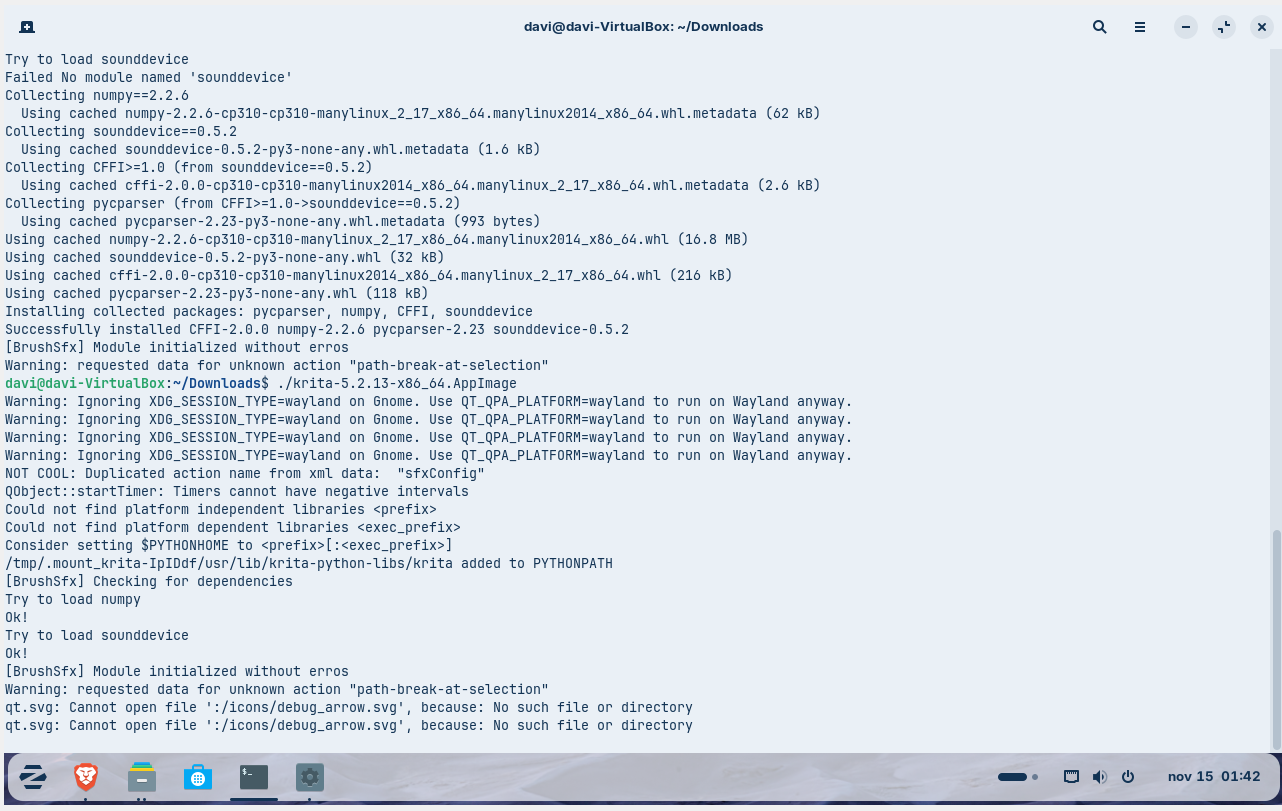
Just updated the plugin, now it should work for krita 5.3.0. You will have to delete the piplib folder again and let the plugin reinstall the dependencies, after that you can go offline again. You will also have to do that again if you go back to 5.2.14 or previous.

The piplib folder contains only the dependencies and not the plugins. I checked the plugins you mentioned and it seems they don’t use external dependencies

Explanation: Krita 5.2.14 uses python 3.10, the krita 5.3.0 build uses python 3.13. The numpy dependencie on python 3.10 goes only up to version 2.2.6, for python 3.13 this numpy version causes the problem you reported. With this update, if you are on krita 5.3.0 the plugin will install numpy 2.4.0.

Hi @davi133 :slight_smile:

After “suffering” a lot of time without the loved sounds :pensive_face:… I discovered that the plugin doesn’t work when “Canvas Graphics Acceleration” is disabled (test with Win 11 - Krita 5.2.13-14 Portable).

Is this mandatory? Because strokes are much more “fluid” without “Canvas Graphics Acceleration”, the PC consumes less power and the fans are quieter, or stop at all.

1 Like

Updated the plugin, now it has an option to disable the constraint of sound effects to only play over the canvas, this should solve your problem.

It was not mandatory for the sounds to work, but a detail about it was necessary to detect the canvas object, I couldn’t find another way to do that

In my experience, if I use the graphics acceleration with the Direct3D option, krita would be capped to 60 fps (my monitor refresh rate) and it would feel way less fluid, but when using the Opengl option the fps would be uncapped and it would run fine. Don’t know about the resource consuming tho.

1 Like

No words.
Works wonderfully.
Thank you infinitely… :face_holding_back_tears:

:sparkling_heart:

1 Like