Update: after using it a little more I noticed an issue, when selecting a dropdown in Krita toolbar (i.e. workspaces or the brush blending mode), after opening/closing one of them, the sound stays always active when moving over all Krita parts, is necessary to select and deselect “Constrain to canvas” in plugin options (F8) to return to the intended behavior.
I don’t know if I reproduced the bug correctly, I opened the Blending Mode dropdown and closed it by pressing the ‘Esc’ key and without releasing the left click and the sound stays always active, but it stops if I left click again anywhere on the app
1 Like
..I don’t know.. because I tried now, but the sound is working perfectly, it doesn’t stays active anymore with dropdowns.. 
If it happens again I’ll investigate.
Thank you very much as always 
1 Like
Thanks for responding. Hadn’t tried piplib removal and don’t recall running 5.2 … always used 5.3-prealpha, latest being March 2025, with python 3.11. Sounds like newer 5.3-prealphas must have moved to python 3.13.
Thanks for checking the plugins. I took a look at the piplib folder, but overall I think it’s better I just uninstall the plugin. Running as air-gapped a system as I can, for 9 years on linux, after windows turned me full linux-libre and offline and anti-tech, lol, alongside dealing with long-term ill health. No install on my system or in krita pings out, which provides some peace of mind. If ever there’s a zip can be done that includes portaudio and numpy and no pings/downloads, would be very grateful.
1 Like
Ok, after other tests it seems that the sound stays always active opening toolbars dropdowns - or Krita menus - with mouse left click, not with the tablet pen (the last time I tested only with tablet pen, I suppose).
And, as you told, it stops left clicking with mouse (or tapping with pen, I can add) anywhere in Krita app.
So, if it’s too tricky to fix this issue, is anyway possible to stop this behavior with this simple workaround 
Happy new year.
I think it is fixed now
1 Like
Wow, thank you very much! Happy new year to you too (and to all forum users) !
I’ve done a really quick test in 2 Krita versions I’ve installed as “real” portable (Win 10 for now):
it seems ok in Krita 5.2.14 (Great!)in Krita 5.3 it seems not fixed (krita-x64-5.3.0 prealpha ff1d7054 2025-12-30)
Anyway I’ll try it out better.
1 Like
Well.. I was wrong 
Seems that there are no differences in plugin behavior in different Krita versions, 5.2.14 or 5.3 prealpha (indeed it would have been strange IMO).
So far, in my tests with this new version, the issue still seems triggered when you open a dropdown and close it left-clicking with the mouse in Krita titlebar.
But it’s better than before of course, it’s easy to avoid to do so
Thanks again
1 Like
Hello @Vadkline, and welcome to the forum!
I don’t think so, but it can be that it isn’t updated to work with the recent formal release 5.3.0 right now, because that is quite new and had a few issues in the beginning. For me mine works in the previous formal release 5.2.16 without issues, only the recent release can’t use it (right now).
In Krita 6.0 I haven’t tested it so far, so I can not say anything on that, but I guess therefore it needs to be updated. But there are already a few tips on how to relatively easy make a plugin work again with Qt6 quickly here in the forum.
But, can it be that have you overseen that for support requests, which your question in principle resembles, you should always name some information, which is requested by one of our many rules and guidelines, so helping you gets possible? Among the things we need to know is the OS and its version, as well as the exact version number of your Krita, and we also want to know from where your Krita stems because this can influence some specialties of Krita which can be important in support. Can you please provide that with your answer? This will allow a better answer to why your plugin refuses to work right now.
@davi133, is it possible for you to look into this to hopefully solve the issue?
Michelist
Addendum:
Krita Version: 5.3.1-prealpha (git 757be8c),
Qt version compiled: 5.15.7, loaded: 5.15.7
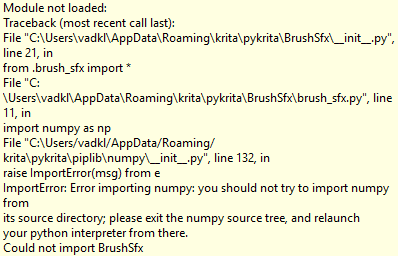
The error description as OCR result:
Module not loaded:
Traceback (most recent call last):
File “C:XUsersXCheffeXAppDataXRoaminngritaXpykritaXBrusthxX_init_.py”, line 21, in
from .brush_sfx import *
File “C:XUsersXCheffeXAppDataXRoaminngritaXpykritaXBrusthxXbrush_sfx.py”, line 15, in
from .sound import sound_p|ayer
File “C:XUsersXCheffeXAppDataXRoaminngritaXpykritaXBrusthstound.py”, line 122, in
sound_p|ayer : SoundPIayer(input_listener)File “C:XUsersXCheffeXAppDataXRoaminngritaXpykritaXBrusthstound.py”, line 50, in _init
self.p|ay_stream : sd.OutputStream(NNNNNNNNNNNNNNNA
samplerate=self._brush_sfx_source.get_samp|erate(),
AAAAAAAAAAAAAAAAAAAAAAAAAAAAAAAAAAAAAAAAAAAAAAAAAAAA
callback=self.callbackAAAAAAAAAAAAAAAAAAAAAA
)
A
File “C:XUsers/Cheffe/AppData/Roaming/kritaXpykritaXpiplibXsounddevicepy”, line 1515, in init
StreamBase.init(self, kind=‘output’, wrap_callback=‘array’,
NNNNNNNNNNNNNNNNNNNNAAAAAAAAAAAAAAAAAAAAAAAAAAAAAAAAAAAAAAAAAAAA
**_rem ove_se|f(|oca Is()))AAAAAAAAAAAAAAAAAAAAAAAAA
File “C:XUsers/Cheffe/AppData/Roaming/kritaXpykritaXpiplibXsounddevicepy”, line 909, in init
_check(_lib.Pa_OpenStream(self._ptr, iparameters, oparameters,
NNNNNNAAAAAAAAAAAAAAAAAAAAAAAAAAAAAAAAAAAAAAAAAAAAAAAAAAAAAAAA
samplerate, blocksize, stream_flags,AAAAAAAAAAAAAAAAAAAAAAAAAAAAAAAAAAAA
callback_ptr, userdata),
AAAAAAAAAAAAAAAAAAAAAAAA
f’Error opening [self.class.name_]')
AAAAAAAAAAAAAAAAAAAAAAAAAAAAAAAAAAAAAAAAAAAFile “CXUsers/Cheffe/AppData/Roaming/kritaXpykritaXpiplibXsounddevicepy”, line 2804, in _check
raise PortAudioError(errormsg, err)PortAudioError: Error opening OutputStream: Device unavailable [PaErrorCode —9985]
Could not import Brusthx
And alternatively as screenshot:

i just made an account so i didnt know about the stuff needed to file for a support request, but thank you for letting me know as im new here
i fixed it !
i installed numpy on my own python version (3.13 the same as krita’s version) and then copied the numpy installation folders inside krita’s python libraries (in programfiles>krita64) and it worked
note: i used numpy version 2.1.0
1 Like
Ah, good to know how to work around this glitch. Thank you! Let’s hope that @davi133 will soon revise its plugin, because most of our users would have issues to apply your hint.
And additionally that would be a chance to make this plugin also Krita 6.x compatible which would make a lot of users happy too.
Michelist
1 Like
Se podrá colocar en krita Android esto por favor habría laguna posibilidad??
@dieruco.art: Sorry, but you are required to add an English translation to your texts in native language. Alternatively I can offer you to answer in my home area dialect, for that even Google can’t offer translations …
Michelist
@Michelist @Vadkline
Updated the post on how to update for Krita 5.3, for Krita 6.0 I still have to update
2 Likes
Thanks for the fun plugin.
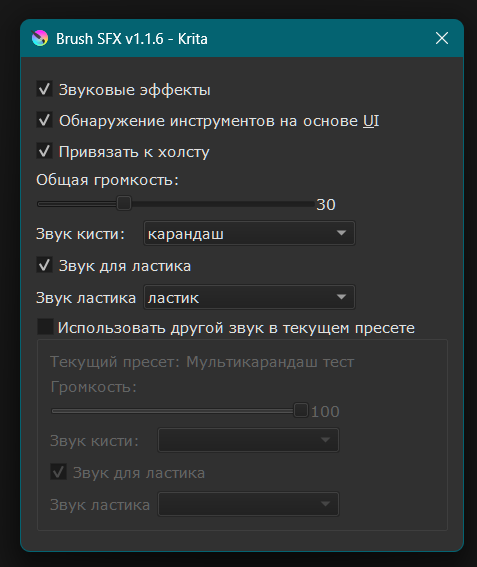
Перевод на русский язык.
Russian translation.
Установка: скопировать содержимое архива в папку для плагинов
Installation: copy the contents of the archive to the plug-in folder %APPDATA%\krita\pykrita
Google Drive: DOWNLOAD
3 Likes
With the chosen name of your bug fix one could imagine to now hear the sound of Russian brushes. 

Thanks for the update.
Michelist
1 Like
Plugin upated for version 1.1.7, should be working with krita 6.0.
Check instructions for updating on the post or in the readme on github.
Please report any bug.
2 Likes
Is it possible to install this on Krita Android? Is there any chance?
That would be hard, it seems the audio lib used (python sounddevice) is not well supported for android, and I don’t have any android device that can run Krita to test