This topic is not about Brush performance and optimization but about delay of Transforming Input from your stylus onto your canvas.
Perfect scenario for me Would be Drawing program and hardware reacting 1:1 to input.
In mouses reacting time is really important but it seem tablets have stroke processing delay but its not as big as what drawing applications introduce.
I dont like stabilizers even if they provide better looking lines my brain is really happy when I see canvas reacting to my movements without any delay.
Krita 5.3 is introducing some new and nifty stabilization/stroke processing that it seem that cant be turned off and it introducing bigger and inconsistent delay.
Krita 5.2.3 was actually BEST application out there when it comes to overall responsiveness of brushes. Few minutes in CSP and i want to go back to silky smooth Krita every time.
Other application that had this raw input feel was Photoshop when it was not sh*tting the bed.
It would be amazing to get some insights how Stylus Input processing works in Krita and are here any other lag sensitive people?
Have you already updated to Krita 5.3.1, because of some lagging here and there in Krita 5.3.0? If not, this may be the reason for your issue.
Maybe I’m too old to notice, but so far I find Krita reacting well, let’s wait what other users will say on it.
I didn’t find any noticeable increase of lag on my Krita (although I’m using Krita 6 alpha) and I’m quite quick with my strokes. However I’m on Linux with Wacom so that could be why it is different for me.
Yes im running 5.4 actually (first fix)
Maybe no Input smoothing was actually introduced but there is still some UI lag.
When you drawing for hours and know how program responds those changes in delay throw you off but its impossible to explain if someone doesnt experience it themselves.
I should test Krita 6 again.
I would say my XPpen is little less responsive and maybe little more noise than Wacom Tablet but i got used to it when i switched years ago.
Im interested if Krita performance is much better on Linux than on W10
I know WinTab (windows tablet drivers) is kinda mixed bag so that may be another point of failure.
I would not recommend Krita 6 for production use already. I only use it because of (for me) the better compatibility with Wayland graphics server. Otherwise it is more buggy than 5.3.x in a lot of aspects, including UI.
I can’t give you a comparison of Windows vs Linux because I completely switched to Linux many years ago.
I would say, felt Linux is faster, because when I used it on my Windows machine in a VM Krita on Linux was definitely not slower than on Windows, it was at least as quick as the same version used on Windows. So, Krita on Linux is fast in my eyes. But I can not provide any measurements only say it felt very snappy!
From a developer perspective it’s very hard to “argue with feelings”. Unless you have actual measurable results or a side by side comparison it’s tricky. And even if you can show it, it’s sometimes hard to pin down the issue (especially on PCs which can have multitudes of configurations). I’m not saying a feeling can not put someone in the right direction but even with the vocabulary to put it in words it doesn’t mean it will be understood.
Yes the new database is can not be converted to the old format.
Definitely not, one has to clean them up by hand, but if you go and rename the one that is the current one for version X and rename it and add an X to it and an Y and a Z for the others, before you start a different version, then you’ll soon have three different databases that you can switch between. You can do this after you terminate Krita to be able to start another version, then you can access the database and do this renaming thing - because as long as Krita runs the DB is locked.
This can be a good idea when you have tons of resources imported into Krita, like I have with my “so-called” maximum installation in which I have anything I have for Krita far over 600 bundles, loose presets, ten-thousands of brush tips, patterns, gradients. But I’m using it only to identify resources because of forum requests because it sometimes has slowdowns but with a resource database of 17 GB! Because rebuilding these large databases can take some time.
Testing brushes in Scratchpad in Krita 5.3.1 are much faster than even on small canvas (512x512).
While In Krita 5.2.3 brushes are way more responsive…
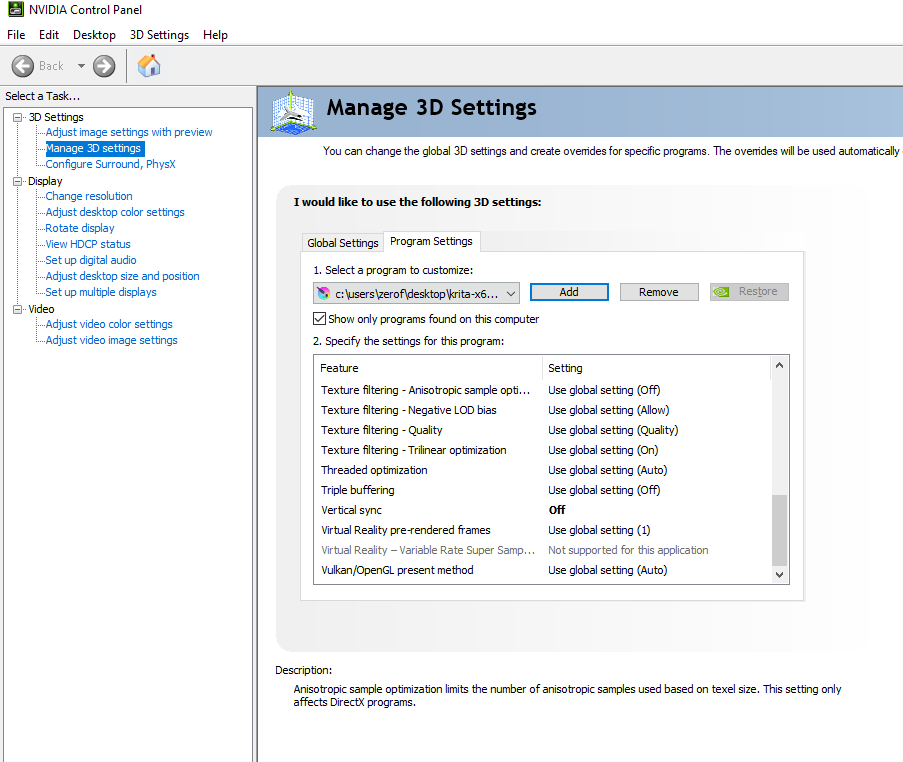
Then it struck me. What i did years ago to improve Lag.
Goddamn Vsync!!!
Im using Standalone Krita and Nvidia Setting are saved per .exe localization so they did not apply to localization of 5.3.1
Basic Vertical sync settings are “Application Controlled” And Krita turns vscn into lag i was complaining about.