so like, i used the selection tool to erase a color then redrew it on another layer. but when i remove the selection then try to draw, the brush strokes doesnt appear. its either something weird or im just stupid ( …i was an ibispaint user shush)
Hi! There could be several reasons for it. Usually, it’s a good idea to paste a screenshot of your whole Krita window to help debug.
But I would check:
- did you really remove all selections (even 1 pixel somewhere will block you from painting outside)?
- isn’t your layer locked, or alpha locked, etc.?
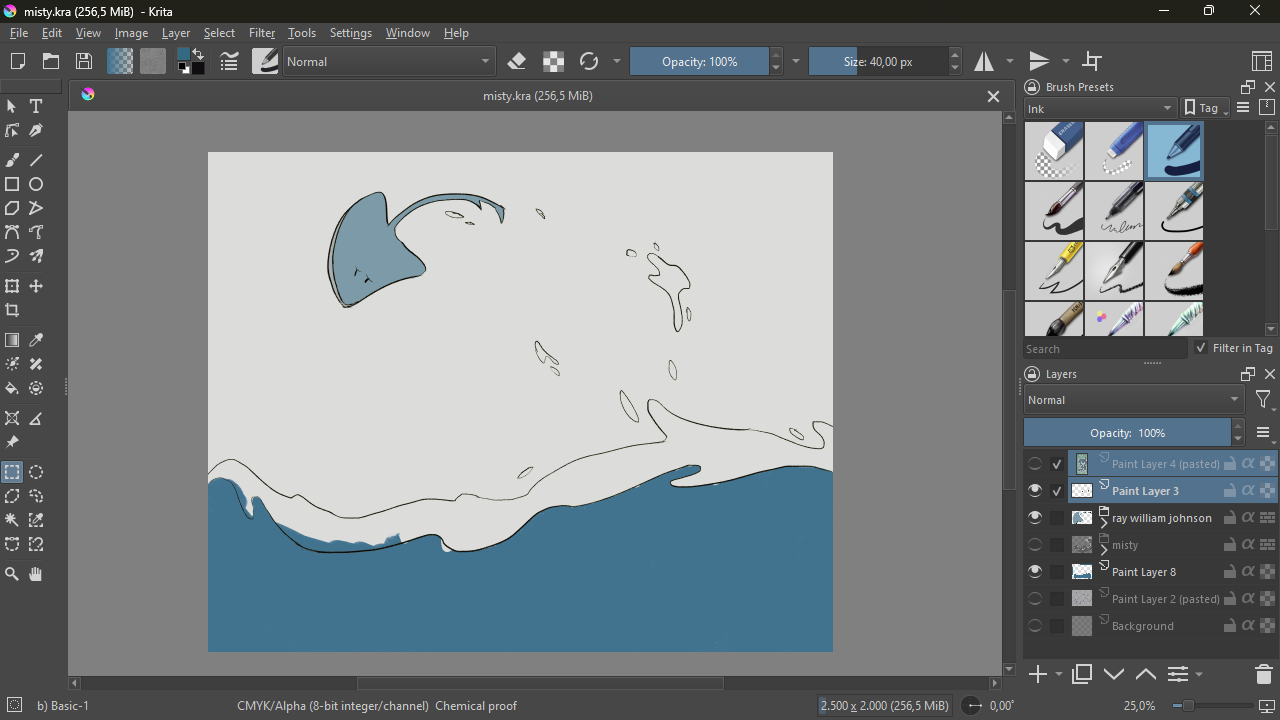
Currently, in your screenshot, you have not enabled the Freehand Brush Tool respectively the Dynamic Brush Tool in Krita’s so-called Toolbox on the left side. Krita does not automatically snap back to brush after selections made, you have to select one of the brush tools before you can paint again, and here you have selected the Rectangular Selections Tool.
Michelist
1 Like
kinda forgot to say but i did enable the freehand tool (my bad)
I know you say you did deselect all, but to be 100% sure, in Krita do Select >> Deselect or use the shortcut CTRL + SHIFT + A.
I’m away for some time, I hope others will step in and help you further in the time between.
And, by the way, welcome to the forum @hellzumar!
Michelist
Don’t say it did the trick, did it?
If so, you may want to put this as a button into your toolbar, I have it between undo and redo and find it very convenient, one touch with your stylus and all selections are gone.
Michelist
Edit: When editing got wrong because you’re in a hurry  … corrected that
wowzer, it worked. thanks man 
1 Like
This topic was automatically closed 4 days after the last reply. New replies are no longer allowed.