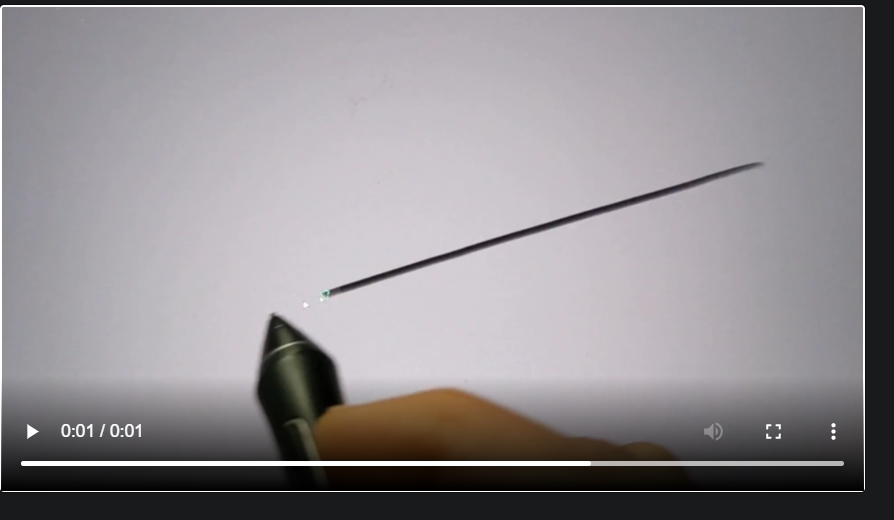
For some reason Krita has more brush lag/delay compared to Photoshop with my Wacom Cintiq. PS drawing feels more snappy than Krita drawing. When I say lag I do not mean something like a cpu/gpu performance issue. The distance between the pointer and where the brush during drawing is slower and bigger with Krita compared to PS. For some reason PS feels like it has at least 10-20ms better brush response.
I have this difference with small and simple brushes as well. I also disabled brush smoothing in Krita so that is not a factor either.
I have Intel 12900 and RTX 3080 so I doubt that this is related to hardware given I use both apps on the same device.
Was anyone able to improve Krita brush performance?
I don’t have any lag at all unless I choose a super large brush (500 px or larger) even though I’m working on a 10 year old low spec laptop. Have you gone through the Krita setup process to determine whether you should use Windows Ink or not?
You can find the Input API under Tablet Settings in Configure Krita. Note that you have to make Wacom match in the Desktop Centre and Krita has to be restarted before any Input API change will take effect.
The lag is a relative issue, you need to compare it to Photoshop.
These devices always have a lag, the brush is never under the mouse pointer, you can see the issue when you do a relatively fast move (but not too fast)
Also this is a Cintiq, so you need to have a display graphic pen device to see the issue more clearly.
I still wonder if the API change will make a difference. Usually, WinTab is the more responsive solution. And in case you are using Windows Ink now, it would be worth a try. (And because computers often behave unpredictable, I would even check if Windows Ink reacts better than WinTab if you are on WinTab now.) You won’t lose anything, but if you’re lucky you might get a better responsive Krita, if not you can reset it to the former used API.
And beside of the API, if you haven’t already created a profile, I recommend creating one for Krita and for any other software you use with your pen display. That way Photoshop can use Windows Ink, Krita Win Tab, and whatever other software you still use, it gets the API that fits best.
I already tried that, it makes no difference. In fact Wintab seems a bit slower but hard to tell. What I know is that there is no improvement between these drivers.
The issue becomes very visible with larger brushes.
I didnt notice any lag with my cintque on linux. The cursor is always exactly where my pen is even when going fast and relatively big brushes. Maybe it’s a windows issue.
I use both, Ps and Kr, never noticed any difference and when it comes to brushes and the feeling of drawing I guess Kr always feels a bit smoother than Ps.
But I never “tested” it and I guess the difference (if there is any) is so minimal that it comes always down to Hardware, Settings, Tablet, and how all of this stuff works together.
Bet it’s not a software issue so keep trying and eventually you will figure it out, good luck.
Really? I never heard that before, these devices always have a lag. The pen tip is never dead on with the brush location, and this is not the parallax issue because some screen glasses do not have that issue.
See the video. The issue is not super visible due to the frame rate but you can clearly see the distance when you stop the frame sometimes.
I have been experiencing this issue for a long time too (I’m on Windows 10 x64) and I kinda gave up since it’s not that much of a bother.
By any chance if you’re using Windows 7… You can disable Aero(Desktop Window Manager Session Manager) and it will make the delay go away completely(not just for Krita, but for all drawing applications).
And if you’re on modern OS, try changing the Canvas Graphics Acceleration in the Display setting. It made a difference for me a little. (OpenGL generally shows shorter delay than ANGLE)
How does this ‘Canvas lag’ compares to the Windows cursor? You know the ‘normal’ OS cursor outside any application?
I’m assuming the normal cursor presents this lag behind the pen too (?)
Right, there is always a delay between the pen tip and the pointer but the delay becomes much more noticeable when I switch to Krita (that 10-20 ms, it could be a larger numbr hard to measure it), and this drop does not happen as such In PS. PS brush strokes definitely feels snappier (but not as good as Ipad Pro).
Bear in mind that I can see the lagging even when I am using regular Wacom tablet. Krita suffers from a brush delay (see my screenshot and video above).
You might know the type of delay I am talking about if you ever used an older Android tablet with a Wacom screen pen.