Hi! Newbie, super greatful for an awesome free app that’s better than super expensive ones. Thank you! <3
Migrating from Sketchbook Pro and I truly miss blending brushes. Not having to switch tools to smudge is the one feature I truly loved Sketchbook for. Is there any chance…?
If someone does have the time and want to add the feature, that will make Krita THE Best IMHO.
Welcome to the forum!
I’m pretty sure what you are talking about already exists, have you tried any of the default watercolor brushes? Ones that have a little droplet on their icon?
Oh really? Watercolors are actually my favorite traditional medium But the Krita brushes are not like the real thing at all so I hope you’ll find something you’ll like
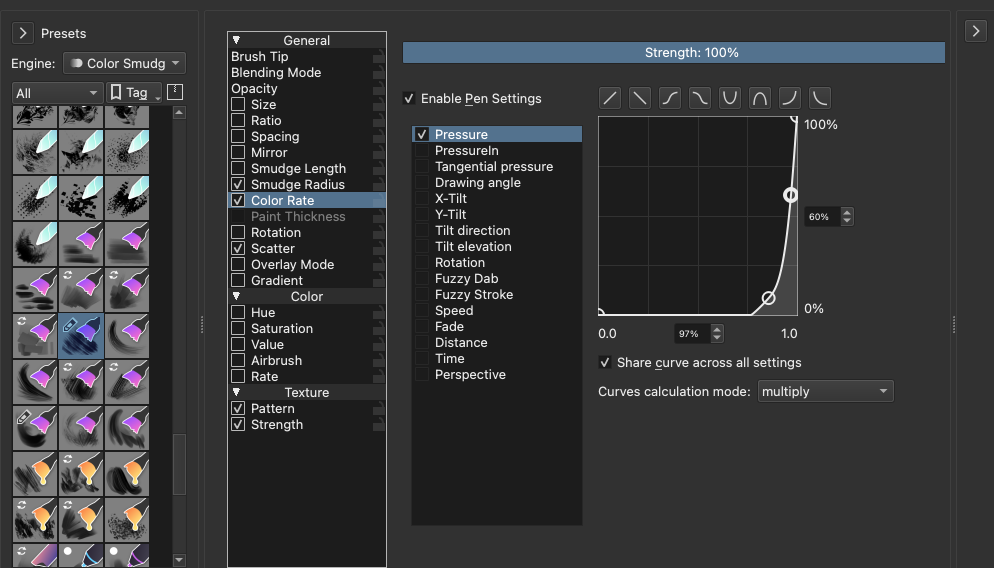
I have been looking for something similar, and I think the key is to have a brush using the Color Smudge engine. You can click F5 to bring up the brush options, then in the upper left corner push the button with arrow to see a list of brush presets. At the top of this list is a dropdown. Please select the engine “color smudge” and select all tags. This should give you all brushes using this engine. Try these brushes to see what is closest to what you want.
The essential setting for blending under low pressure and paintung under higher pressure is the option Color Rate. Make sure this option is enabled and set it to pressure (which is the default). The important part is the pressure curve. I like a brush with a curve like this:
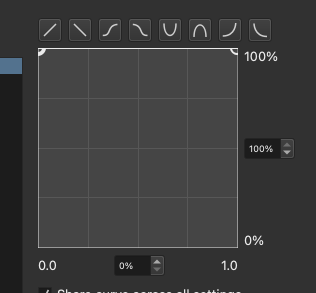
But you may have to experiment with this setting. Another option to enable is “smudge length”: also set this to 100% and pressure. I have my curve set up like this:
I hope this helps.
I actually have a hard time understanding exactly which setting does what, so please refer to this documentation on the color smudge engine to give you more information:

 But the Krita brushes are not like the real thing at all so I hope you’ll find something you’ll like