New to bug reporting here. Sorry if something’s wrong.
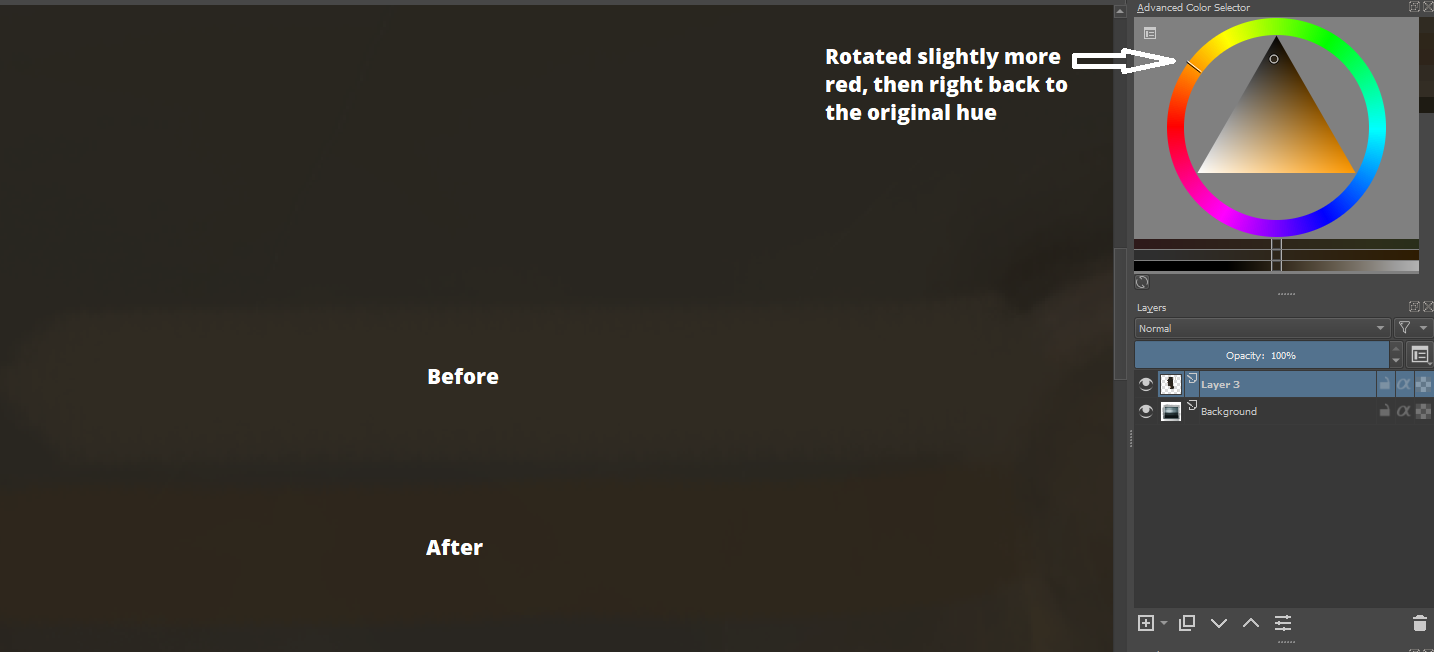
I believe I have found a bug with the advanced color selector. When painting in a 16 bit color space, after picking a color and rotating the hue, the luminosity/value/intensity isn’t preserved and the color actually gets darker.
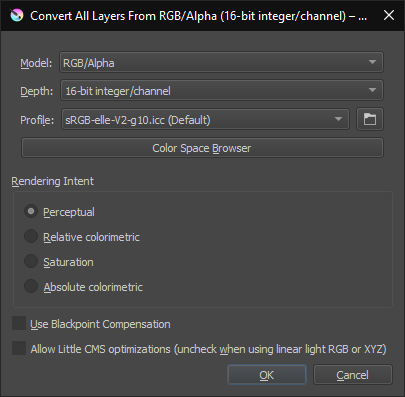
And just to verify, I created a copy of the document I was working in and converted the color space to the equivalent 8 bit srgb color space and rotating the hue worked as expected.
For all problems/bugs, it would be better to try the public 4.3.0 beta-1 which is very close to formal release now. You can get it from here:
You can use the portable .zip version if you prefer not to update your installed 4.2.9.
(However, this bug is also in the public 4.3.0 beta-1)
How are you rotating the hue?
Manual drag or spot selection doesn’t seem to have a problem.
Use of the keyboard shortcuts does have a problem.
I’ve just tried it in 16-bit integer and 8-bit integer colour spaces and they both have the same problem.
So, I’m not sure why you see converting from 16-bit to 8-bit as not having the problem.
Thanks for the response. That bug report doesn’t sound quite like what what I’m experiencing, though it’s similar. My issue occurs specifically when clicking on the hue wheel around the edge of the advanced color selector. It is most noticeable when the current color is fairly dark as it results in a near-black being picked instead. Perhaps incorrect gamma/linear selection?
Here is what I am clicking specifically.
I noticed that even just rotating it slightly, then rotating it back to the original hue results in a noticeably different color than the original which is definitely not the expected behavior.
I’ll try the beta and see if I can reproduce it there.
If I do a large hue shift fron orange to red, then the painted stroke does appear darker, as might be expected.
Moving the hue back to orange restores the appearance of the painted stroke.
This was with 8-bit and 16-bit default colour profile.
Slight hue shift and back again shows no difference either.
I’ve no idea why this may be happening to you so I hope someone else can try this to see what may be going on.
I’m using Linux (Debian 10) but I can’t think why that should make a difference.
I suggest you wait a while to see if anyone else has any ideas about this.
Thanks for checking, even if you couldn’t reproduce it. Hopefully someone else can figure it out because this makes painting subtle skin tone variations very difficult in particular.
Is there any noticable variation in the effect with different HSX models or different colour profiles or maybe some other variable?
When clicking on a different hue, do you see any movement of the small white circle in the triangle?
The only time I see any movement is if I change the image colour space profile but that’s some kind of initial ‘settling down’ thing and what you’re seeing doesn’t happen after that.
for the triangle, it’s all HSV. What is proly specifically going on here is that the advanced color selector has to transform from the linear srgb to regular 8bit srgb, and then to hsv, and then back again. All these transforms lead to rounding errors and thus the color being a tad different.
@Lynx3d has been poking at the color selectors the most past year, so he might be able to tell you if this can be fixed at all, or that it is just a fact of math.
Hm the color selector itself seems fine, but I discoved an issue when your color history has colors in a different color space than the current image.
Clicking on a color that is 8-bit sRGB while you work in 16-bit linear RGB simply gets converted incorrectly by the advanced color selector, so any kind of tweak will be based on a wrong color.
I need to investigate the cause…oddly enough, loading colors from a palette shows no issue, just the color history.
Guess I got confused, it’s actually picking 16-bit linear colors that goes wrong.
KoColor::toQColor() is the culprit. I need to look at this some more, but I already had the urge to rip out some ugly code there last time I looked at it, since it seemed redundant now anyway…
Oh I forgot to ask: since it appears to actually be a bug, should I fill out a bug report for it to track it? Or anything else I can do to help with the process?
Unfortunately I don’t have a quick fix for it, on closer inspection the problem isn’t simply using a wrong color profile…
while there are different profiles involved, they are used consistently and even should be equivalent too, but one of them behaves weird.
And just eliminating that one is not trivially possible either.