By
I mean, what’s your use case exactly?
Grum999
By
I mean, what’s your use case exactly?
Grum999
I have been using this script since shortly after it was released. Thanks for the great job.
By the way, the description of the bulinote says
When a note is displayed as a post-it, clicking on the scratchpad will change the brush color with the picked color.
However, in my environment, whenever I click on a handwritten note displayed as a post-it, the foreground color always turns to black.
Is this a bug? (No error messages, etc.) This is the first time I am reporting this, but I have had this phenomenon ever since I started using it.
I am currently using Krita 5.1.3 on Win10.
Hi @dk8
Probably…
I have to test it on Windows 10, but no time tonight: it’s time to go to bed for me in ~15min 
A screenshot or better a small recording could also help 
On my side, it works:
Grum999
weird

Tested on windows 10, I’m not able to reproduce it.
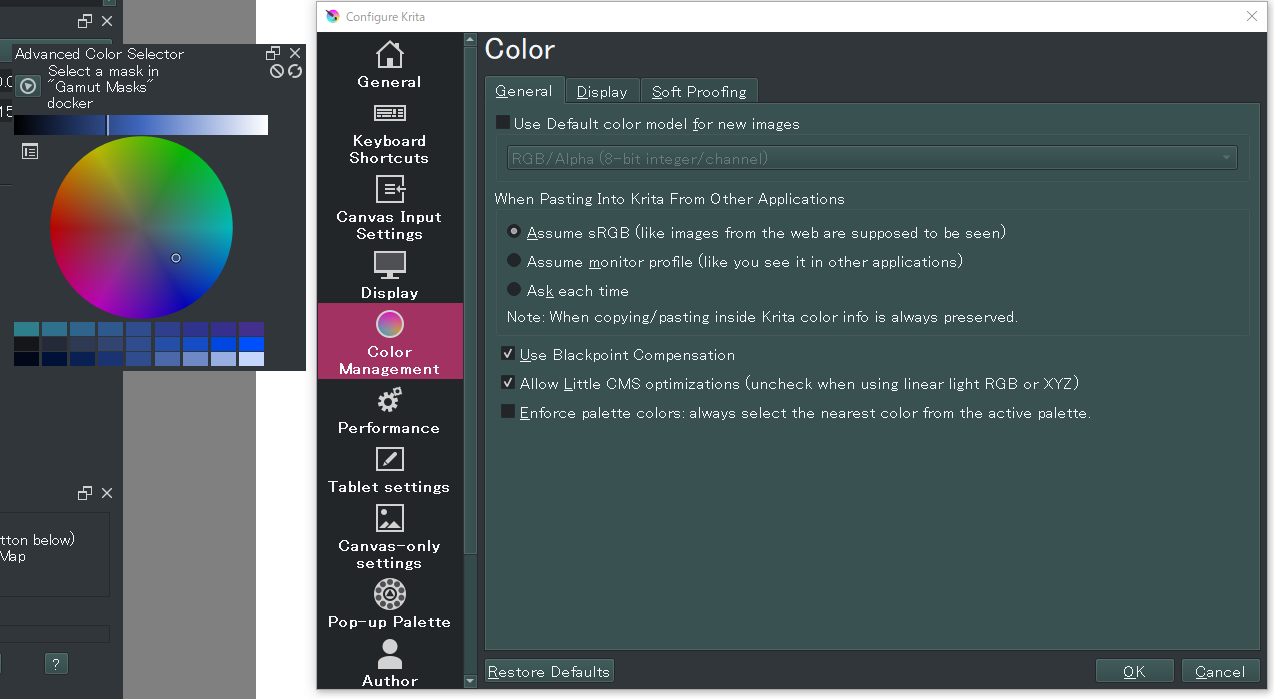
As everything is in Japanese, which color selector docker is it?
I don’t have this one.
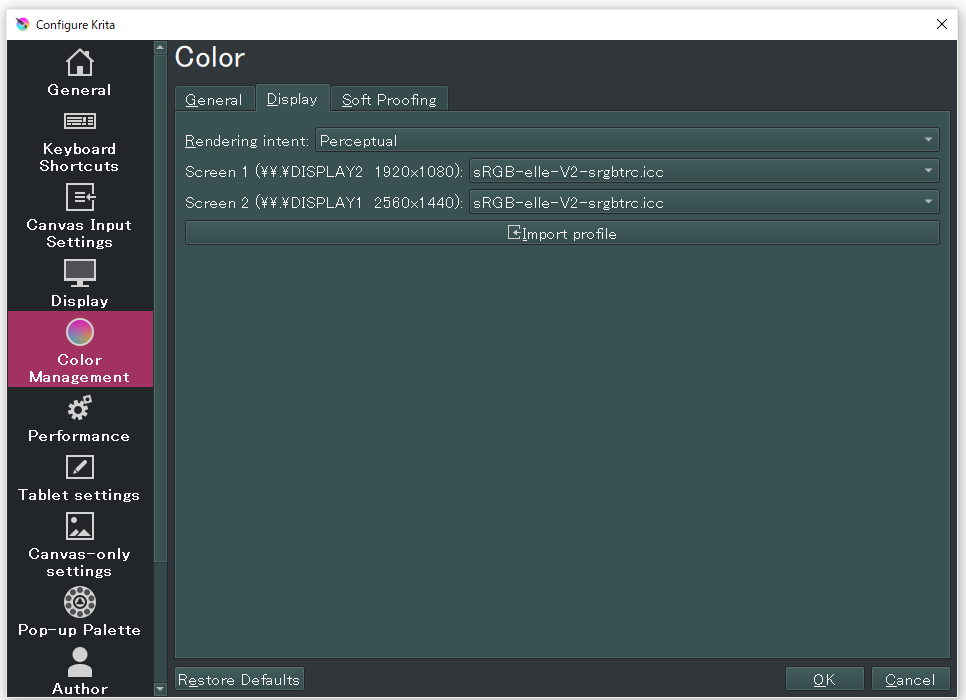
Or at least, I’m not able to find which one is it and/or which settings are applied
Also, your document in RGBA 8b color space?
Or another one?
Grum999
It is the advanced colour selector with what seems to be in HSV mode with a circular shape.
I am using the advanced color selector. However, picking up colors from various other dockers and palettes gives the same result. If I pick up red or blue from a palette, the foreground color changes to black when I click on a handwritten note in BuliNote.
I don’t know much about color space, so it would be helpful if you could judge from the screenshots.
Tested in similar settings condition, it works on my side…
I think the only things we can do now is to try to debug plugin on your computer to try to understand what happen here… 
Grum999
Thanks for checking it out.
I did a little research and it looks like debugging is difficult for me… 
I wanted to say one more thing, and this is a suggestion for a plugin.
How about adding a button to the list of links to layers to swap positions? Or the ability to move them by dragging, etc. I often work with hundreds of layers and often want to organize the order of the links.
It would also be useful to have the ability to add all layers that are currently in focus in the layer docker to the list at once. This would be useful when I want to quickly add the active layer to the list. (This would be easier than searching through the list of layers in the BuliNote)
I’ll prepare a version ready for debug tomorrow
Good idea, not able for now to create the feature request on github but I’ll do it tomorow too
Grum999
Hi @dk8
For this one, I need to be sure, japanese->english translation may not accurate here.
What you need is, instead of adding current active layer, you want to be able to add all selected layers at once
Right?
Grum999
Ok, first debug tests
in file C:\Users\daini\AppData\Roaming\krita\pykrita\bulinotes\bn\bnnote_postit.py line 584, can you replace current mousePressEvent method definition with this one?
    def mousePressEvent(self, event):
        """Pick color on click"""
        if event.modifiers() & Qt.ControlModifier or event.buttons() & Qt.MidButton:
            return super(BNWLabelScratch, self).mousePressEvent(event)
        else:
            view = Krita.instance().activeWindow().activeView()
            color = QApplication.primaryScreen().grabWindow(self.winId()).toImage().pixelColor(event.pos().x(), event.pos().y())
            qDebug(f"set color: {color.name()}")
            view.setForeGroundColor(ManagedColor.fromQColor(color, view.canvas()))
            qDebug(f"current color: {view.foregroundColor().colorForCanvas(view.canvas()).name()}")
Then display log viewer (ensure enable logging it’s active)
And test plugin
What do you get in log viewer?
Grum999
What you need is, instead of adding current active layer, you want to be able to add all selected layers at once
Right?
Exactly. It would be nice to be able to add all the layers that are in focus other than the active layer to the list at once.
And, again, a thought: how about adding a button at the top or bottom of the post-it that opens an edit window for the post-it itself?
It would be more intuitive.
The log has been output.
set color: #000000
current color: #000000
set color: #000000
current color: #000000
set color: #000000
current color: #000000
KoFileDialog::onFilterSelected: Cannot find suffix for filter “”
Ok then feature request I wrote match this need 
You’re right
Feature request created:
Ok.
Let me guess: you have 2 monitor, and post-it note is on secondary one…
If you move it to primary monitor, does it work? 
Grum999
I am using dual monitors and using Krita and BuliNote with the LCD pen tablet as a secondary monitor.
However, when I tested with the LCD pen tablet changed to the primary monitor, the results were the same, including logs. When I run Krita with either of these displays as the primary monitor, I only get black color from BuliNote… 
The results are also the same when testing with Krita on Display A and a post-it on Display B.
Hi @dk8
Mmh ok
So problem don’t come from here…
Here’s another version of method, with additional log information.
    def mousePressEvent(self, event):
        """Pick color on click"""
        if event.modifiers() & Qt.ControlModifier or event.buttons() & Qt.MidButton:
            return super(BNWLabelScratch, self).mousePressEvent(event)
        else:
            view = Krita.instance().activeWindow().activeView()
            img=QApplication.primaryScreen().grabWindow(self.winId()).toImage()
            qDebug(f"window size: {img.width()}x{img.height()}")
            qDebug(f"mouse position: {event.pos().x()}x{event.pos().y()}")
            color = QApplication.primaryScreen().grabWindow(self.winId()).toImage().pixelColor(event.pos().x(), event.pos().y())
            qDebug(f"set color: {color.name()}")
            view.setForeGroundColor(ManagedColor.fromQColor(color, view.canvas()))
            qDebug(f"current color: {view.foregroundColor().colorForCanvas(view.canvas()).name()}")
Can you test and give me results?
Not sure it will provide me more useful information, but it could give me tips for next debug iteration
Grum999
QLayout: Attempting to add QLayout "" to BNNotePostIt "", which already has a layout
QLayout: Attempting to add QLayout "" to BNNotePostIt "", which already has a layout
window size: 368x301
mouse position: 106x140
set color: #000000
current color: #000000
window size: 368x301
mouse position: 163x97
set color: #000000
current color: #000000
QLayout: Attempting to add QLayout "" to BNNotePostIt "", which already has a layout
QLayout: Attempting to add QLayout "" to BNNotePostIt "", which already has a layout
window size: 640x371
mouse position: 240x163
set color: #000000
current color: #000000
window size: 640x371
mouse position: 215x183
set color: #000000
current color: #000000
KoFileDialog::onFilterSelected: Cannot find suffix for filter ""
I have tried two post-its, one in the first half and one in the second half, and the result is the same.
By the way, when I open the edit window of a post-it, the foreground color is changed to black and returns to the previous color when I close the window with “OK” or cancel. Only when I re-edit a handwritten post-it, the foreground color is the last color used in that handwritten note, and it returns to the previous color when I close the window. Is this behavior a specification?
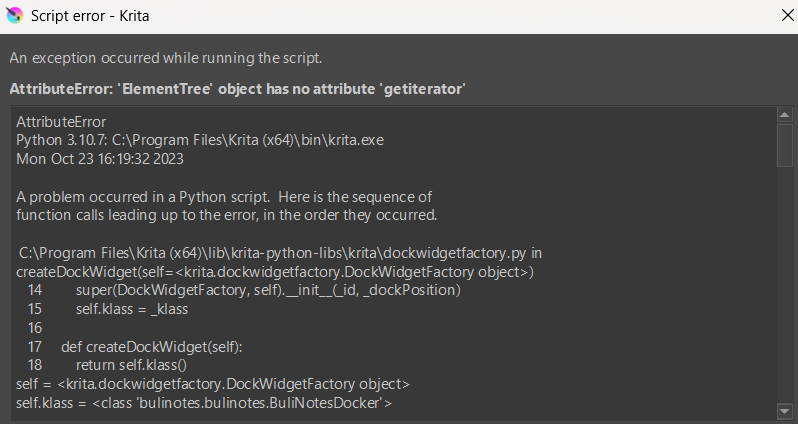
Hey, I just want to let you know that this plugin doesn’t work for the latest version of Krita. This message keeps popping up every time I start the app
Hello @greed and welcome to the forum
The problem with plugins not working properly with version 5.2.0 has been observed and noted before.
The plugin creators are very aware of it and are reworking their plugins as fast as they can whenever they can find time to do that.
Hi
Problem has been fixed in may, the 9th, with release 1.0.2
If problem still occurs with latest release, please open an issue on BuliNote github:
Grum999