BuliCommander

Hi

Release v0.6.0a is available

[2020-12-29] Version 0.6.0a

  • Implement Clipboard manager
  • Implement tool Copy to clipboard
  • Implement function Open file as reference image
  • Implement context menu for files
  • Improve Krita image information - Reference Images
  • Fix bug - Active panel not highlighted

For screenshots and functionalities description, you can read the full detailed release content directly on github repository.
And main BuliCommander page.

Grum999

3 Likes

hi. It seems that this plugin has not been updated for a long time. I just used it and I got an error when opening “preference”

AttributeError
Python 3.8.1: C:\GAMES\STEAM\steamapps\common\Krita\krita\bin\krita.exe
Sun Aug 22 17:42:40 2021

A problem occurred in a Python script. Here is the sequence of
function calls leading up to the error, in the order they occurred.

C:\Users\123\AppData\Roaming\krita\pykrita\bulicommander\bc\bcuicontroller.py in commandSettingsOpen(self=<bulicommander.bc.bcuicontroller.BCUIController object>)
2289 def commandSettingsOpen(self):
2290 “”“Open dialog box settings”“”
2291 if BCSettingsDialogBox.open(f’{self.__bcName}::Settings’, self):
2292 self.saveSettings()
2293
global BCSettingsDialogBox = <class ‘bulicommander.bc.bcsettings.BCSettingsDialogBox’>
BCSettingsDialogBox.open =
self = <bulicommander.bc.bcuicontroller.BCUIController object>

C:\Users\123\AppData\Roaming\krita\pykrita\bulicommander\bc\bcsettings.py in open(title=‘Buli Commander::Settings’, uicontroller=<bulicommander.bc.bcuicontroller.BCUIController object>)
1325 @staticmethod
1326 def open(title, uicontroller):
1327 “”“Open dialog box”“”
1328 db = BCSettingsDialogBox(title, uicontroller)
1329 return db.exec()
db undefined
global BCSettingsDialogBox = <class ‘bulicommander.bc.bcsettings.BCSettingsDialogBox’>
title = ‘Buli Commander::Settings’
uicontroller = <bulicommander.bc.bcuicontroller.BCUIController object>

C:\Users\123\AppData\Roaming\krita\pykrita\bulicommander\bc\bcsettings.py in init(self=<bulicommander.bc.bcsettings.BCSettingsDialogBox object>, title=‘Buli Commander::Settings’, uicontroller=<bulicommander.bc.bcuicontroller.BCUIController object>, parent=None)
953 self.bbOkCancel.accepted.connect(self.__applySettings)
954
955 self.__initialise()
956
957
self = <bulicommander.bc.bcsettings.BCSettingsDialogBox object>
self.__initialise undefined

C:\Users\123\AppData\Roaming\krita\pykrita\bulicommander\bc\bcsettings.py in __initialise(self=<bulicommander.bc.bcsettings.BCSettingsDialogBox object>)
1010
1011 # — NAV Category -----------------------------------------------------
1012 self.bcpbCNUserDefined.setPath(self.__uiController.settings().option(BCSettingsKey.CONFIG_FILES_HOME_DIR_UD.id()))
1013 self.bcpbCNUserDefined.setOptions(BCWPathBar.OPTION_SHOW_NONE)
1014
self = <bulicommander.bc.bcsettings.BCSettingsDialogBox object>
self.bcpbCNUserDefined = <bulicommander.bc.bcwpathbar.BCWPathBar object>
self.bcpbCNUserDefined.setPath = <bound method BCWPathBar.setPath of <bulicommander.bc.bcwpathbar.BCWPathBar object>>
self.__uiController undefined
global BCSettingsKey = <enum ‘BCSettingsKey’>
BCSettingsKey.CONFIG_FILES_HOME_DIR_UD = <BCSettingsKey.CONFIG_FILES_HOME_DIR_UD: ‘config.files.homeDir.userDefined’>
BCSettingsKey.CONFIG_FILES_HOME_DIR_UD.id = <bound method BCSettingsKey.id of <BCSettingsKey…HOME_DIR_UD: ‘config.files.homeDir.userDefined’>>

C:\Users\123\AppData\Roaming\krita\pykrita\bulicommander\bc\bcwpathbar.py in setPath(self=<bulicommander.bc.bcwpathbar.BCWPathBar object>, path=‘’)
725 def setPath(self, path=None):
726 “”“Set current path”“”
727 self.frameBreacrumbPath.set_path(path)
728
729 def goToBackPath(self):
self = <bulicommander.bc.bcwpathbar.BCWPathBar object>
self.frameBreacrumbPath = <bulicommander.libs.breadcrumbsaddressbar.breadcrumbsaddressbar.BreadcrumbsAddressBar object>
self.frameBreacrumbPath.set_path = <bound method BreadcrumbsAddressBar.set_path of …adcrumbsaddressbar.BreadcrumbsAddressBar object>>
path = ‘’

C:\Users\123\AppData\Roaming\krita\pykrita\bulicommander\libs\breadcrumbsaddressbar\breadcrumbsaddressbar.py in set_path(self=<bulicommander.libs.breadcrumbsaddressbar.breadcrumbsaddressbar.BreadcrumbsAddressBar object>, path=WindowsPath(‘C:/GAMES/STEAM/steamapps/common/Krita’))
364 emit_err.emit(path)
365 return False
366 self.clear_crumbs()
367 self.path
= path
368 self.line_address.setText(str(path))
self = <bulicommander.libs.breadcrumbsaddressbar.breadcrumbsaddressbar.BreadcrumbsAddressBar object>
self._clear_crumbs = >

C:\Users\123\AppData\Roaming\krita\pykrita\bulicommander\libs\breadcrumbsaddressbar\breadcrumbsaddressbar.py in _clear_crumbs(self=<bulicommander.libs.breadcrumbsaddressbar.breadcrumbsaddressbar.BreadcrumbsAddressBar object>)
243 if child.widget():
244 layout.removeWidget(child.widget())
245 child.widget().deleteLater()
246 child.widget().setParent(None)
247
child = <PyQt5.QtWidgets.QWidgetItem object>
child.widget =
).deleteLater undefined
AttributeError: ‘NoneType’ object has no attribute ‘deleteLater’
cause = None
class = <class ‘AttributeError’>
context = None
delattr = <method-wrapper ‘delattr’ of AttributeError object>
dict = {}
dir =
doc = ‘Attribute not found.’
eq = <method-wrapper ‘eq’ of AttributeError object>
format =
ge = <method-wrapper ‘ge’ of AttributeError object>
getattribute = <method-wrapper ‘getattribute’ of AttributeError object>
gt = <method-wrapper ‘gt’ of AttributeError object>
hash = <method-wrapper ‘hash’ of AttributeError object>
init = <method-wrapper ‘init’ of AttributeError object>
init_subclass =
le = <method-wrapper ‘le’ of AttributeError object>
lt = <method-wrapper ‘lt’ of AttributeError object>
ne = <method-wrapper ‘ne’ of AttributeError object>
new =
reduce =
reduce_ex =
repr = <method-wrapper ‘repr’ of AttributeError object>
setattr = <method-wrapper ‘setattr’ of AttributeError object>
setstate =
sizeof =
str = <method-wrapper ‘str’ of AttributeError object>
subclasshook =
suppress_context = False
traceback =
args = (“‘NoneType’ object has no attribute ‘deleteLater’”,)
with_traceback =

The above is a description of an error in a Python program. Here is
the original traceback:

Traceback (most recent call last):
File “C:\Users\123\AppData\Roaming\krita\pykrita\bulicommander\bc\bcuicontroller.py”, line 2291, in commandSettingsOpen
if BCSettingsDialogBox.open(f’{self.__bcName}::Settings’, self):
File “C:\Users\123\AppData\Roaming\krita\pykrita\bulicommander\bc\bcsettings.py”, line 1328, in open
db = BCSettingsDialogBox(title, uicontroller)
File “C:\Users\123\AppData\Roaming\krita\pykrita\bulicommander\bc\bcsettings.py”, line 955, in init
self.__initialise()
File “C:\Users\123\AppData\Roaming\krita\pykrita\bulicommander\bc\bcsettings.py”, line 1012, in __initialise
self.bcpbCNUserDefined.setPath(self.__uiController.settings().option(BCSettingsKey.CONFIG_FILES_HOME_DIR_UD.id()))
File “C:\Users\123\AppData\Roaming\krita\pykrita\bulicommander\bc\bcwpathbar.py”, line 727, in setPath
self.frameBreacrumbPath.set_path(path)
File “C:\Users\123\AppData\Roaming\krita\pykrita\bulicommander\libs\breadcrumbsaddressbar\breadcrumbsaddressbar.py”, line 366, in set_path
self._clear_crumbs()
File “C:\Users\123\AppData\Roaming\krita\pykrita\bulicommander\libs\breadcrumbsaddressbar\breadcrumbsaddressbar.py”, line 245, in _clear_crumbs
child.widget().deleteLater()
AttributeError: ‘NoneType’ object has no attribute ‘deleteLater’

Hi

I suppose you’re using the 0.6.0a version
I don’t make many tests on windows, but I already encountered this error with Krita 5 even under Linux.

I’m currently not very active with this plugin (I’m working on too many things currently at the same time :disappointed_relieved:) but this bug has been fixed with 0.7.0a version (Fix bug · Grum999/BuliCommander@6072dcf · GitHub)

As 0.7.0a is not yet released because I didn’t finished some heavy work I want in this version, there’s no official package yet published.

But branch is available on github repository.

You can download it and use it: normally I push my commit on github only if it’s stable enough to be let the plugin being usable.

Grum999

1 Like

A bug encountered today: I did not perform any operation, it popped up when I closed the gmic filter and ui becomes very big

AttributeError
Python 3.8.1: C:\GAMES\STEAM\steamapps\common\Krita\krita\bin\krita.exe
Thu Sep 16 16:57:09 2021

A problem occurred in a Python script.  Here is the sequence of
function calls leading up to the error, in the order they occurred.

 C:\Users\123\AppData\Roaming\krita\pykrita\bulicommander\pktk\modules\uitheme.py in reloadResources(clearPixmapCache=True)
   96             clearPixmapCache=True
   97         for theme in UITheme.__themes:
   98             if UITheme.__themes[theme].autoReload():
   99                 # reload
  100                 UITheme.__themes[theme].loadResources(clearPixmapCache)
global UITheme = <class 'bulicommander.pktk.modules.uitheme.UITheme'>
UITheme.__themes undefined
theme = r'C:\Users\123\AppData\Roaming\krita\pykrita\bulicommander\pktk\resources'
].autoReload undefined
AttributeError: 'UITheme' object has no attribute 'autoReload'
    __cause__ = None
    __class__ = <class 'AttributeError'>
    __context__ = None
    __delattr__ = <method-wrapper '__delattr__' of AttributeError object>
    __dict__ = {}
    __dir__ = <built-in method __dir__ of AttributeError object>
    __doc__ = 'Attribute not found.'
    __eq__ = <method-wrapper '__eq__' of AttributeError object>
    __format__ = <built-in method __format__ of AttributeError object>
    __ge__ = <method-wrapper '__ge__' of AttributeError object>
    __getattribute__ = <method-wrapper '__getattribute__' of AttributeError object>
    __gt__ = <method-wrapper '__gt__' of AttributeError object>
    __hash__ = <method-wrapper '__hash__' of AttributeError object>
    __init__ = <method-wrapper '__init__' of AttributeError object>
    __init_subclass__ = <built-in method __init_subclass__ of type object>
    __le__ = <method-wrapper '__le__' of AttributeError object>
    __lt__ = <method-wrapper '__lt__' of AttributeError object>
    __ne__ = <method-wrapper '__ne__' of AttributeError object>
    __new__ = <built-in method __new__ of type object>
    __reduce__ = <built-in method __reduce__ of AttributeError object>
    __reduce_ex__ = <built-in method __reduce_ex__ of AttributeError object>
    __repr__ = <method-wrapper '__repr__' of AttributeError object>
    __setattr__ = <method-wrapper '__setattr__' of AttributeError object>
    __setstate__ = <built-in method __setstate__ of AttributeError object>
    __sizeof__ = <built-in method __sizeof__ of AttributeError object>
    __str__ = <method-wrapper '__str__' of AttributeError object>
    __subclasshook__ = <built-in method __subclasshook__ of type object>
    __suppress_context__ = False
    __traceback__ = <traceback object>
    args = ("'UITheme' object has no attribute 'autoReload'",)
    with_traceback = <built-in method with_traceback of AttributeError object>

The above is a description of an error in a Python program.  Here is
the original traceback:

Traceback (most recent call last):
  File "C:\Users\123\AppData\Roaming\krita\pykrita\bulicommander\pktk\modules\uitheme.py", line 98, in reloadResources
    if UITheme.__themes[theme].autoReload():
AttributeError: 'UITheme' object has no attribute 'autoReload'

Hi

Sorry to not have answered before :sweat_smile:

Thanks for the detail of error message, it’s fixed on my side and should be available with release 0.7.0b
I’m currently working on it, not able to tell when it will be released, but I already fixed many small annoying and/or blocking bugs (most of them are windows specific :sweat_smile:), and tried to improve a bit the UI for windows too (but do not expect UI being redesigned for windows, this might be for release 0.8.0 or 0.9.0 :upside_down_face:)

Also, same bug occurs with BuliNote; also fixed on ly side for BuliNote then , but not yet released.

Grum999

1 Like

Pretty impressive to create a file manager entirely within Krita. Nice for having a “project view”.
Couple of things:

  1. Are there plans to change the strength of mouse scroll in grid view? Currently, scrolling with 256 px thumbnails seems to scroll an entire page, which is pretty strong compared to list view and Dolphin.
  2. Is there a reason behind “Open File” on the welcome screen not being able to open Buli Commander? Plugin limitation?

Hi

Thanks :blush:
If at least one person find it useful enough to ask for enhancements :hugs:

Your questions/ideas are interesting :slight_smile:

I opened a feature request:

I opened an another feature request, you can go here to get detailed explanation about why welcome screen is currently not taken in account:

Both should be available for v0.9.0b (But can’t tell you when this version will be released)

Also note since version 0.7.0b you can add Buli Commander to Krita File menu, and configure a dedicated shortcut for it :slight_smile:

Grum999

4 Likes

It feels good to read something from you again and to see your avatar!

Michelist

2 Likes

Hi

Implemented for version 0.9.0b :slight_smile:

Grum999

2 Likes

Hello, the plugin looks very interesting. Do you plan to make a definitive version?

Hi @lian00

Yes a definitive version is expected, but to do list is so long and time for coding so short that I can’t tell you when the version 1.0.0 will be available

Note since version 0.7.0b I consider the plugin provides all basic files manager functionnalities to consider it as useable

I use it myself now to manage my pictures even if there’s still some bugs or function that need to be improved/implemented

The only recommandation I have is to save your documents before to use BuliCommander, especially the search tool (there’s curently a bug that sometime occurs and crash Krita with a segmentation fault… And for which I have some difficulties to reproduce and understand the origin)

Grum999

2 Likes

Hi

Implemented for version 0.9.0b :slight_smile:

Grum999

Hi

Release v0.9.0b is available

[2022-09-30] Version 0.9.0b

  • Improve Search engine - Reduce search execution time duration
  • Improve Search engine - Limit results
  • Improve File panels - Grid view mode - Smooth thumbnail scroll
  • Improve Clipboard panels - Save item as
  • Improve Clipboard panels - Remove item
  • Improve User Interface - Override Krita Welcome Screen “Open file” dialog
  • Improve User Interface - Implement “Save All”
  • Improve File management - Improve mass renaming
  • Fix bug - Search for condition generate python exception
  • Review code to follow PEP8 recommendation
  • Migrate to SPDX licenses headers

For screenshots and functionalities description, you can read the full detailed release content directly on github repository.
And main BuliCommander page.

Grum999

6 Likes

Thanks.
Couple more things:

  • It seems to me that buttons and icons (and maybe interface texts) could be made a bit bigger.
    1
  • Any low hanging fruit in regards to optimizing the startup time? On my HDD, it takes about 3 seconds for Buli Commander to startup on my typical sketch folder, though it may not be noticeable if you’re using an SSD and/or split things into small folders.

I need to check but normally system font size is used in breadcrumb bar, only font family is forced to monospaced font :thinking:

Concerning icons, I already saw on my side, if there’s a display scale factor applied at system level, button/icons are not properly rendered… :confused:
Can you confirm me:

  • Your OS
  • Scale factor applied in system display settings

I need more information about that:

  • Your typical sketch folder contains how many files, total files size (in MB or GB) and typical file size (MB / GB)
  • Is the problem only occurs at startup and after it’s ok, or it occurs each time you go in this folder
  • Concerning other folders (less files, less total size) is performances are “normal”? Did you detected approximately if there’s a number of files and/or file size from which it start to be slow?

Also, how many thread/cpu and memory your computer have?

Grum999

Debian sid, Plasma
100%

  • My typical sketch folder is currently ~690 .kra files, including backups. Total size: 1.7 GB (1.6 GiB). Average size: 2.5 MB (2.4 MiB)
  • Navigation seems to be cached, but actual startup doesn’t seem to be cached.
  • Starting BuliCommander on a tiny folder of one 1.4 MB file takes about two seconds.
  • I don’t think amount of threads matter as the operation doesn’t seem to be multithreaded. My processor (i3-4170) has a base frequency of 3.7 GHz so the single-thread performance should be decent. I have ~24 GB of RAM.

Similar than me… :thinking:

So once started, there’s no problem anymore? Load directory content is fast?
I mean you go on an another directory and came back in this one, and it’s fast?

Yes Everything is cached to improve performances, especially thumbnail load and metadata.
First access to a directory for which content hasn’t been cached could take some time according to directory content, but next access should be fast.

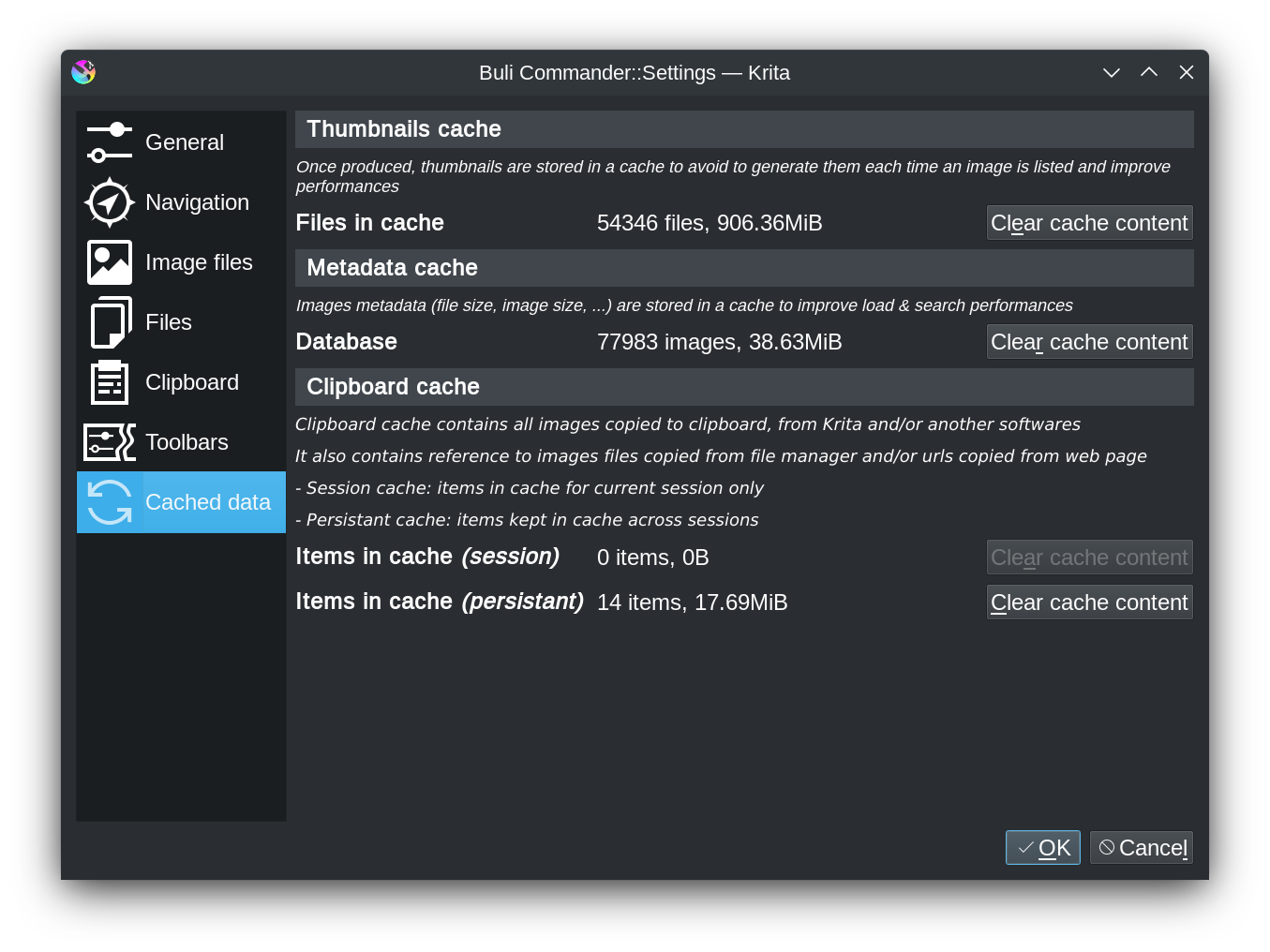
You can see size cache in settings:

Everything is multi-threaded, especially for reading/writing cache.
On my side reading a directory of 14000 files / 91GB took 11s (excluding thumbnail load that is made asynchronously once list is loaded)
Data are loaded from a sqlite cache by 24thread (on my computer) ; the question of memory was because loading metadata from cache means each worker need his own memory allocation (so 24thread will need more memory than 1 thread…)

And read 14000 files properties from 24 thread is faster than just with 1 thread (I already tested it)

I don’t think the problems came from HDD; I have one, I’ll try this week to copy the 14000 files on it to check time difference, it should be slower but now so slower.

Grum999

So once started, there’s no problem anymore? Load directory content is fast?
I mean you go on an another directory and came back in this one, and it’s fast?

Navigating to the sketch folder while cached takes roughly a second, which isn’t too bad. Navigating to the small folder is basically instant.

Startup on the sketch folder always takes 3 seconds, regardless of whether thumbnail view is enabled and regardless of whether grid view is enabled.

Ok!

I’ll take a look on it, truying to understand what happen at startup that can take so much time

Thanks for feedback and precisions :slight_smile:

Grum999

Hi @tom

Something you can do on your side (as you are on Linux):

  1. Exit Krita if opened
  2. Edit file ~/.local/share/krita/pykrita/bulicommander/bc/bcfile.py
  3. Uncomment the last line of file to have this:
    Debug.setEnabled(True)
    
  4. Open a terminal and execute from command line (it’s import to get output information!)
  5. Open BuliCommander
    You should get something like this in terminal output:
    DEBUG: ===========================================
    DEBUG: BCFileList.execute
    DEBUG: ...........................................
    DEBUG: Search in paths: [<BCFileListPath('/home/grum/Temporaire/TempKrita/testMisc/testmd5', False)>]
    DEBUG: Found 500 of 500 files in 0.002569913864135742s
    DEBUG: - Files: 500
    DEBUG: - Directories: 0
    DEBUG: Filter 500 files to 500 files in 0.3373551368713379s
    DEBUG: BCFileList.execute.99-global: 0.4158
    DEBUG: BCFileList.execute.01-search: 0.0026
    DEBUG: BCFileList.execute.02-filter: 0.3374
    DEBUG: BCFileList.execute.03-result: 0.0369
    DEBUG: BCFileList.execute.04-buildStats: 0.0387
    DEBUG: BCFileList.execute.05-sort: 0.0000
    DEBUG: ===========================================
    
    DEBUG: ===========================================
    DEBUG: BCFileList.execute
    DEBUG: ...........................................
    DEBUG: Search in paths: [<BCFileListPath('/home/grum/Data/Temp/testmd5', False)>]
    DEBUG: Found 500 of 500 files in 0.002535104751586914s
    DEBUG: - Files: 500
    DEBUG: - Directories: 0
    DEBUG: Filter 500 files to 500 files in 0.3148353099822998s
    DEBUG: BCFileList.execute.99-global: 0.3918
    DEBUG: BCFileList.execute.01-search: 0.0025
    DEBUG: BCFileList.execute.02-filter: 0.3148
    DEBUG: BCFileList.execute.03-result: 0.0341
    DEBUG: BCFileList.execute.04-buildStats: 0.0400
    DEBUG: BCFileList.execute.05-sort: 0.0000
    DEBUG: ===========================================
    

Go up from directory and go in again, just to got a comparison startup/not startup.

I think problem is not in this part of plugin (searching & analyzing files) but your stats would confirm me this ; I’m trying to determinate where to put stopwatches especially on startup to get a more precise idea of what happen

Also, doing some tests I saw that since I’ve implemented metadata cache, even if it’s quite faster than before cache implementation, if I reduce multithreading it’s now faster than before :thinking: :upside_down_face:
I’ll do some more tests for that to determinate when activate/deactivate multithreading…

Grum999