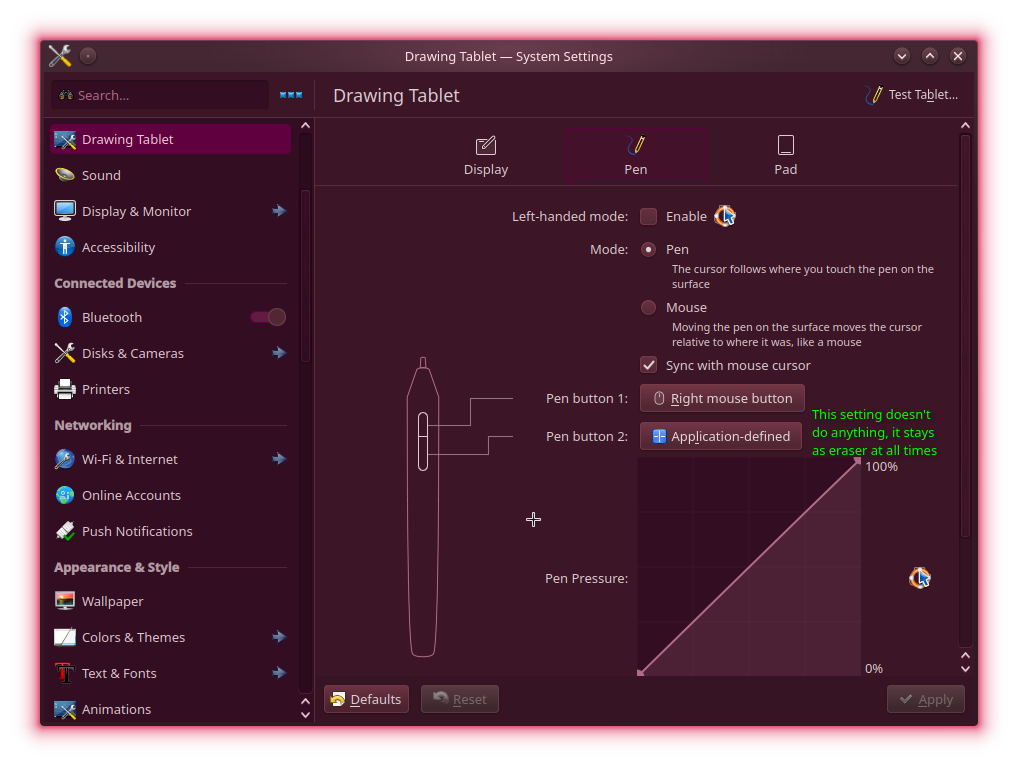
Type of device* : 2-in-1 laptop
Brand and version of the device: Lenovo Yoga 7 2-in-1 14AKP10 (AMD)
System** : KDE Fedora 44
* graphics tablet/display tablet/2-in-1 laptop/Android tablet
** Windows/Linux/Mac/Android, + version (you’ll find it in Help -> Show system information for bug reports)
Description of the issue (you can include screenshots): the bottom barrel button is always set to eraser mode, System Settings → Drawing Tablet → recognizes both and the top was tested to be remapped to a mouse input that’s picked by Krita correctly (after setting the workaround togle in Krita’s tablet settings)
But remapping the bottom button doesn’t override and stays in eraser, this was tested in several apps, Blender, Dolphin/the Desktop, Krita, Discord, Firefox and consistently shows that it’s always eraser mode for anything, only Krita uses the eraser buttom correctly but inflexible
This is out of the box KDE Fedora, no special utilities has been installed for controlling input devices
But then, the issue affected all tablets without a driver but working with this Microsoft Surface standard compatibility: Huion, Gaomon, XpPen, and all convertible laptops too.
In June 2025, the libinput developper decided to launch a big refactor (src. Who-T: libinput and tablet tool eraser buttons ) that would allow users to customize the stylus button. That was a big relief for me, unfortunately, things were a bit more complex.
Because of the Wayland architecture, now each D.E. have to expose and integrate libinput new features to the user on their System Settings GUI. (on X11, new features could work on all D.E. globally thanks to CLI tool like xsetwacom, then reach the GUI optionally)
As far as I know, right now, only GNOME integrated this change. On KDE Plasma, user (I’m part of it) are blocked. There is one only dev able to do this change, and he signaled a burnout situation and low priority on the item in June after a year… https://bugs.kde.org/show_bug.cgi?id=506012
That’s how we end up in August 2026 with this bug. And because only two or three users complain about it on the bug report, the priority is low.
I invite you (and readers of this thread in the same situation) to write on the bug report that you are also affected.
I’d love to report my issue! Where should I do it?
Also hey David, I’ve been reading your blog articles and YouTube videos for quite a while, you’re one of the reason why I dropped Windows all together! Your recent article on Wacom legacy is what gave me the courage to troubleshoot my issue (thanks to Brodie Robertson for making me aware of it, read your article after watching his video).
I will make a KDE Invent account if necessary, I just wanna know what’s the upstream site to report it, I also got a Huion H951P blind tablet with the same issue so I can report two devices if that helps
Also finally, I also read in both your most recent wayland station article and the Wacom article about udev-hid-bpf, KDE Fedora’s iso already has it installed and there’s a testing package in the vanilla repo, I was wondering if I could do something with this tool, I tried to read the gitlab repo about but I couldn’t understand it very well.
I think the most efficient impact you can make, is write a post on https://bugs.kde.org/show_bug.cgi?id=506012 telling you have two devices affected, and mention them. This bug report will certainly attract attention with more reporter. If not, it will be considered endlessly like a niche issue.
About reverting the hardcoded eraser at the kernel level with a udev-hid-bpf rule, it’s possible but complex. You’ll find many Huion device in the ‘stable’ directory, and they can give you hints about how to code one for your device. On my side, I’m studying this project since May, and I sent my first driver in June, and recently I went more ambitious with the XpPen Artist 12 3rd from scratch ( MR: Making sure you're not a bot! ) . But I’m still ‘noobing’ compared to the skill of the maintainers, and you’ll see I have many refactor to do before getting my driver accepted.
Maybe the most accessible way to contribute this project is to open tickets in the “work items” (on udev-hid-bpf repo) one for each of your models. Inside, attach hid-recorder reports. You can find the threads I opened in the past, with all information I provided. This way, maybe the maintainers or contributors will see your device to be easily ‘fixable’ (like, being the cousin of a model already existing) or interesting (like being a model with a sort of new strategy inside).