When I use that keyboard shortcuts, it increase or decrease 5.
I want to change that value.
Is that possable?
I am new to krita, I don’t even sure of that this forum is q&a forum.
1 Like
Hello @mira1 and welcome to the forum 
It is a q&a forum, among many other things, and that’s why it has a ‘Support and Advice’ category
Somebody who knows about this area of functionality will come along eventually and give you advice about this.
I do not think you can change this value directly in the user interface. You can smoothly change the brush size by holding down shift key and dragging.
If you want to configure the brush size increments, you will probably need to create some scripts to achieve this. I have included a guide below:
Tools → Scripts → Scripter
Copy and paste script below
from krita import *

def increaseBrushSize(presets):
   activeView = Krita.instance().activeWindow().activeView()
   currentPreset = activeView.currentBrushPreset().name()
   steps = presets.get(currentPreset, presets["default"])
   nextSize = next((s for s in steps if s > activeView.brushSize()), steps[-1])
   activeView.setBrushSize(nextSize)

presets = {
   "b) Airbrush Soft": (20, 50, 100, 200, 300),
   "default": (5, 10, 20, 40, 80, 160, 320)
}

increaseBrushSize(presets)
The keys inside the presets dictionary, are the names of the brush presets that you want to configure. The “default” preset will apply to all brush presets, that are not named in the dictionary.
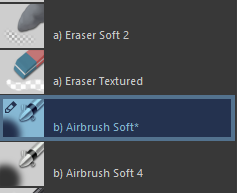
You can add new entries to the dictionary, if you want to specify steps for another brush preset. You can modify the “default” steps, but do not delete the entry.
presets = {
   "b) Airbrush Soft": (20, 50, 100, 200, 300),
   "c) Pencil-2": (5, 50, 75, 100),
   "default": (5, 10, 20, 40, 80, 160, 320)
}
File → Save As
Choose a directory and name the file:
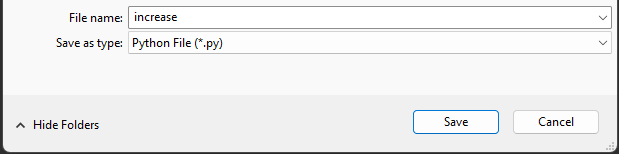
Repeat all the steps above for the decrease script:
from krita import *

def decreaseBrushSize(presets):
   activeView = Krita.instance().activeWindow().activeView()
   currentPreset = activeView.currentBrushPreset().name()
   steps = presets.get(currentPreset, presets["default"])

   nextSize = next((s for s in reversed(steps) if s < activeView.brushSize()), steps[0])
   activeView.setBrushSize(nextSize)

presets = {
   "b) Airbrush Soft": (20, 50, 100, 200, 300),
   "default": (5, 10, 20, 40, 80, 160, 320)
}

decreaseBrushSize(presets)
Now we can activate the scripts with a keyboard shortcut using Ten Scripts
Tools → Scripts → Ten Scripts
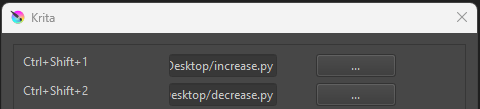
Once both scripts are added you can configure the keyboard shortcuts:
Settings → Configure Krita → Keyboard Shortcuts
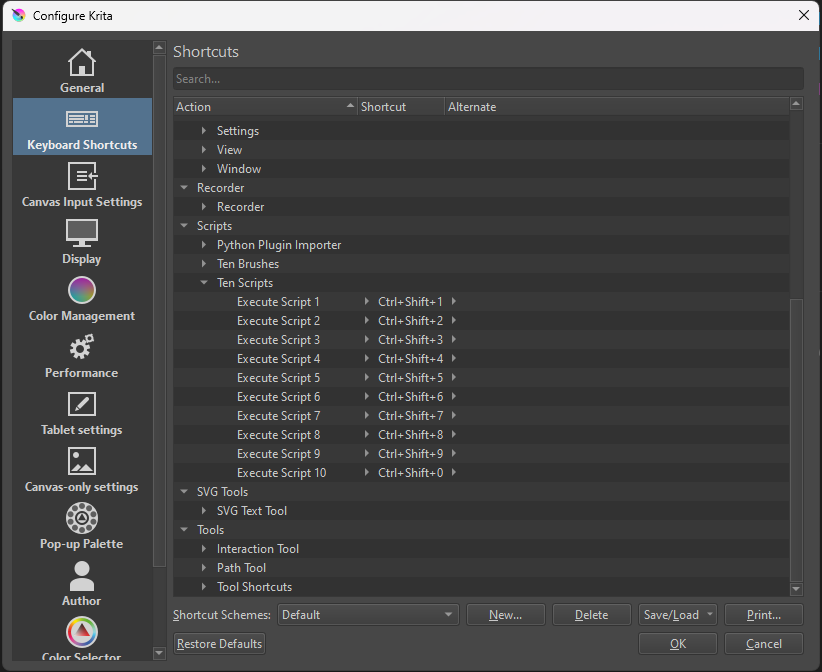
Now it should work, if you have everything set up correctly!
2 Likes
Thank you so much! 
This is a very important topic for me as well!
I have no idea of “scripts”, but I got it done with your guide on how to do it, it works well!
I have 2 questions:
- Can I apply that to all presets all at once (if so, how), or do I necessarily have to name every brush set I want to apply it to?
- Is 1000 the upper limit of brush size in Krita or can I go up to 2000?

1 Like
If you want the same steps for all brush presets, you only need to keep the “default” preset. I added the option to change the brush presets individually, because one might need different steps for an airbrush/eraser over a pencil
presets = {
   "default": (5, 10, 20, 40, 80, 160, 320)
}
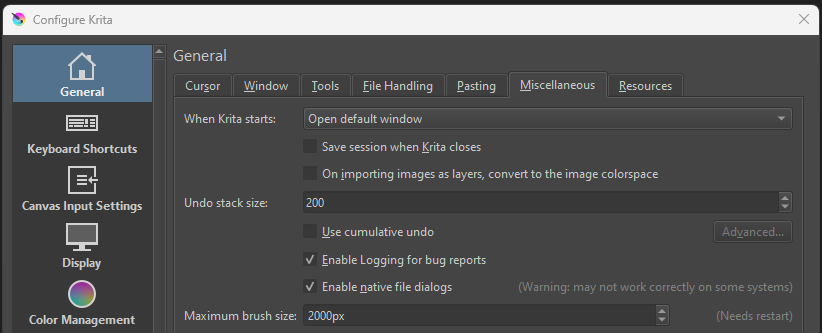
You can increase the maximum limit to 2000 in settings, but it will demand more system resources. If you have an older system, I imagine that it can start lagging or become unresponsive as you draw
Settings → General → Miscellaneous
2 Likes
Thank you very much, you helped me to increase my workflow significantly!
Another question just “popped up” (no pun intended): Is it possible in Krita 5 to eliminate the pop up notification that pops up on the screen every time the script is executed / the brush size is changed?
1 Like
Allright, got it:
Under settings / Krita configuration / General / Window / uncheck “Show on-canvas popup messages”.
1 Like
This topic was automatically closed 30 days after the last reply. New replies are no longer allowed.