Maybe it’s because she was new to using Krita that she couldn’t find it. It doesn’t look like CSP does the on cursor flip

Maybe it’s because she was new to using Krita that she couldn’t find it. It doesn’t look like CSP does the on cursor flip
That’s probably it. 
I did enjoy watching her explore krita.
That’s interesting to know.
It’ll come in handy for those who need it. probably for large tablet user or ones with offset window layout.
I also have encountered this when working with symmetrical images -although not images as wide as yours, so I just lived with it. I’d like to add to the discussion over on the tracker but I don’t have an account so I’ll write here. My use case for the mirror canvas action is the following :
I’m more comfortable drawing strokes in a certain direction. As a right-handed artist, I’ll usually be more at ease with strokes lying along the north-western quadrant, because that’s the easiest degrees of freedom the right-hand wrist has : it corresponds to its pivotal motion, without any added translation of the arm & forearm. So in order to draw strokes lying along a trajectory that is not covered by my wrist’s pivotal motion (eg top-left to bottom-right), I’ll use the mirror canvas action. Compensating for my physical shortcomings, basically !
And when I do, especially when dealing with a complex image, I want to keep track of where I am, ie which area I intended to draw the strokes from… as it is, the current mirror action jumbles that physical awareness.
…however ! sometimes I’m working on a (mostly) symmetrical image, and I want the flipping to just give me the other side. I’ve been in both situations, so I lobby for keeping both. @raghukamath I like your idea of firing the regular action when hovering over a part of Krita that’s not the canvas. As long as these actions can be bound to hotkeys, I’m all good.
I tested various programs, all flip around center except photoshop. This and also because it might be weird to make this a default for Android, is why I have not made it so. If anyone uses Android or has a device krita can be installed on, I would like to know what happens when you touch the screen with your finger and lift, does the cursor remain onscreen? (I would assume not, but don’t know).
@Hadriscus That’s a very interesting use case, flipping to do strokes, never thought about that.
I implemented @raghukamath suggestion about flipping centered when hovering outside the viewport, BUT, there is a problem, if the user adds the action to a toolbar (which would have a different icon) or clicks it from the menu, then when they click it, it would not function differently. So instead I think doing a little notification message (like the one that pops up when you mirror) that: "Mirror View Around Cursor" only works when hovering over the viewport. is better. Unfortunately does not happen when clicking through the menu because one is technically over the viewport.
Ah, yes. A warning message would be fine by me. As long as it’s communicated and not just silently failing.
I’d be interested to hear about use cases. Ultimately all these features help us “wise apes” translate limb movement into complex digital artwork, and we don’t all use our bodies quite the same way. I think we should make a habit of collecting “user stories” so as to make informed decisions about such things. This is not really criticism, just my own thinking out loud… since I consider Krita to be generally orders of magnitude more ergonomic than most programs already.
Just tested it, it stays on screen even after clicking toolbar icon both with finger and s-pen.
Just to be sure, we’re talking about the “real” cursor, not the brush outline. It just stays were you last touched?
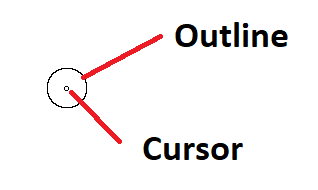
Note: how this looks might vary depending on your settings.
Tested it again, just outline stays then just mirror around brush outline.
Yeah, that’s what I suspected, and am assuming your brush outline gets flipped when you mirror after having lifted too.
It is the “real” cursor that matters, so no idea what cursor position the new command would get after lifting. Someone will have to try the changes on android.
Yes it flips.
If most software do it by center and most are more familiar with it - then i think its much safer to do Mirror around center the default, and around cursor a nifty option with accessible key.
I tested it - the most difference I can say is I pan less. Specially if i draw on the mirror side.
I also just realized i abuse the mirror view.
Mirror view around cursor feels alot natural if you are one of those who also draw and correct on the mirrored view. Since if you flip - you rarely and if needed only need to pan a little.
But then once you found your center point / Mirror around center is not much work compared to it.
Heres as speed up vid of my testing.

From time to time i do forget that im using around cursor mode.
Edit: I forgot to add i have another reference offscreen - my other monitor.
are this the travel gap between the cursor and where they end up in mirror?
they do look interesting - like those ancient pillars.
is there anything specific you want us to look for when doing mirror while drawing?
i’ve been exclusively using your branch this past few days and im truly enjoying it.
Yes, I’m just doing a squiggly line off to the side while hitting M occasionally, very fun.
There are some minor things:
What happens on tablets with touchscreens, if one adds the icon to a toolbar, then touches the toolbar button, does the canvas flip, or does the warning message display? Does it behave different if the pen is hovering vs lifted?
With the latest changes, is the time the message is onscreen okay?
Also added an icon, and set the shortcut to Alt+M. A menu shortcut in other languages might interfere with it, but since the menu seems to take priority, I would hope the problem would be obvious if it happens.
build it off this morning,
I can answer the bullet point 2.
With the latest changes, is the time the message is onscreen okay?
For me yes. it’s right on time. Immediate and noticeable. 
The build though is giving me trouble with brushes so probably not be able to do some sample drawing of of it.
That is not because of this branch I am using nightly master and it is giving problems too. I have reported that issue here - 440951 – Scrolling and browsing brush preset spikes CPU core usage and lag occurs making it hard to use the docker
Yep it seems so that it is in the main like you said- i just finish building off nightly just to see and has it open and currently hanging on me.
Thank you for the heads up.
edit: anything accessing brush preset / docker or toolbar had issue.
Thanks, though I didn’t mean if it was immediate, more if it could be read in the time it’s onscreen. Of course the user can just press again, but before I felt it was super fast (I had copied the code from elsewhere and it had been at 500ms).
It can be read. The time i think it more tham enough. I notice it alot more than I notice the mirror on and off.
When i hit it, the pop up appears and theres about enough time to read it before its gone.
