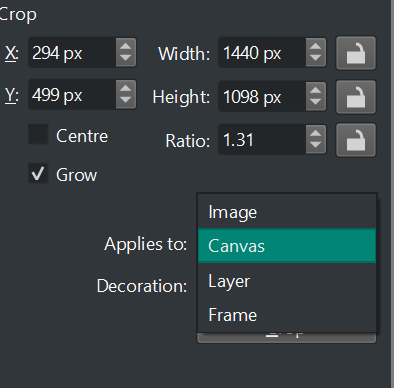
Recently I switched to a new linux operating system and downloaded krita and got to work on a file with multiple layers, all with different drawings. Nevertheless, I only worked on 1 drawing. Once finished, I cropped it, did a few more touches and then saved it.
Guess what? All my other drawings, about 20 of them were gone, cropped to nothingness. Thank god I had a backup. I completely forgot about this feature. I’m not sure why cropping the image is the default, when all other art programs crop the canvas only.
Considering all the work I almost lost, if I was a beginner artist just getting into digital art, I would had avoided krita like the plague from then on. Please make cropping the canvas the default option, I beg you.
I’ve never used the layer option, as far as I know, it’s just a shortcut to delete outside of a selection. It doesn’t actually crop the image to a composition on which you want to export to.
I may have misunderstood what exactly you meant by that.
Can you explain in more detail with simple diagrams or a screenshot of a simple example file with multiple layers?
I haven’t said that canvas shouldn’t be the default. I said that forever deleting pixels (image option) could have a warning potentially, that’s regardless if it’s default or not.
Actually, you want to Resize the canvas while not removing any layer content.
That is what Image → Resize Canvas does.
Sadly, the UI for that tool is not at all good. In the past, I’ve suggested that Crop and Resize Canvas be combined with the option to remove content or not.
What you seem to be asking for is for the Crop tool to not remove content when used in Applies to: Canvas mode.
We do use the Crop tool and we understand the word ‘crop’ to mean removing content outside the final area.
What you want is Resize Canvas but with a better UI than it has at the moment.
Or you want the Applies to: Canvas option to not remove any content by default.
The difference between Applies to: Canvas and Applies to: Image is maybe mixed up.
This needs a wider discussion involving developers.
Edit:Add: I think you need Applies to:Image as it is at the moment.
Please try that.
…Alright.
I’ve never seen an artist actually use the canvas resize option, so i assumed what i was trying to get at was clear.
In any case, either of the two is fine.
Either 1: Change the crop tool’s default option to be ‘canvas’.
or
2: Make better UI for ‘Resize Canvas’
I imagine option 1 is easier than option 2.
Note: I did not understand what you were trying to say in your last edit message.
I was getting mixed up between Canvas and Image (easily done)
As far as I can tell, the Tool Options docker for the Crop tool remembers the Applies to: option between sessions and some people may prefer to work with other options as their default.