I try to export the recording and it worked, then I cleared the frames and continued drawing and then tried to export the 2nd drawing session and it shows this error msg and won’t start the exportation:

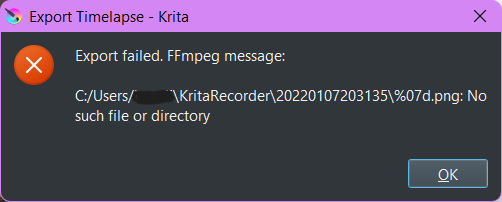
Anyone know how to fix this? thanks
 Hello @beeprats and welcome in the forum!
Please check the spelling of your path. The second screenshot shows slashes with different slope direction, but as far as I know this is not allowed. In Windows, the slashes in paths usually fall to the left “\” (backslash).
Michelist
Hiya @Michelist ! thanks for the welcome!
Thanks for answering, however I tried editing the slashes earlier and it made no difference ):
Just to be sure though, it is the video location section that I edit the slashes of right? Because that is the only thing I can edit the name of.
The error message seems to be referring to the folder containing the screenshots/frames which is odd because when I open the folder all the images are present and there seems to be no issue.
Instead of typing the video location, it’s better to click the folder icon next the video location box and navigate to the folder. If you haven’t done it that way, it might be worth a try.
I tried this but it requires you to type a name after clicking the folder
Which version number of krita are you using?
Did you do that by clicking on ‘Remove Recordings’?
Can you try specifying a different folder in the ‘Recordings directory’ part at the top of the Recorder docker?
Did you do that by clicking on ‘Remove Recordings’?
yes
and no, no way to specify a different folder ): thanks for the suggestion though!
Can you take a screenshot of your Recorder Docker and upload it here?
wait ive noticed that the frame numberings dont begin at 0000000, should they begin there? they start at 0000893… could this be why the error is popping up?
I don’t get why it didn’t start at 0000000 after i cleared the recordings and began recording again.
also i didn’t realise you meant this part, and ye i can change this to a different folder you are right but where would I change it to?

Neither do I, especially after you did Remove Recordings.
Try adjusting them the next time.
I have all my input and output files/folders on the Desktop because I find it easier that way and I don’t have to remember where things are while I’m working.
(I do Move them back into their appropriate storage folders after I’ve finished.)
alrighty thanks for the tip.
I’ll just be more cautious with recording from now on! thanks <3