Hi! Would appreciate some help with an issue I just noticed today where I cannot select any of the MyPaint engine brushes from the default resources in Krita. They’re present in the list of brush presets, the Manage Resources tab, et cetera but whenever I click on them they are highlighted but do not register as demonstrated by the screenshots below:
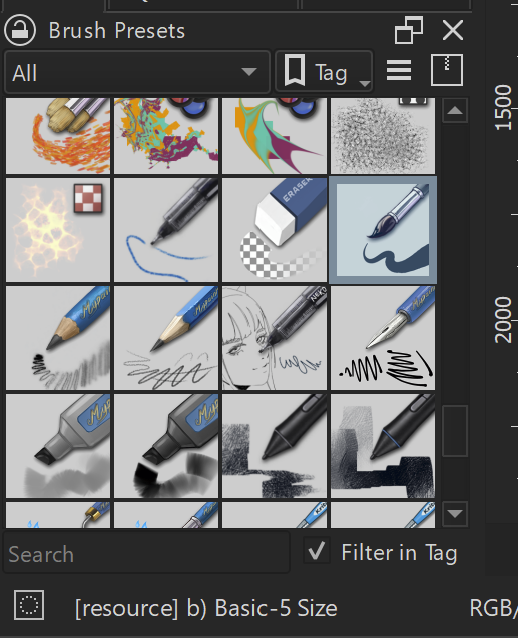
This is a screenshot where I’ve selected a brush in the Local Resources that isn’t made/function with the MyPaint engine, b) Basic-5 Size.
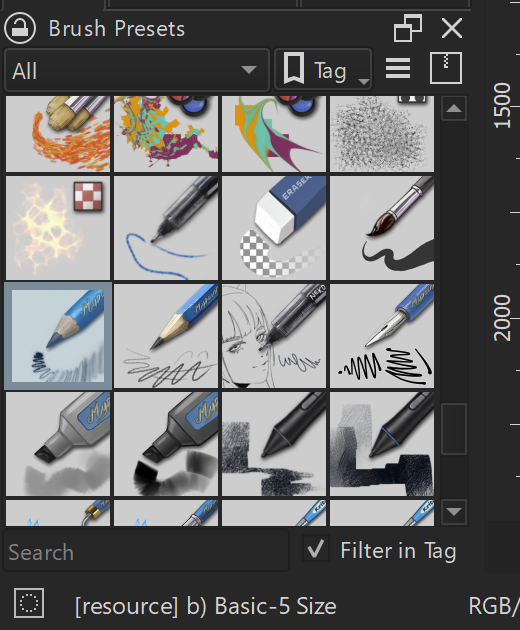
And this is immediately after, clicking onto c) Pencil 1 Sketch (mypaint); the program still registers it as the previous brush and acts as such when drawing on the canvas, shown by the text bellow still saying the name of the other brush. This is the case for all of the MyPaint Local Resources brushes, and any brush selected previously to them is what remains active.
MyPaint brushes from downloaded bundles don’t have this issue, I can click and select them just fine. Since it’s only the ones in the Local Resources that this is happening to, I don’t believe it’s a problem with the MyPaint engine itself and have so far been unable to find a cause on my own. All of the information I could find with regards to this kind of brush not working had to do with the color space of a given file and not whatever is going on here, and the color space thing doesn’t apply because all of the files I’ve got are RGB/Alpha 8-bit integer and so should work fine. I don’t know if this is a bug to be logged and reported or an issue with my files that can be fixed on my own, and I also don’t know for how long these brushes have been like this.
I’m on version 5.3.4 (git c5b23e3) on Windows, if that may have impact as to what’s going on.