No matter what settings I change in brushes, size,pressure, brush tip, it doesn’t change the way it looks. I save a new brush preset every time and it just won’t work. I’ve even watched thorough videos on brush settings and copied each step and then saved and nothing happened. What should I do? 
Can you record the Video or Screenshot of your Problem ?
So others might be able to understand more clearly


Maybe your Krita don’t have pressure sensitivity?
Go the the top bar, Settings -> Configure Krita -> Tablet Settings
To try change this from WinTab to
Windows 8+ Pointer Input
(or vice versa), and then restart Krita
2 Likes
sadly that did not work. I’m using a touchscreen computer and maybe krita doesnt support that. Its weird because I have pressure sensitivity on other art software and this is the only one that it doesnt register in. if you have any other ideas plz let me know
Are you directly drawing on the Computer or using tablet ?
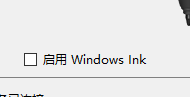
If you are using tablet try Turning Off Window Ink in the Tablet Software.
1 Like
There’s a basic test you can do to make sure that the stylus is sending good pressure signals to krita.
Go to Settings → Configure Krita → Tablet settings and click the large ‘Open Tablet Tester’ button. A ‘Tablet Tester’ window will open and you can drag it and resize it to make it conveniently large.
If you draw on the grid area on the left, you’ll see a log of the signals that krita sees on the right side.
Here’s what I get if I vary the pressure of my stylus while drawing:
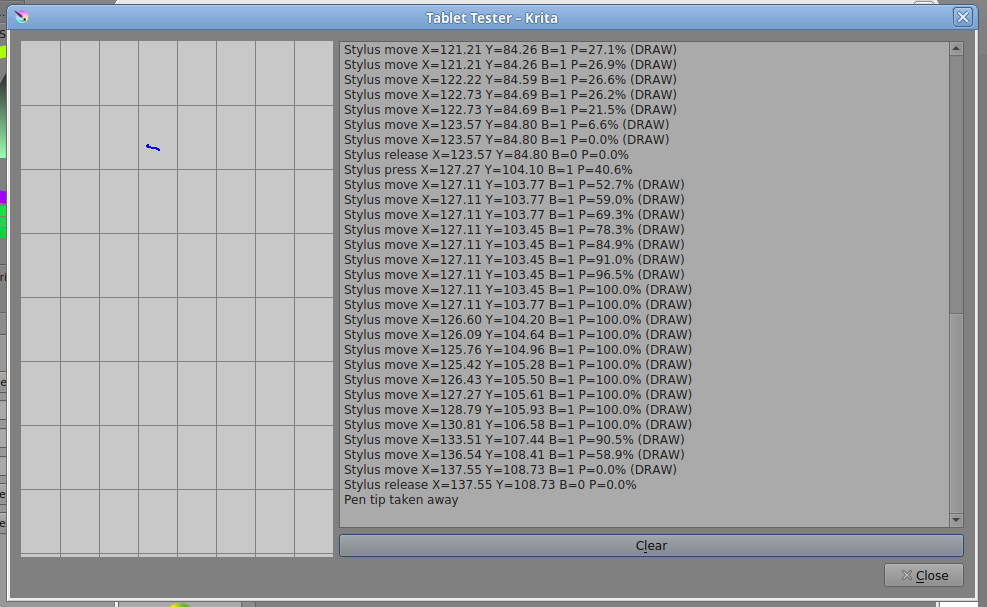
The short blue line is what I drew and you can see on the right that my stylus was giving pressure in the range of 0% to 100%.
Those lines of text are produced very quickly and you’ll probably need to scroll the right hand side up and down to see them all.
You can click the Clear button and try again if there’s too much text in there.
Until you can see pressure in the range 0% to 100% in the tablet tester, there’s no point in trying to edit/design brush presets.
1 Like
Try switching to Windows Ink: https://docs.krita.org/en/contributors_manual/user_support.html#quick-solutions - make sure to restart your PC afterwards.
1 Like
This topic was automatically closed 15 days after the last reply. New replies are no longer allowed.