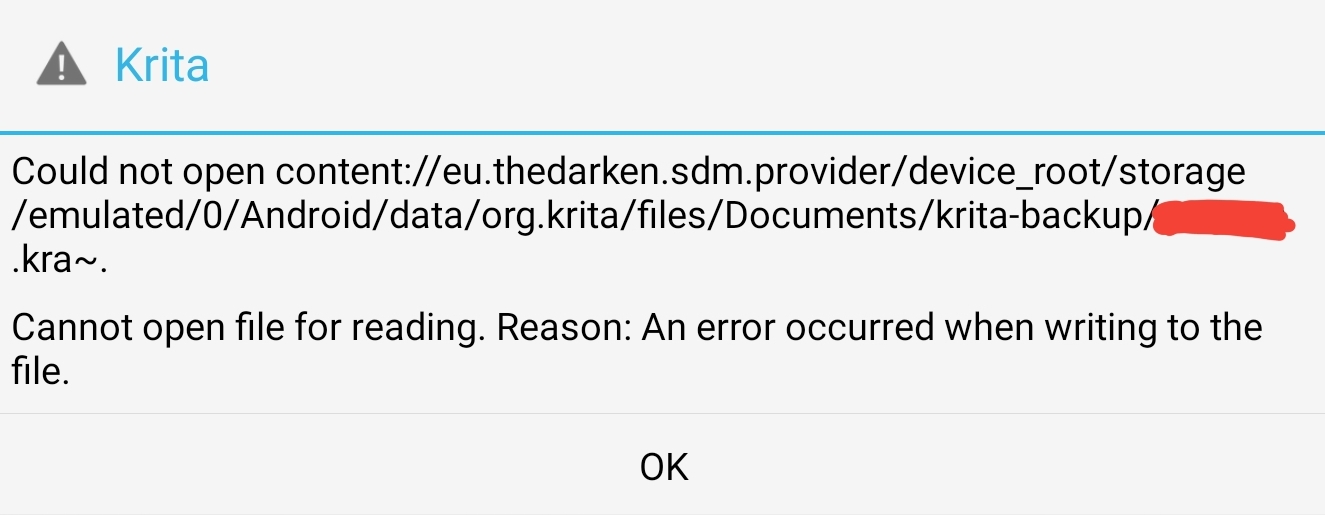
Hi! I worked on the animation for about a month, and at some point I stopped saving manually because the file was saving automatically. I periodically clicked the save button and the file was saved within the program (i.e. without opening the file manager to save manually, saying “Saving Document…”). That’s when I thought that all autosaves and clicks on save button are saved to the last saved version.
As I recall, when I was working on another animation, I was able to open that last version not from Recent Image but from the file manager, and all the animation was there. But either I’m confused or something got deleted, but when I opened this animation file again after a while, I found that the last part of the animation was gone.
Then I opened all the hidden files, searched through the manager and somehow found only one possible I need a file that I see only in the file manager, and nowhere else. Accordingly, I can’t open it through Krita either. I also downloaded recovery apps, but they didn’t see any files of later dates.
Although I was sure that the animation was saving to the last saved file.
Is there any hope of recovering the files, maybe someone has encountered this problem and was able to recover? (apps, programms or file paths)
The autosave file is not intended for your use. It is there in case krita crashes so that when it is started again then it will see the autosave file and recover your work from the autosave file.
If you close krita normally then it will assume that you have done any manual saving required and it will then delete the autosave file.
You should always Save your work, regularly, as a .kra file. Autosave is only for crash recovery.
Hi! Thank you. Yes, I read that article before. The reason I hope to find this file in the manager is the same posts of people losing files and finding them through a certain path and so on. Since I’ve already searched for files with the .kra extension without success.
I checked it, I was saving this file inside the program by clicking on the save button and seeing the “Saving Document…” (not autosaving) on the bottom. So I think it is a manual save after all. (I will edit my post)
I’m not at all familiar with using krita on Android but there are people on the forum who are.
I’ve edited your topic title to help attract their attention.
You’ve added the crash tag to the topic title. Was a crash involved somehow?
@Aehm I don’t know anything about it but you seem to be using ‘SD Maid 1’ to manage your file storage, based on the location shown in your screenshot: content:eu.thedarken.sdm.provider/device_root/storage/{etc}
Thank you!
I’ve added this thinking I might have lost this file due to some crash, but not sure what kind of.
Yes I do use this file manager but it doesn’t do any cleanups without my knowledge. But that’s a good point, I will check what I’ve done for the last month in there when I’ll be around my tablet later.
Hi! Thank you. I have SD Maid file manager, which helped me to find this exact path, but
unfortunately I can’t open possible the last save file, either through this manager or through Krita. Plus, Krita sees all the saved files except this one. it shows what’s in the screenshot when I try to open it through the file manager.
In your screenshot, you’re not opening a .kra file from the folder that holds your .kra documents, you’re trying to open a backup file from the backup folder.
I would make a copy of that backup file and rename it by removing the tilde (~) and saving it as a regular .kra file. Then try to open that one.