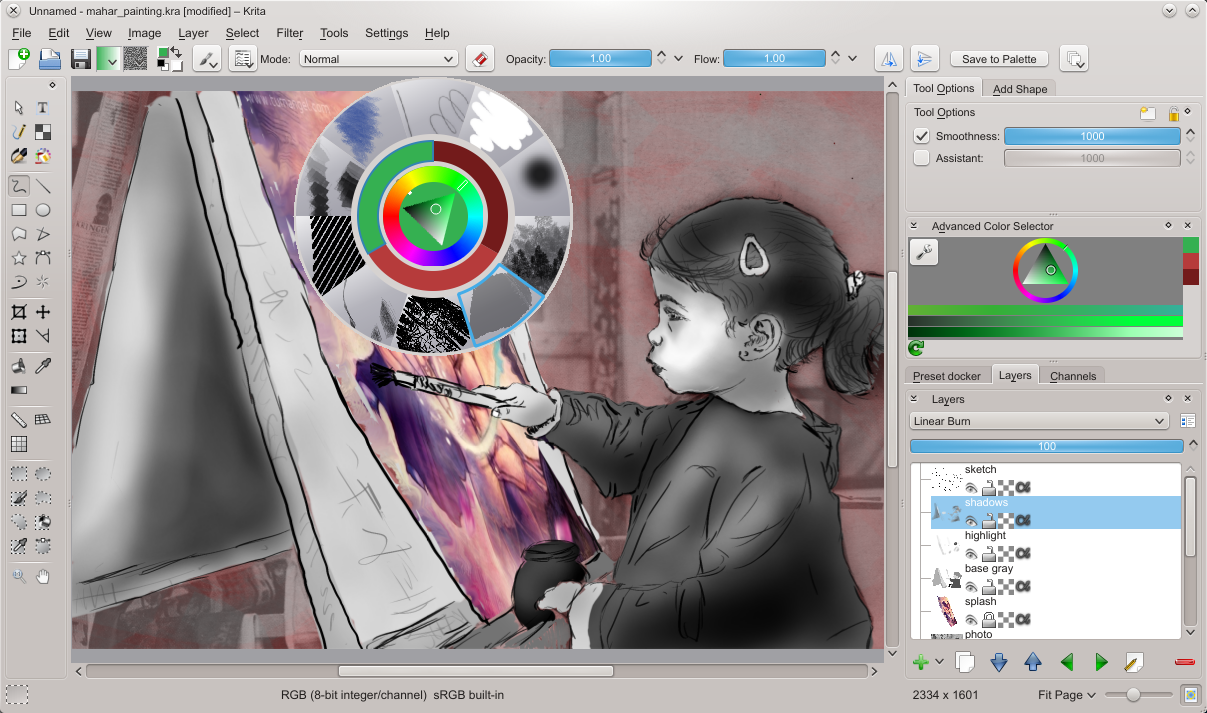
I saw the UI Icon post but I’m wondering when will Krita change it’s UI?
It would really help a lot beginners to stay in Krita if the UI was more welcoming, everything looks 2012 we need 2020!
I saw the UI Icon post but I’m wondering when will Krita change it’s UI?
It would really help a lot beginners to stay in Krita if the UI was more welcoming, everything looks 2012 we need 2020!
Hello and welcome to the forum 
There have been many posts about the UI and icons so which one are you referring to?
The years 2012 and 2020 are very specific so can you give examles of what you mean and what you are hoping for?
What does ‘welcoming’ mean in this context?
Er, this is coming a bit out of the blue, right, and I’m not sure what "everything looks 2012"even means? In 2012, we released Krita 2.4. This is what Krita looked like back then:
So, yes, while keeping the fundamental interface intact, I feel we’ve made Krita look a lot more polished, with new icons, updated layer panel, improved popup palette…
And anyway, newcomers to Krita usually say that they felt immediately familiar with the application, and long-time users are happy we’re not forcing them to learn a new interface with every release. Given that Krita has got about 3,000,000 users currently, I guess that the current interface is not, actually, driving people away?
As for “when” something will happen – Krita is free and open source software. If you feel you can contribute improvements, do.
I used an iPad Pro and Procreate seemed much more simple and 2020, I’m not sure if I described it well.
Procreate seems very simple and natural, I don’t know about the UX side of the story. I use Blender and it’s great for me, btw I’m not a fan of Photoshop and I’m sure it will feel more natural in future as more and more people uses these apps.
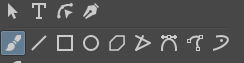
I’d like to contribute but I’m an graphic designer, I could sadly only sad icons look lines beetween icons look wrong?
Are you taking about the separators between the icons in the toolbar? Can you show some screenshot of what you are pointing to?
The issue is not about we are willing to polish it or not. Of course developers are willing to improve Krita in any way possible, but there are only few developers so much so that you can only count them with your hands, so at this stage there are more important issues to fix than these.
So like I say in all UI thread, if you can contribute you are welcome start from low hanging fruit first and then gradually change bit by bit. If you are unable to contribute on your own hire someone to do it. If you are not able to do both then I think you can post your ideas but we hope someone with free time can volunteer to implement your ideas.
Hey there! Me and @Kapyia were / are still working on a plugin for this, seen here! Here’s the current state of affairs of the plugin, and if you want to make some suggestions, I’m more than happy to listen to your feedback!
Also, regarding comparisons to Procreate, I think those are two different beasts, that is if we’re comparing it against Krita on the PC. There are a different set of limitations when it comes to user interfaces on mobile and desktop platforms, and simplicity is a necessity with limited screen real estate.
Instead of spendind some money on an iPad I could spend some time in forums, I’m really obsessed about U andI I’d like to learn how to design one for Krita.
If @slightlyangrydodo’s design gets official I could suggest things here or there but right now simple suggestion won’t be enough and it needs a rewamp while preserving what’s at the heart of Krita I think. @slightlyangrydodo’s and @Dmitry’s designs really did it for me, it feels satisfying!
I think Krita needs this UI evolution, just because there is no turning back now! It’s a whole new era for digital art.
I nearly gone blind 
Ekran görüntüsü 2020-11-18 214343|244x63
I see, I’m not saying it should be Procreate and you did a wonderful job modernising Krita!
I mean who knows, maybe Apple brings touchscreen to new Arm-based Macs so Krita competes against Procreate one day? I see a huge future in digital art, thinking more people using it everyday…
So is this plugging will be usable in an official release? If so when? Can I use it as a begginer now?
It’s only an interface change, so you can use it at whatever skill level. Regarding making this plugin official, it still needs more tests, feedback in order to really make it reach that level, so if you have any suggestions, I’m more than happy to hear them, and maybe even implement some of them!
Like I said. Need more volunteers to actually do it. We have seen lots of suggestions and mocks. But there is no proper work yet. No statistics, no survey, no mockups, no detailed process. We can’t just whip up different UI just for feeling more trendy or modern. Other than @slightlyangrydodo, @wojtryb @Kapyia’s effort I have not seen any serious attempt.
Right now we sort need more people who would get their hands dirty and less people who would direct and advise.
I surrender, I’ll go with what we got.
Please don’t think that I dismissing your concern or defending what is already there.
See we already have lots of advise and mocks as you see on the forum. but the questions remains who will code these?
And believe me, changing the UI and coding it is not a small feat. It requires patience and countless hours of testing and time. We just don’t have anyone who would be willing to volunteer for these things, of course except few who are already making efforts.
I see, I see and it’s not just coding I’m questioning it’s necessity.