trying to change the shortcut combo for Image/Rotate Image…
want to use ctrl= (or ctrl+=) but it’s not accepting the = key
it keeps changing the combination to ctrl++
I’ve been using a Huion mini keydial pad for hot key combos ctrl+= has been the assigned shortcut for years. Since switching to the new version it’s not working now.
I guess I’m just asking if someone can confirm the problem. thx
I can’t even check it, because the = would need SHIFT to enter it, because of my locale.
Michelist
Since 5.2.9, there has been a change to the keyboard shortcuts so that Ctrl+= has been assigned to Zoom In in addition to the standard Ctrl+Shift+= keybind, in 5.2.10 and in 5.2.11 which is the latest formal release.
If I try to assign Ctrl+= to Image -> Rotate Image then with the 5.2.11 Linux appimage I get this:
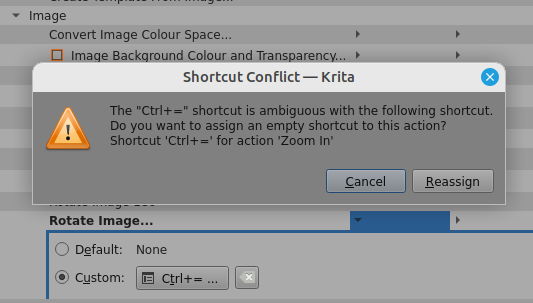
If I then press the Reassign button, the shortcut Ctrl+= is reassigned to Image -> Rotate Image
Did you get that warning notice and then try pressing the Reassign button?
I believe that the change from 5.2.9 was made to ease the confusion for people who have difficulty in realising the difference between a key that has a ‘+’ sign somewhere on it and the action required to generate a ‘+’ keypress (i.e. Shift+=). That may just be the experience for UK keyboards and I know it always confuses me when my fingers try to dance on the Zoom shortcuts.
Could you change the configuration of your Huion keydial so it generates something else instead of Ctrl+= ?
1 Like
So, this is the reason for all those XP-Pen users who suddenly claim to have Zoom issues!
Thank you for finding out and explaining, I somehow didn’t notice the reason for their issues!
Michelist
1 Like
It took a long time to figure it out 
1 Like
An update: I figured out what the problem was. And it had to do with the double plus sign.
It was the View/Reset Canvas Rotation option that used ctrl+=
I saw ctrl+= used on another combo so I reset that other combo to 0 (blank)
It’s working as expected now.
thank u for the responses. I’m not sure I understood everything but your council helped steer me in the right direction. As far as I’m concerned this is a fixed problem.
1 Like
As far as I can tell, for 5.2.10, there is no default shortcut or canvas input binding for View -> Reset Canvas Rotation.
Maybe you set that up yourself some time ago and forgot about it?
(This is why I don’t create custom bindings: I can never remember them and I can’t even remember the ‘standard’ bindings except for the common well known ones. I use menus a lot.)
1 Like
Sorry correct path is View/Zoom, Rotate, Mirror/Reset Canvas Rotation
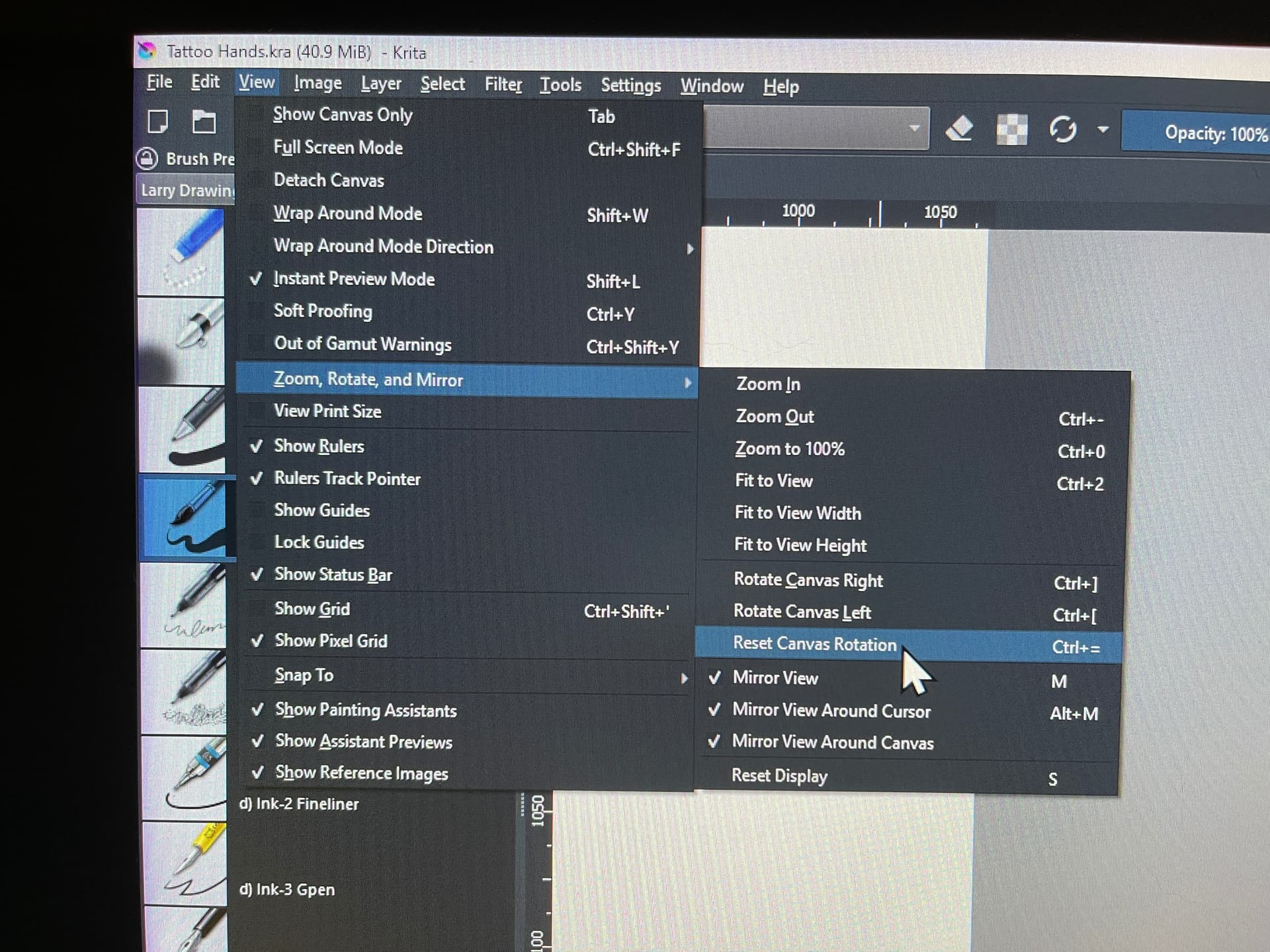
This is assigned to one of the key pads on my Huion mini dial. I rotate canvas work quite a bit and a single button resets the rotation back to zero.
1 Like
This topic was automatically closed 4 days after the last reply. New replies are no longer allowed.