For the Texture Splat brush, is there a way to change the size of each individual splat other than changing the entire brush size? I want very small “splats” without having to spend forever using a size 1.00 px brush.
Nah, just edit the texture to shrink the size of the splats and change the brush or make a new brush to use that texture instead.
That’s what I’m asking how to do, if it’s possible which it sounds like it is? I’m asking how to edit/change the size of the texture splats.
Similar tasks is already opened in “Feature Requests” section:
The brush (tip) texture file for that brush preset is 111 x 112 pixels and the ‘splat’ dots themselves are between four and ten pixels so if you go much less than a brush size of 50px then you’ll lose the visual quality of the individual dots.
As @tapatilorenzo suggested, you can make your own brush tip texture file that’s more suited to your needs.
You can use the existing texture file as a starter/basis for this and take it in various directions of development. Here it is:
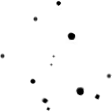
It has some ‘dirt’ under the upper large dot that you’ll probably want to clean up if you do use it.
For small area painting, you can use a brush tip texture file as a pattern file and then scale it under the Options tab of the patterns parameter, using a Basic Opacity brush. If you try this over a large area then even with Random Offset selected, you get obvious repeat/tiling effects.
Also about “particles” style you have lot of info here
Thanks to all replies. I will investigate further.