Hello, I’m pretty new to Krita and I’m still learning how to use it. I just want to know if there is any way to clip a layer, to an already clipped layer? For example, the shadow layer is clipped to the base color layer, but I want to add strokes that only appear on the shadow color and not interfere with the base color. Please and thank you 
Hello @Chubs and welcome to the forum!
In Krita, the concept of clipping is different to what you know from other software and called alpha inheritance. We, who we use it for a longer time and know the clipping from other software, believe Krita’s system is more versatile and powerful. But since so many new users keep asking for clipping functionality in Krita, it seems that it will come in the future, there are already proofs of concept, but it will take time, since Krita’s development team has not even ten developers working on the project.
So you will probably read about Krita’s possibilities and the differences to “your” clipping masks:
Michelist
2 Likes
So basically you put all layers that need •clipping* in a group and turn on alpha inheritance on (what michelist already mentioned) for the layers that need to be clipped. In krita you can basically make clipping as complex as you want by nesting group layers.
2 Likes
Ah, alright, i see. Thank you
1 Like
I know that i need to make a clipping group for a layer (like a shadow color) to be clipped to the base layer. But if i try the same method for the shadow layer and group it, it dosen’t appear on the base layer. I dont know what im doing wrong 
As a hint, a picture builds up from the bottom layer, for clipping you put what you want to clip into a group, and you can also stack groups in groups. The group, or grouping, limits the effect to everything in the group. This way, you can apply an effect to group 1, and if you put another group into that group (I call it for myself group-stacking), you can apply the next effect to your first group with applying it to the second group.
Sorry for the wording, I rarely used clipping groups as I always tried to solve my problems painterly, like you would with real media. So I’m not the best tutor here.
Michelist
1 Like
I would do that also!
1 Like
Don’t forget that clipping is a mighty function, that, especially for those who paint a lot or even earn their living with painting, can help to do jobs faster than doing it painterly. But here I’m an awful tutor because I’m bad using clipping in Krita.
@Chubs, you should try our forum search for alpha inheritance, it is the magnifying-glass icon in the upper right of the forum.
Michelist
1 Like
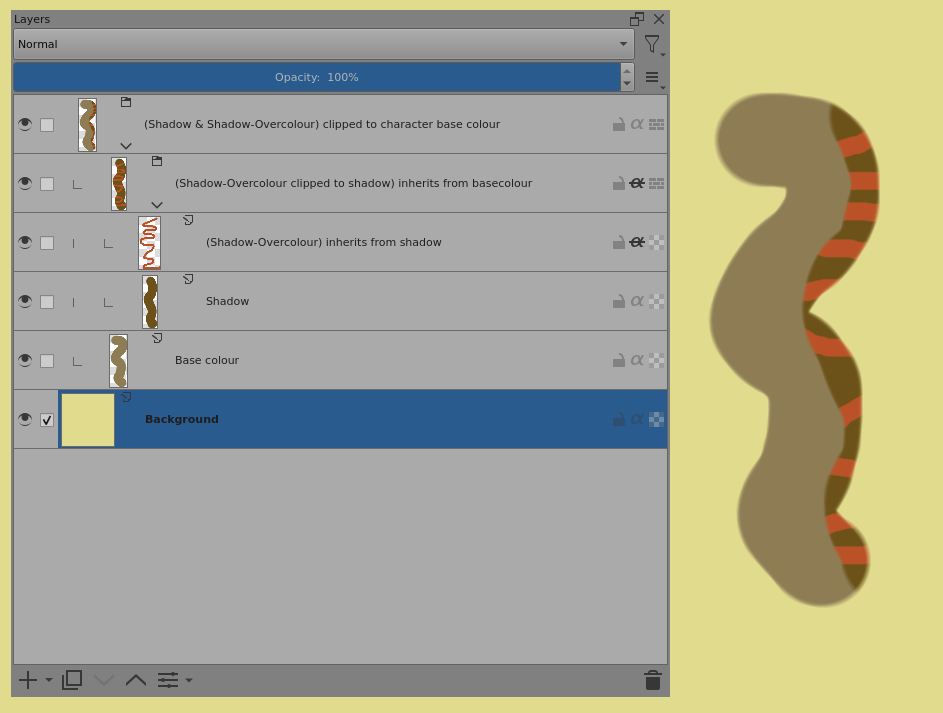
Holy crud, i didnt see ur post at all. Tbh, what i need is a visual tutorials and yours helped a lot. What i was doing wrong is keeping alpha inheritance on the shadow layer activated 
2 Likes
This topic was automatically closed 4 days after the last reply. New replies are no longer allowed.