Hi everyone,
I made Color Grimoire, a Krita docker for the part of an OC that is easy to lose between sessions: the exact skin, hair, eye and clothing colors, which body part each color belongs to, what the color is for, its opacity, the layer recipe (Multiply shadows, Add light, Burn, etc.) and the environment lighting palette.

What it does
- One sheet per OC: summary, history, personality, relationships and tags.
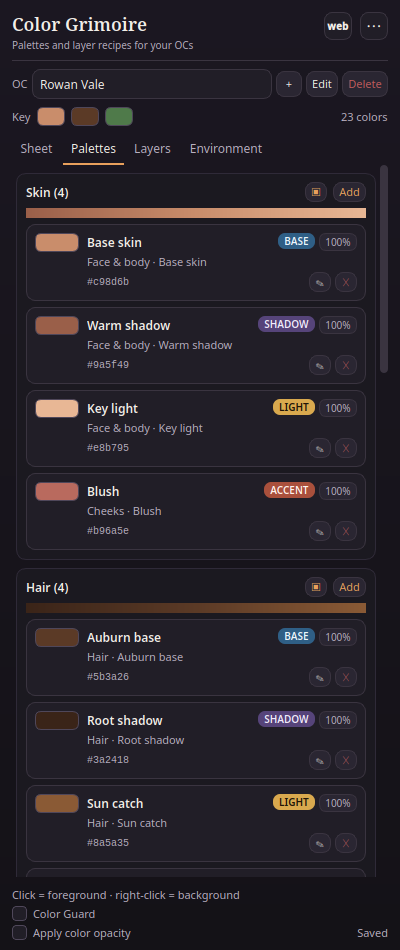
- Eight palette zones: skin, hair, eyes, clothing, armor, accessories, private and marks/scars.
- Each swatch stores a name, HEX, role, body part, purpose, opacity and a free note.
- Left click a color to set the foreground; right click for the background. Optional alpha from the swatch opacity.
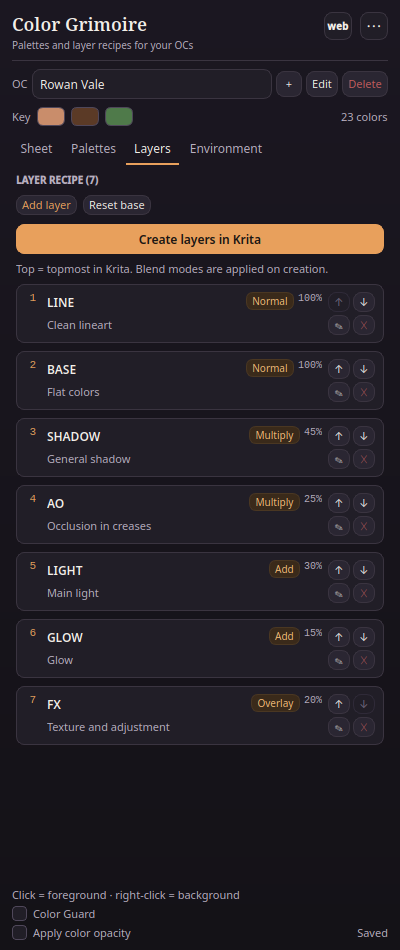
- Layer recipe with order, blend mode, opacity and purpose. Create layers in Krita builds the group with the recipe in the active document.
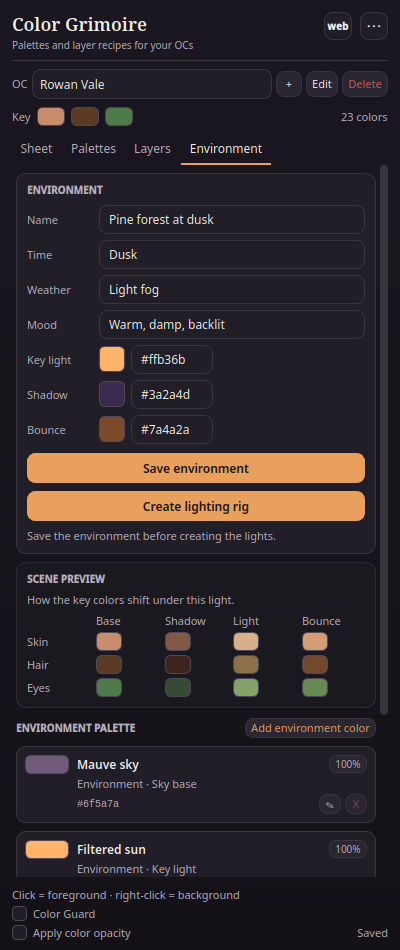
- Environment tab for the scene’s key light, shadow tint, bounce, mood and palette.
- Scene preview: the key colors tinted by the scene lighting, with clickable chips.
- Create lighting rig: fill layers for SHADOW, AO, LIGHT, GLOW and BOUNCE, clipped to the layers below.
- Color Guard: compares the current foreground color with the OC palette, shows the nearest swatch and ΔE, and snaps to it.
- Optional OC photo and zone example images: add a reference photo and a painted crop per zone; they live locally next to the JSON.
- Color ramps: each zone shows an automatic shadow → base → light gradient.
- Custom translations: add your own JSON language files; the menu creates a template, opens the folder and reloads them.
- Web companion button: open the web app in your browser; configure a local path or a hosted URL. The plugin and the web app share data through Export/Import JSON.
- Private zone hidden by default; the data stays local.
- JSON import/export and
.gplexport for Krita’s Palette Docker. - Spanish and English UI, plus your own languages.
Install
- Download
grimorio_color-0.4.1.zip. - In Krita: Tools → Scripts → Import Python Plugins, select the ZIP.
- Restart Krita.
- Settings → Configure Krita → Python Plugin Manager: enable Color Grimoire.
- Restart Krita again.
- Open it from Settings → Dockers → Color Grimoire.
Compatibility
Tested in depth on Linux with Krita 6.0.4.1 (Qt6): layer stack, all blend modes and the lighting rig. Krita 5.3.4.1 (Qt5) passes the model, bridge and UI tests; the full real re-run is pending while Krita is open and locks the resource database. The plugin is pure Python and uses a small Qt compatibility layer. Windows and macOS should work with the same ZIP, but I have not tested them yet; if you try, please report the Krita version and any error.
Privacy
No network, no accounts, no telemetry. Everything lives in a local JSON file; use Export JSON for backups. The private zone is hidden in the UI but not encrypted.
Contributing translations
I would love help with translations. In the repository, copy grimorio_color/translations/translation-template.json to <code>.json (for example fr.json), set code and name, translate the values in strings, and open a pull request. The plugin loads bundled translations and your local translations/ folder; the local files override the bundled ones. See CONTRIBUTING.md and grimorio_color/translations/README.md.
Feedback
This is a 0.4.1 and I would love feedback on the workflow: which fields are missing, whether the lighting rig should also paint masks or fill the base colors, whether Color Guard should scan the whole layer instead of the current color, and whether custom zone examples, OC photos or a native .kpl export are the right next step. Bug reports with the Krita version and the Plugin Manager error are especially helpful.
Download: Release Color Grimoire 0.4.1 · ImBoolean-2/color-grimoire · GitHub
License: GPL-3.0-or-later.
 Hello

