I’m surely stupid but…well…thank you in advance for your help.
I faced this issue in version 4.4.1 windows x64. I then installed v4.4.2 but the problem remains.
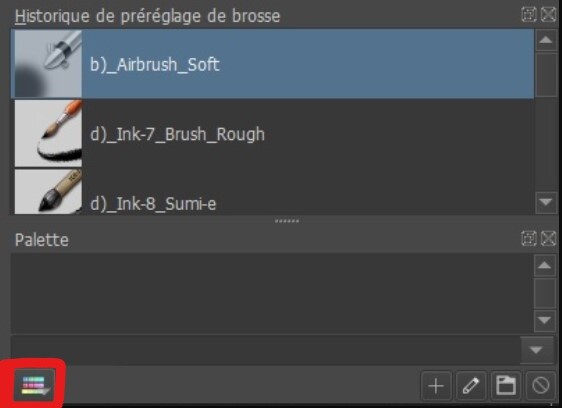
My color palette is no longer visible (I suspect my kid ) and I don’t manage to bring it back. It used to be placed nearby “calques” and “vue d’ensemble” (as shown surrounded in red
in the picture).
I tried to display all panel but without success. The only workaround I found is the advanced color selector.
Thank you again for your help!
Hi!
It looks like your “Palette” panel is below your “Historique de préréglage de brosse” panel. You will have to drag the Palette panel back to where you want it. To show a color palette, so it is not empty, you will have to click on the colored square and it should bring up your palettes. (I surrounded it with red).
Hi and thank you for your quick answer, it is very helpful! =)
So I managed to display some kind of a color selector and to drag it where i want (surrounded in red).
But is there a way to display it the same look as the advanced color selector (surrounded in green)? As a matter of fact, i clicked on the button you have surrounded in red in your pic and tried all the possible options (surrounded in yellow), but the panel still looks weird
Hi again!
OK I managed to do it! It was so simple, I feel so stupid. I just had to drag the advanced selector color where I wanted. Thank you again for your help, that was really helpful! =)
 ) and I don’t manage to bring it back. It used to be placed nearby “calques” and “vue d’ensemble” (as shown surrounded in red