Hiya! As the title suggests, I’m looking for a way to make the color picker ignore the active filter layers (or masks or whatever). Is that possible?
For example, say I have a layer stack that includes a “levels” filter at the top to darken things down. When I use the color picker, it’s picking the visible color – the darkened color – and then when I paint it gets darkened again by the filter layer, so the color/value is incorrect. (Sorry, this is a little confusing to describe .)
What I’d like is an option to select the color before any filter layers get applied, so when I paint it appears correct. Does that make sense?
I’m aware of the “sample the active layer only” option, by the way… this works in limited use-cases, but not (e.g.) when you want to add a new layer to a layer stack that includes a filter layer.
The easiest workaround I’ve discovered is to simply disable any filter layers temporarily, paint, then enable them again. But that’s kinda tricky, and it’s not ideal to paint while you’re not looking at the image as it will actually appear in the end.
Other workarounds involve simply using masks on individual layers (instead of a filter layer over a stack) and flattening them down as you go, but… well, that’s destructive editing!
There’s not an option for that, from what I know. Would be nice to see an implementation of the color tags, for this. So, as we can now have Krita see or ignore layers by associating color tags to them, when we use the Fill Tool, we could also set the color sampler (whether selected as a tool or via the shortcut) to see or ignore layers that are tagged or not tagged with a color.
In the meantime, as we don’t have that feature, my first thought would be to group your working layers (those layers beneath your filter layers) and then have a key setup for the “Isolate Active Group” feature. This would give you a quick way to hide your filter layers, allowing you to select the color from the isolated groups layers, then you could toggle it back to normal by hitting the key again. At the very least, it would save you from having to scroll up and turn the layers off and, if I’m not mistaken, means Krita doesn’t need to take time recalculating those layers filters when being turned on/off.
(edit) - To be clear. It doesn’t matter which layer you have selected within a particular group. So long as the layer is in a group, using the shortcut to “Isolate active Group” will hide everything but that group. I’m currently using this method to hide/show groups in a template I’m setting up for doing comic story boards.
Yes! This sounds like a great idea that would give me exactly what I’m looking for. If it existed
Also, as a side note: I didn’t even know that color tags existed… awesome feature for me to fold into my workflow. Thank you!
This is an excellent suggestion, thank you! I was trying to figure out how to make this a bit smoother of a process, but I was hitting a wall since grouping the filter layers is a no-go (since the filters will only be applied inside that group, of course). Great idea to do the inverse instead, isolating the others.
I’ll mark this as the answer since it seems as close as we can get without adding features to Krita. Thanks again!
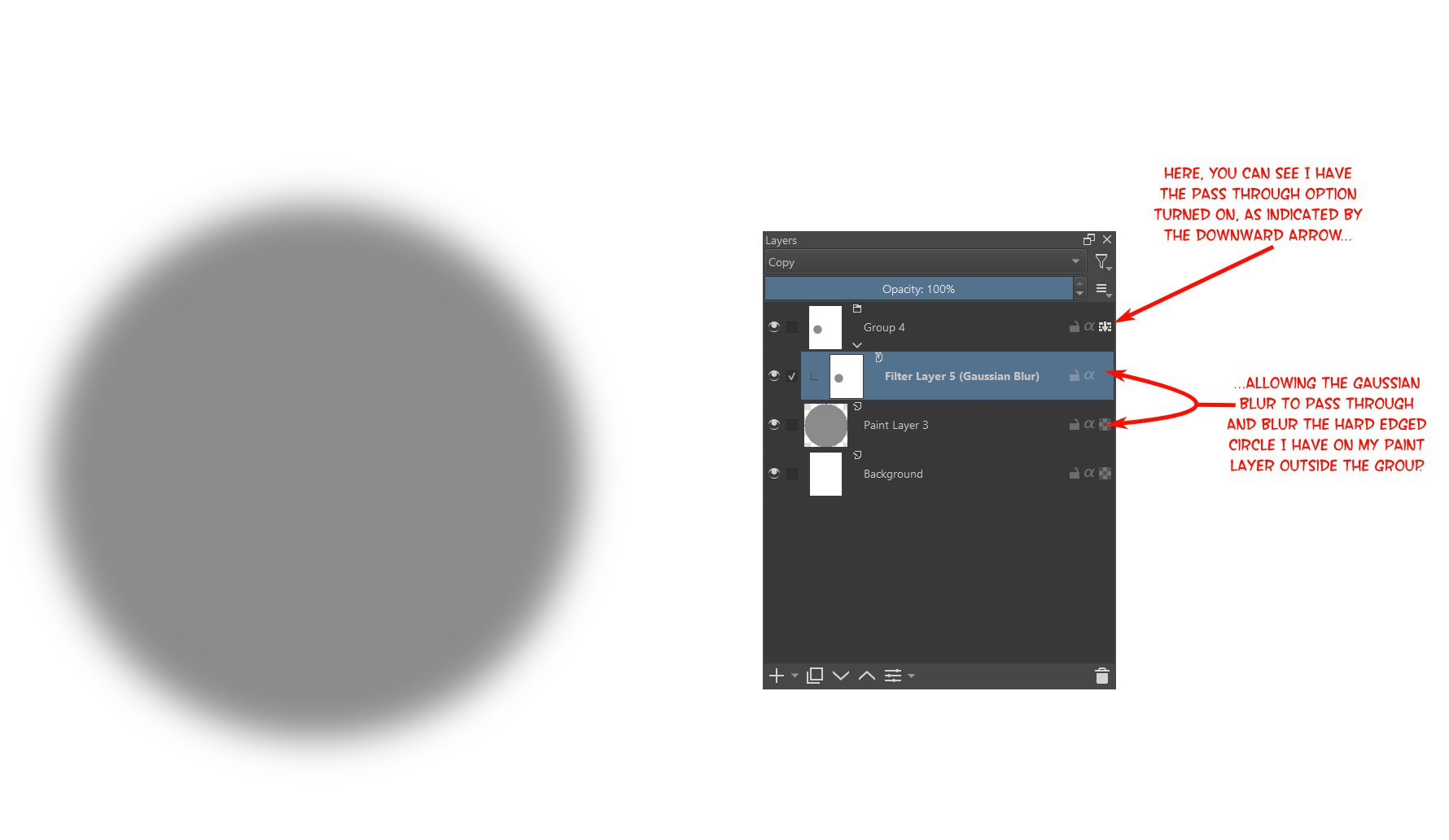
Actually, this can also work; you just need to set the group layers Pass Through option (see screen shot). This will allow the group to let the filter effects pass through it, to the layers below. However, I do think the method I mentioned before will have less impact on your systems processing because, as I mentioned, I think Krita doesn’t need to recalculate anything if you’re using isolate, whereas if you hide the filter layers, Krita seems to reapply things. Though, do try both methods and see what works best for you .
Oh man, I also didn’t know about this option! Fantastic, thank you again!
Funny – I’ve used Krita for about a year now, but haven’t delved much into its many, many features and options. I pretty much just… paint (and throw in some basic “levels” or “hsv” filters from time to time).
Probably time for me to start going through some real tutorials or something
You should check out YouTube. There’s a lot of Krita tutorials there. I know JustCallMeInsane has a lot of videos dedicated to Krita features, that can be useful. (Edit - Don’t go by her most recent one, though. It was her April Fools video, lol).
 .)
.)

 .
. .
.