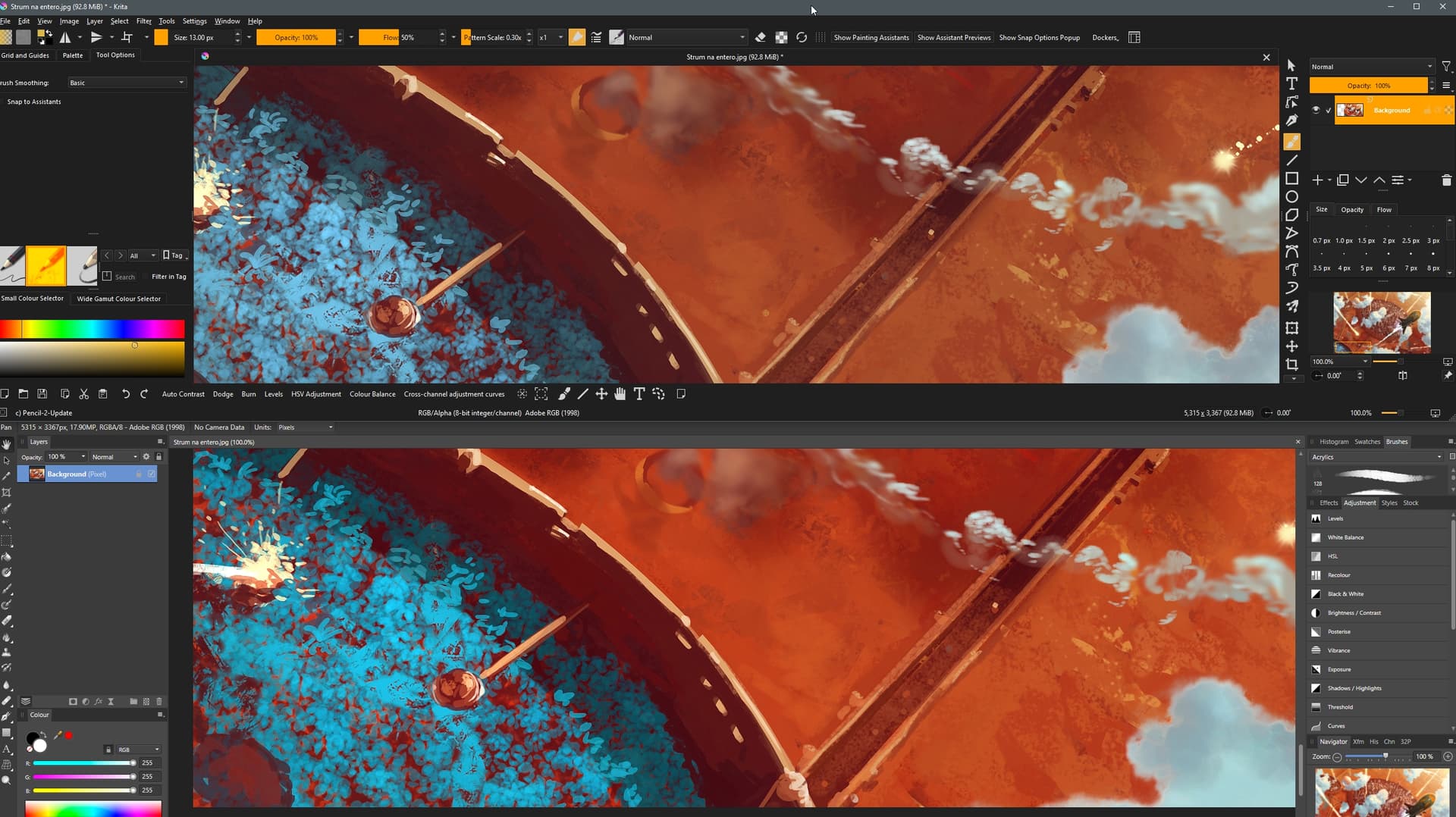
This is the same file, RGB profile, color depth, rendering method - displayed in Krita (top) and Affinity Photo (bottom). The difference is astonishing. I created this illustration many years ago in Photoshop and Affinity (Clip Studio, SketchBook, Paintstorm) display it right - only in Krita everything got messy.
I need some help with this - I’ve been playing around with the options for a long time - no results.
2 Likes
Which rgb profile specifically are you using? There’s a difference between linear and generic rgb profiles, and iirc Elle’s profiles display color differently too (imho they’re usually the most accurate ones, but that might just be on my displays)
Adobe RGB(1998)
Could you sent that snippet of the image? I’ll check how things look on my end that way.
In Krita’s display settings, is the color profile set correctly for your monitors? I think on Windows Krita has trouble to pick it up automatically because Windows 10 and earlier don’t really have color management by themselves.
Try opening this screenshot and see if you can spot the difference. Try in Krita and windows image viewer. I just opened it in Krita - Affinity part is shifted and Krita part is shifted even more. Saturation is shifted down for all colors and there is also a tonal shift for some colors. 
I don’t know what that means - what is correct profile for Huion 24UHD ? The screenshot was taken from the same monitor (Huion display tablet) at the same time - both programs had Adobe RGB as color profile, 8bit per channel. I tried diffent profiles and just cant get the colors right. 
This one:

Krita will try a color conversion to the display’s color profile to account for difference in gamut and when the display colors profile is set up wrong the colors for output are calculated incorrectly too. It also gets difficult when the input color profile has has a wider gamut than the output device, then you will simply always have colors that are not displayable. What the Huion’s color profiles are, is probably specified in their manual somewhere.
Does Krita show the document color profile correctly at the bottom in the status bar? Also, I assume you probably open this image from a PSD file, right? Krita’s PSD support is… spotty. I don’t even know if it supports embedded color profiles for PSDs.
1 Like
I probably found the solution - I set all monitors and programs to IEC61966-2.1 - and colors are now the same everywhere. I couldn’t find what profile should be in Huion - but set 1966-2.1 as default - it seems to work. The same move with Adobe RGB didn’t work ( maybe there is the problem with this particular profile/monitor combination). Thank you very much - your comment was very helpful.
2 Likes
setting all monitors to IEC61966-2.1 (also known as sRGB) is correct here. There’s no monitors out there that can display Adobe RGB in full.
Even more correct would be to have each screen profiled, said profile assigned to the given screen in both Krita and Affinity. That requires some special hardware, however, and if you do not have it, sRGB is good enough. I think what happened is that Affinity was set to sRGB and Krita to a system-assigned profile.
2 Likes
Generally your question is about Colormanagement.
A thread in our forum:
(It also contains a discussion about the Huion 24 4K and its limitations)
A general resource worth reading as a starting point:
https://www.cambridgeincolour.com/color-management-printing.htm
My problem was a little bit different. It was an inconsistency between programs ( krita and rest of the graphics software) despite the same settings. Windows color manager was the key in my case - the profile assigned to the both monitors was the factor that made the difference.
This topic was automatically closed 30 days after the last reply. New replies are no longer allowed.