So far when I use my drawing tablet to draw I get really inconsistently sized lines. I usually use 40px but in reality the brush strokes I draw only go up to 5 based on the amount of pressure I put on the tablet. I feel like I’m doing something wrong… if I use a 40px brush should the brush’s maximum size I use when drawing be 5px? A lot of my art ends up with inconsistent line sizes even when I use the same px size brush throughout. This leads to me having to retrace lines because they are too thin. Any help is appreciated, thank you in advance.
Sounds like the brush preset is set to be really “hard” or the tablet’s global pressure curve is, when you get that feeling with all brush presets. If it’s the former, adjust the pressure curve for the brush preset. If it’s the later, change the pressure curve for the whole tablet either in Krita’s settings or in your tablet’s driver setting (but not both) to be softer. I too prefer a softer feel (needing less pressure) for my brushes.
Just to confirm I should be using the full brush when drawing correct? (if I’m using a 10px brush then I should be drawing with the full 10px)
Only if the brush has no pressure sensitivity for size. Otherwise if a brush has a size of 10px but you only put 50% of pressure on your pen, it will draw at 5 px (assuming a linear pressure curve).
If you want the brush to be exactly the same size, always. Disable pressure for the size. (Depending on the preset, other things can affect the size too)
The thing I struggle most with is putting equal pressure on my pen so when I’m drawing lines should it have maximum pressure on the pen so I can keep the lines consistently sized?
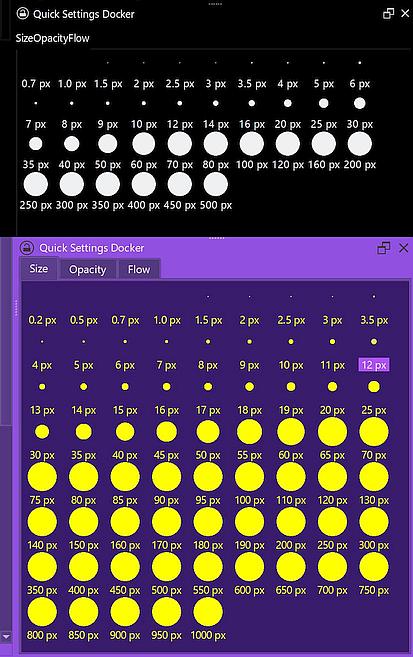
For a stroke holding its size constantly, you should use brushes that do not react to pressure or disable the pressure in that brush via Krita’s brush editor, that you can reach via F5 or a click on its toolbar-icon. This way you can set the wanted brush size/diameter and paint in that size. In combination with the Quick Settings Docker, you can access several brush sizes with a click. The Quick Settings Docker is found in Krita via ‘‘Settings’’ >> ‘‘Dockers’’, and you can even customize it if you are computer-savvy and have no fears when it comes to editing configuration files in folders Windows dislikes to see users in. 
The upper part shows the unmodified version, the lower one is an extended version I just made to showcase the possibilities:
As I wrote, just disable pressure if it annoys you or you can’t handle it.
Alternatively you can draw with the mouse.