I’m using Windows 10, and using Krita version 5.1.5
I have the latest release of ffmpeg (and downloaded it multiple times to doublecheck if i got the right version but if I still don’t, let me know!!!) it’s version 6.0 on this site Builds - CODEX FFMPEG @ gyan.dev
the animation plays just fine in krita but can’t be rendered for some reason. I do have an audio file attatched (.wav format)
the frames are saved just fine but the mp4 doesn’t render properly (unviewable).
I tried running krita as an administrator incase it was a permissions issue but that didn’t work either.
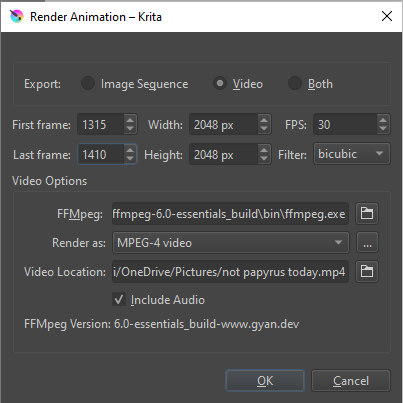
Here’s a screenshot of what I have before I render it. It also doesn’t work when I try to render it as a GIF. Feel free to ask any other questions about my situation but know I’m not very tech savvy so I might ask seemingly obvious questions.
I, as a non-animator, would say you should try to render it locally, but definitely not to online storage where you can still move it after rendering. Also, you could try to render it first into an image sequence before you render it in complete into video, but here I may be wrong, but that was the way I had chosen with a few animation-files I got from other forum-users.
Furthermore, but there I’m not sure, I think you have to render to video beginning with your first frame.
I will definitely try the first suggestion out when I can use my laptop again, thank you!
Sadly it doesn’t work even when starting at frame 0 :'D I appreciate this though!
images usually do save but they get deleted after the animation renders usually unless the image sequence is selected to save, but good suggestion!
Thank you again! Will try to figure out the non-online storage thing once I can (probably in ~10 or so hours since I have to sleep) I’m not used to this laptop/having a onedrive LOL
Can you try removing the audio file just in case it’s causing a problem?
Also, is there any error message? If so, please provide a screenshot of it.
The rendering process first quickly exports all frame images to the target folder and then ‘calls’ ffmpeg, telling it to make a video file from all images in the target folder.
That can cause problems if the target folder is a live ‘cloud’ storage folder.
I recommend creating a folder called ‘Rendering’ on the desktop and having that as the target folder.
If the rendering process goes wrong, you won’t end up with a very large number of frame images scattered over your desktop or anywhere else. They’ll be in a folder you can see on your desktop, then you can delete it and make a fresh empty one for the next try.
Some people have their personal data folders set to be automatically included in OneDrive. I have a vague memory that Windows can ‘helpfully’ and automatically include the desktop as part of it’s continuous OneDrive cloud backup process.
I suggest that you check and make sure that wherever you decide to render a video to is not included in OneDrive’s activities.
There is a problem with rendering from a frame later than frame-0 when the animation has a large number of frames. This has been reported.
A workaround for that has been described here: Krita wont fully render the animation - #6 by AhabGreybeard
After removing my desktop from onedrive (and making a rendering folder, thank you for that idea @AhabGreybeard !), starting from frame 0, and changing some of the animation cache settings, it rendered!
 Hello
Hello 