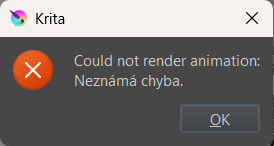
every time i try to render an animation i get the: could not render animation unknow error message. ive watched tutorials on youtube but those did not help, all the specs are correct and i even read some similar questions on here but nothing.
im on the 5.3.0 version but ive had this problem even before this version so i dont think krita is the problem. when i check the log it says theres Error opening input file and something with frame%04d.png.
ive started to look into using different programs but i really enjoy kritas animation feature so id be happy if someone could help.
 Hello @bableta, and welcome to the forum!
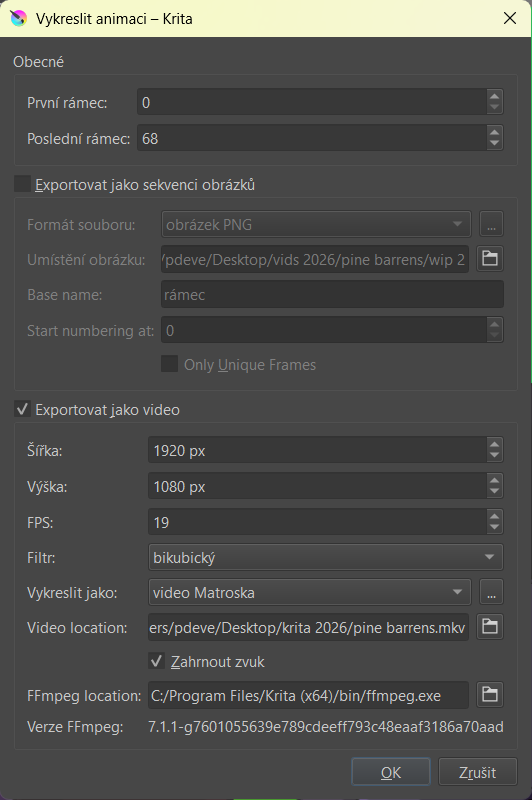
We need at least the screenshots from your export settings, and from the error popup. Furthermore, we need the version of your Windows.
Should you want to render it with dimensions above 2000 by 2000 pixels than that will be your issue, because Krita’s inbuilt FFmpeg is not capable to render this large because the needed codecs won’t fit those needed according to Krita’s license. If that should be the case then you can either reduce the size of your animation or you can download and unzip the ffmpeg-release-full.7z from Builds - CODEX FFMPEG @ gyan.dev to the root of your drive C:\. Here you have the direct download link to that archive:
https://www.gyan.dev/ffmpeg/builds/ffmpeg-release-full.7z
But you need an archiver that is able to unzip 7Zip archives, Explorer can only handle ZIP for my knowledge, at least the Windows 10 version.
Michelist
hello thank you for the response!
i use the standard 1920 x 1080 so i dont think the dimensions are the problem unfortunetly. i use windows 11 and here are the images. its in czech but i can change it to english if neccesary, the error popup says could not render animation unknow error.
Hello @bableta
This problem has been seen before.
I think that the problem is caused by the ‘Export as image sequence’ option having a ‘Base name’ that has characters that are not standard ASCII or are non-Latin characters.
This is a common problem when people use those characters anywhere on the file paths associated with the use of ffmpeg.
So, I suggest that you enable ‘Export as image sequence’ so that its option values can be edited, then change ‘Base name’ to “frame”, then disable ‘Export as image sequence’.
Then try rendering your animation again.
Please make sure that the entire file path for animation settings of any file or folder only contaims standard ASCII characters.
hello omg, it actually worked!!! ive spent months on this problem i feel like i looked everywhere except here, thank you so much i can finaly come back to krita and render my animations! tysm for the response!!
You’re welcome. You should always come here because as far as krita is concerned, it’s the most knowledgeable, experienced and helpful community of people that you will ever find
I’m wondering if you changed the ‘Base name’ to be suitable for your own language or if it was set to your own language when you chose that language.
If it was set to that when you selected your language then krita has a problem.
If it remained as ‘frame’ then it’s only a problem if people change it to have non-standard ASCII characters. That would be not krita’s fault, it’s an FFmpeg thing.
i only changed kritas language. rámec means frame in czech, so krita just translated everything i guess. i would have never guessed that changing a language could be a problem haha
If krita automatically provided the word rámec as the Base name when you changed language to Czech then krita has a problem, for the Czech language certainly and possibly for other languages as well.
I’ll try to remember to create a formal bug report for this but not until tomorrow.
Thank you for that information
sounds great! thank you again for the help!