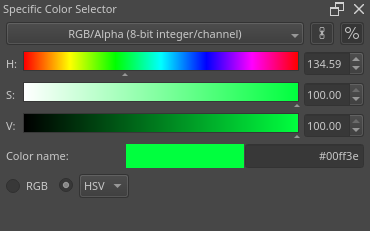
Hello. I am a very long time artist, I used to use Photoshop in uni but the pricing made me use Clip Studio Paint which is a close second best.
After a very long time I decided to try Krita again and see where the development is at.
I could not make the Shade Selector to be functional for what I need. Let me explain.
Shade Selector set on HSV should have 3 distinct bars
Top 1 should have all Hues - so far so good
Saturation bar should adjust the saturation of the chosen colour without changing the value of the currently selected pigment. This is not possible right now as it turns to black when being ‘desaturated’ which is not how an isolated saturation control should work.
Value bar should map the current colour as is respecting the hue and saturation stats.
Meaning if I have a red hue, mapped to 50 saturation and I adjust the Value it would go from black to some red in 100s but if I change the saturation to 0, the value bar would become black and white as there is no longer any colour in my pigment. Currently the value bar just does not respect changes in Hue and Sat.
This all gets 'Fixed" if I turn on the “update when left clicking shade selector” However in doing that The hue slider also updates which is ridicilous.. when sliding one bar all the others mess up and change without any sense, for some reason they’re all relative. This is not useful or useable…
The HSV sliders are useful when an artist isolates the 3 factors and thinks of them as seperate parameters to combine.
Hue should be set to the brightest colours so you can visualize what hues there are in the 360 spectrum and not change everytime I chose a new colour…
Saturation should just add the pigment into a 0 to 100 slider and Value should respect the current selected saturation…
Moreover I do not know why there’s a square in the middle of every bar as if its useful for me to match it pixel perfect in the middle instead of typing a 50 in its value bar and why there are not fields to type in manually the values 0-100 (0 to 360 for H) for every section.
This is a critical component of colour mixing and it is impossible to achieve in Krita.
I am incredibly disappointed that literally the most important colour picking feature in digital painting is still unusable after such a long time of this software existing and beginner artists using Krita have to deal with some arbitrary messy colour picking instead of learning how colour works properly through simple user interface controls.
Refer to how it is in Photoshop or CSP and just copy it there is a reason it’s used by professionals and taught in every school and uni…
For the sake of your project ignore my disappointed tone and just fix this, it looks like it was just coded by programmers of what they think is required with no artist input involved in the process of the slider selector