I would love to see a cursor change change when I press the E key for erase.
Often times when I paint on my Surface pro I like to be in full screen + canvas mode and I use a macropad to toggle between settings. Most times when I’m in canvas mode and I press the key to erase there is no indication that I’m in the erase mode and sometimes I hit the key accidentally. I would love to see the center of the cursor change or and OSD popup that quickly fades letting me know that I’m in erase mode.
This feature would definitely speed up my process and make it so that i make less errors.
I wasn’t thinking if an E inside the cursor but an overlay anywhere on screen or above the cursor. A cursor color or shape change would be ideal that way I don’t take my eye off of what I’m doing. I would be happy with some kind of key overlay off to the right or left when you get into canvas mode. Any kind of status indication. Could also work with a foreground/background color swap too. It would be pop up and disappear.
There are key overlay plugins for Blender I’d be happy with something like that for Krita.
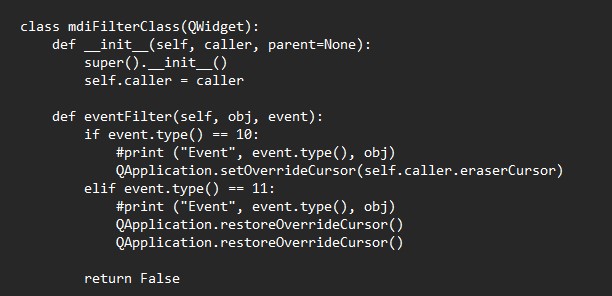
I really would like this also. Two years ago, a code existed to make this happen; but never was merged after the sources got accidentally removed. You can read the thread and example here, it was pretty cool:
Thanks for sharing this. I read that thread and a lot of the suggestions sound good. I think just a color change of the cursor would be great. How can we make this happen? Could someone just whip up a quick plugin that does just that?! I really wish I could program.
Then save it and run from command prompt krita.com, then click eraser on and off and tell me any lines that start with STATUS that appear on command prompt.
It should be there, do note you can only search for 1 line so search for QApplication.restoreOverrideCursor() and keep going next until you see it appear 2x
I think I may know the problem. Press the code button, then download zip. That will get you version 0.09. If you still have the problem, then try what I mentioned above.