I format the pc like 1 week ago i dont have any problem but i stopped the startup of driver i usualy open when i need and i dont know how to ignore windows ink thing or aligne
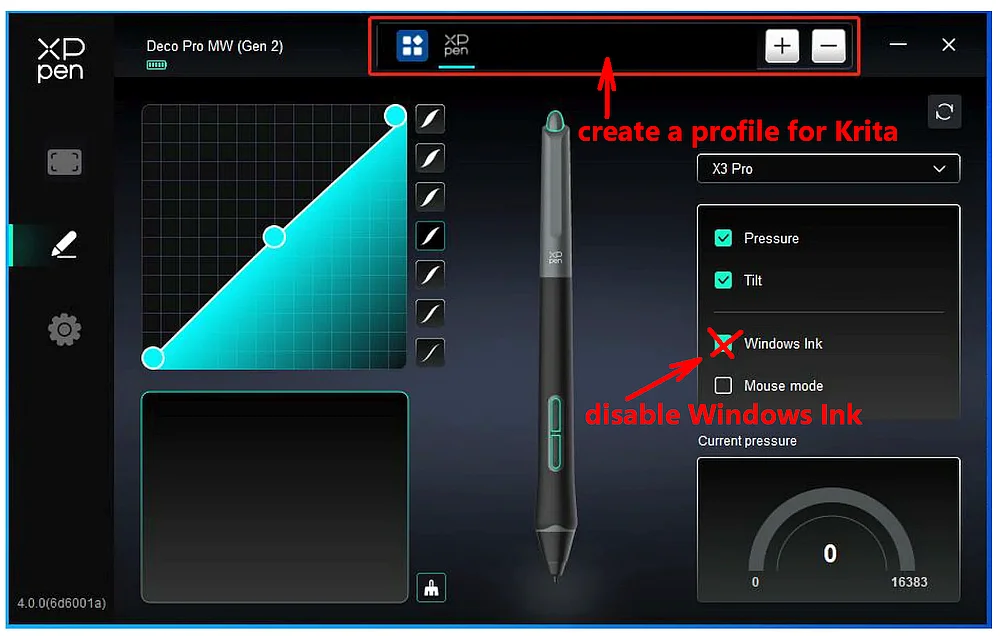
This screenshot is only similar to your driver, but the principle is identical.
You have to install the driver for your XP-PEN Deco Fun S, at least if you haven’t done it so far.
In your driver, you first must create a profile for Krita (sounds more difficult than it is)! See screenshot:
Simply click in the field I marked for creating profiles while Krita is running in the background, then it should be listed there, if it is not listed, you should be able to add Krita to the list of programs using the +-Button, the path to Krita is c:\Program Files\Krita (x64)\bin\krita.exe, when you use the version from Krita’s homepage, the version from Steam is installed in c:\Program Files (x86)\Steam\steamapps\common\Krita\krita\bin\krita.exe, the Epic or the Microsoft Store have different locations that are unknown to me. If you should have issues to add your Krita to the list of applications, then please refer to your manual.
Now, you have to disable Windows Ink in your driver, as you can see in my screenshot.
Then you need to check in Krita that WinTab is activated, you will find it via the menu Settings → Configure Krita in the opening dialog you have to select 1. ‘‘Tablet Settings’’ where you have to enable 2. ‘‘WinTab’’, then confirm that setting with the 3. OK-Button in the lower right corner of that dialog and restart Krita.