Custom Krita frame again(2025)

Years ago, I used to say that Krita could improve its UI/UX by making its frame merged with the native title bar. But everybody would attack me
as if the idea is inherently bad, giving absolutely all arguments to
discourage the idea unless the one suggesting it, works on it
himself.

I provided a little example already before as a starting point :

And today again, as I was exploring Qt’s blog, I fell upon the following:
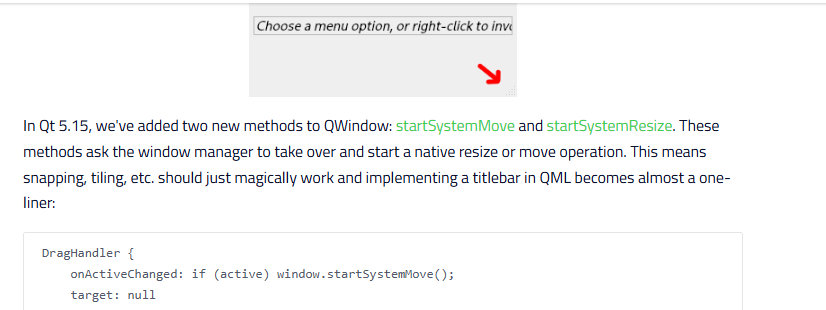
Me trying to explain to some that it’s not about making Krita
handle itself the windows specific functions like resize, minimize or
close, was not a convincing argument, unfortunately.

But instead decorating the UI, while targeting native OS specific functions,
exactly like how it’s already done for the current version of Krita, was the way.

Only difference is the window decoration and some advantage like providing
more space to the viewport in the UI.

I just want to know. If we’re not tackling this anytime soon to improve the
UI/UX, then when exactly or approximatively is it going to happen?
My research clearly shows that you don’t need to recreate the
“minimize”, “maximize” or “close” algorithms yourself( it’s pointless
to recreate when the solution is already there with the OS specific APIs, and
you only need to target the function for GUI actions ).

And finally, if I was willing to help program this feature, would I
receive help, at least for the specific tools I need to get started
with Krita’s UI/UX coding?
Or is the implementation of such a feature so toxic to Krita’s UI/UX
that it will be impossible to see it coming someday?

The returns/inputs from the experts on subjects/topics like this one would
be appreciated.
1 Like

Customization of main window title bar can be done in python extension, and afterwards if there is support, it can be come part of Krita. But any way, working prototype is good way to gather support for change.

Here is quick and dirty hack, if you wish to get started on window title bar customization.

Things to fix:

  • convert script to Krita Extension and create repository for it.
  • mouse cursor resize icon on hover over edges
  • draw dark border edges (Native borders + dropshadow are gone, when using Qt.FramelessWindowHint)
  • min, max, normalize, close button look and icons
  • better handling of move window (what areas should be grip areas for start move?)
  • stop resize on mouse release is random
  • snapping to screen borders (multiple screens?)
  • high dpi monitors??
  • light / dark themes
  • test on multiple platforms Linux, Windows, MacOS
from krita import Krita
from PyQt5.QtCore import Qt, QRect, QMargins, QEvent, QSize
from PyQt5.QtWidgets import QMdiArea, QTabBar, QWidget, QHBoxLayout, QPushButton


class MyTitleBar(QWidget):
    def __init__(self, main_window):
        super().__init__(parent=main_window)
        layout = QHBoxLayout()
        layout.setContentsMargins(0, 0, 0, 0)
        self.setLayout(layout)

        main_window.installEventFilter(self)

        mdi_area = main_window.findChild(QMdiArea)
        mdi_area.setViewMode(QMdiArea.TabbedView)
        tab_bar = mdi_area.findChild(QTabBar)
        tab_bar_size = tab_bar.size()
        tab_bar.setParent(self)
        layout.addWidget(tab_bar, stretch=100)

        self._minimize_button = QPushButton(text='_', parent=self)
        self._minimize_button.setFixedSize(QSize(20, 20))
        layout.addWidget(self._minimize_button)
        self._minimize_button.pressed.connect(main_window.showMinimized)

        self._maximize_button = QPushButton(text='F', parent=self)
        self._maximize_button.setFixedSize(QSize(20, 20))
        layout.addWidget(self._maximize_button)
        self._maximize_button.pressed.connect(main_window.showMaximized)

        self._normalize_button = QPushButton(text='N', parent=self)
        self._normalize_button.setFixedSize(QSize(20, 20))
        layout.addWidget(self._normalize_button)
        self._normalize_button.pressed.connect(main_window.showNormal)

        self._close_button = QPushButton(text='X', parent=self)
        self._close_button.setFixedSize(QSize(20, 20))
        layout.addWidget(self._close_button)
        self._close_button.pressed.connect(main_window.close)

        margins = QMargins(3, 30, 3, 3)
        main_window.setContentsMargins(
                margins.left(),
                margins.top(),
                margins.right(),
                margins.bottom())

        tab_bar.show()
        main_window.setWindowFlag(Qt.FramelessWindowHint, True)
        main_window.show()
        self.show()

    def eventFilter(self, obj, event):
        e_type = event.type()
        if e_type == QEvent.Resize:
            self.setGeometry(3, 3, event.size().width() - 6, 30)
        elif (e_type == QEvent.MouseMove) and (event.buttons() & Qt.LeftButton):
            pos = event.pos()
            rect = obj.contentsRect()

            edges = 0
            if pos.x() < rect.left():
                edges |= Qt.LeftEdge
            if pos.x() > rect.right():
                edges |= Qt.RightEdge
            if pos.y() < rect.top():
                edges |= Qt.TopEdge
            if pos.y() > rect.bottom():
                edges |= Qt.BottomEdge

            if edges == 0:
                obj.windowHandle().startSystemMove()
            else:
                obj.windowHandle().startSystemResize(edges)
        return super().eventFilter(obj, event)


app = Krita.instance()
win = app.activeWindow()
q_win = win.qwindow()

MyTitleBar._instance = MyTitleBar(q_win)

/AkiR

1 Like

Is there a tool or environment set you can use to see the result of the demo?

Just copy & paste the script to Krita’s Sripter and run.

Script changes current Kritas window to FramelessWindow and moves MdiArea tab bar to top and adds buttons for minimize, maximize, normalize, close. It also adds eventlistner to mouseMove events, so that resize & move work. (tested on Windows 10 + Krita 5.2.6)

/AkiR

Greetings.
Tested it today, and it seems to be working towards
the direction I aim for.

Great starting point indeed although not perfect.
Thanks for the valuable input nevertheless.

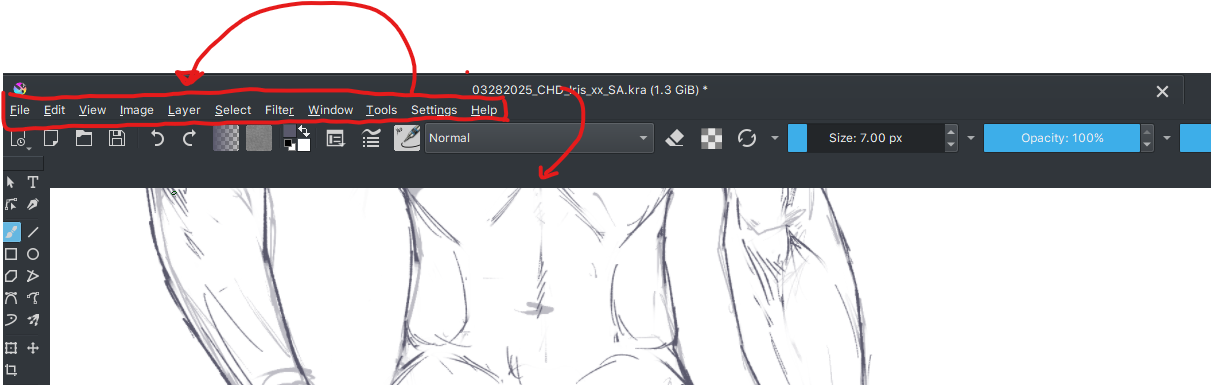
I would change the list of things to do/fix however as follows :

  • convert script to Krita Extension & create repository for it after
    all is done;
  • mouse cursor resize icon on hover edges;
  • draw thin dark border edges;
  • move the menu bar elements( File, Edit, View, Image, […], Help )
    to the same level as the title bar, featuring Krita’s icon )
  • move the document tab into its rightful place;
  • have a working hybrid tabs+subwindow new mode
    for multiple document mode( feature request );
  • rearrange window behavior of button(execute click action only on release & while the
    mouse pointer remains on the button to activate);
  • themes to follow Krita’s own themes
  • complete the modernization of the UI/UX( a long way and that
    wont depend solely on me; potential feature request that might require
    mockups );
  • consistent position of min, max, normalize and close buttons;
  • look and icons for min,max, normalize and close buttons;
  • test on multiple platforms, mainly Linux, Windows & macOS( will probably
    work as Krita’s python scripts are cross platform compatible )
1 Like

Hello.
I’d like to ask by the way.
Is there an IDE or programming
environment I could use to reflect the Ui
change without necessarily having to
start/restart Krita all the time?