Does anyone know if there is, and where i could find a plugin that i can download and install to allow Krita to read and edit .DDS files?
I haven’t heard of it, unfortunately. Maybe the program you’re getting those files from can export in other formats as well? A set of PNG files, for example?
The program i need the DDS plugin for, exports in .TGA formats only, i’m hoping to find a plugin that allows me to convert the files into .DDS after finishing editing them in .TGA, so i won’t need to deal with 3rd party programs and stuff to convert the files
I see that Qt5 has a dds plugin which I can enable in Krita’s generic image handler plugin.
ETA: https://invent.kde.org/graphics/krita/commit/00fee8313844fe704257e017c8cef62ec8570921
Should be in tomorrows’ nightly builds.
Does that means there will be soon, a downloadable plugin or an official update adding it to Krita?
Probably, it means that if you want it asap, you can download krita nightly build tomorrow. If it’s ok to wait, it will be in next release - 4.3.1, though we just had an update, so it may take a month or two
It means that tomorrow you can go to this page: https://krita.org/en/download/krita-desktop/ and download Krita Plus version and Krita should be able to import and export .dds files 
Is it like a separate Krita program or do i have to install it within the normal Krita?
No, just install the Krita Plus version and you’ll be able to import it. Hopefully, at least, since I guess nobody tested it.
Install it or download it and import it to the normal Krita like you would a plugin? Also, sorry if i’m asking too many questions
Install Krita Plus from the website. Then open the .dds file the same way you open .kra and .png files
There is no plugin you’d need to install separately, you just need a new version of Krita. They were talking about a “plugin” but it’s just a technical term that doesn’t mean anything for the user in this case.

-setup.exe is the installer. .zip is the portable version. It just needs unzipping and double-clicking on krita file inside. Take which one you prefer. (the -dbg.zip is debug symbols, not needed for you now. It’s for when you have a crash).
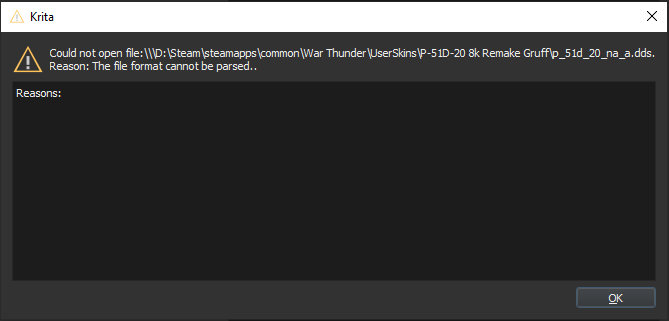
Yes, you just need to close Krita if you have it running, install a new version and open it again.
@halla?
Also can you please provide some .dds file? Otherwise it’s difficult to check it on our side.
Krita wasn’t running when i finished instaling and opened this version
Can i upload the .dds file here? The one i tried to open
No, maybe on Google Drive or Dropbox, or there are some services that allows you to share a file up to 30 days etc.
here’s the google drive link for the file, it is an 8k resolution file and pretty big in size
https://drive.google.com/file/d/13JqUaIOUAov0PokxrCB8M8UZxAa214l7/view
That link is a ‘Google sharing’ link which needs a Google account login to get access .
It’s better to use the ‘share with everyone’ link which is an available option when getting a sharing link from Google Drive. That allows anyone to download it with no sign-in.
According to your posted image of your error message, you were running a Steam installation of krita?
You’ll need to use the portable .zip package and use that to try the update.
fixed it and it should work now