Do you have any previous experience of using another animation application before you started using krita?
If so, then any differences in krita may be causing you confusion.
If not, do you have previous experience of producing animations in krita?
(I know you recently did an Animation Loop of five frames.)
If not, then you have the problem of learning concepts, tools and methods.
This is always a large, long and confusing task.
If you’re using the Animation Curves facilty, and you have little experience in animation, I strongly suggest that you don’t use it.
Animation Curves are intended for long term opacity changes for various special effects and they an be quite confusing to learn and use.
I can understand your concern about your artwork and its appearance, since that is the end result that people see.
However, I think that it woud be a good idea to put that project to one side and start a new project where the artwork is simple ‘blobs and lines’, which are very quick and easy to draw.
Then you could concentrate on learning the tools, methods and techniques.
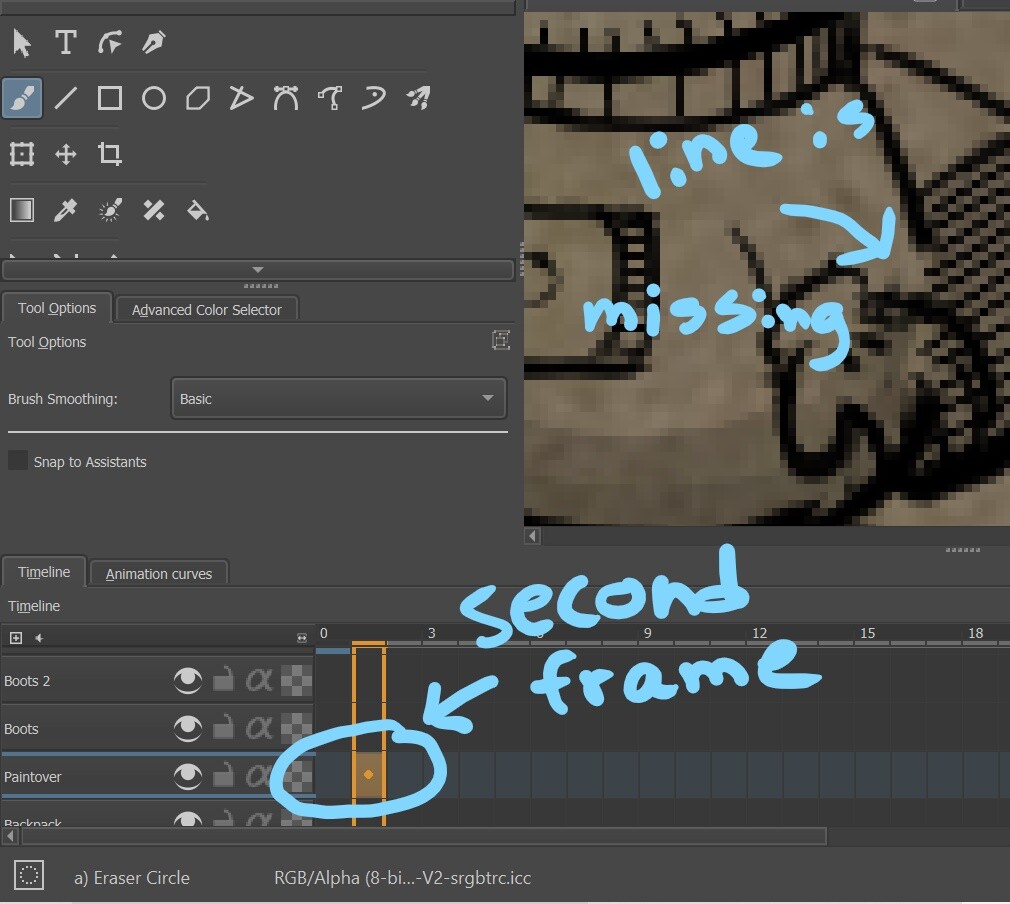
In your third posted image above, the ‘Paintover’ layer is not an animated layer, You can tell it’s not animated because it doesn’t have a lightbulb icon to the left of frame-0.
In the Timeline, blue frames are keyframes (they have content).
A grey frame with a blue line around it is a Blank Frame, i.e. a frame that is defined as a frame but with no content.
An empty grey frame has no defined content.
A frame with a horizontal blue line is a Held frame. That indicates that the content during playback will be whatever the last defined frame was. i.e., previous content is held for display.
Of course it did. The content of frame-1 would be the same as frame-0 because it was held.
Yes, because frame-1 is now a separate defined frame, a keyframe and hence it can have separate/different content.
You need to learn about the tools and how they work and behave.
https://docs.krita.org/en/reference_manual/dockers/timeline.html
 .
.