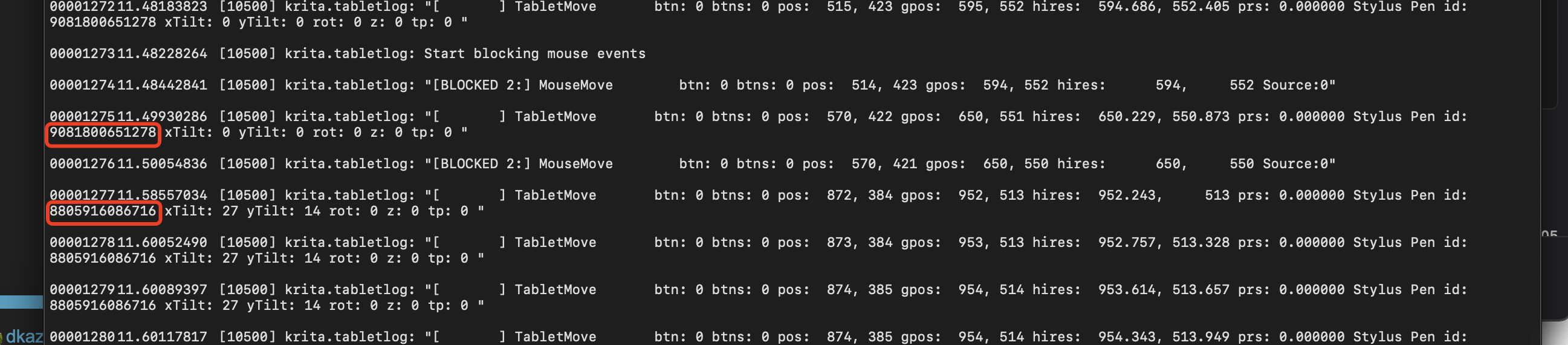
I found a review of someone giving the demonstration, he was able to use one pen as one brush, and another pen for a different brush. I tested and it can work in Krita 4.1.1, but for the latest verison, it does not work at all. Our driver can recognize the different pens, but have no idea how to make it wrok in Krita 4.4.
I’m surprised that there’s a difference between 4.1.1 and 4.4.5 in this situation.
As far as I know, krita only recognises a ‘stylus tip’ and an ‘eraser tip’ which is actually treated as a second/alternate brush and can be used as such to use any brush preset you want to.
Are you alternating between 4.4.1 and 4.4.5 by using a portable .zip for 4.4.5?
In Settings → Configure Krita → Tablet settings → Open Tablet Tester, you can draw on the grid and note what is detected in the event record on the right side.
Just bringing the tip close to the tablet surface will tell you what it is recognised as.
Can you do that for each end of each pen for 4.4.1 then again for each end of each pen for 4.4.5 and see if there is a difference?
Maybe @dkazakov remembers, but that may have been disabled on purpose, I dimly remember some issues with tablet drivers changing stylus tip IDs randomly for no reason (bug presumably), which then broke painting.
Tks a lot! I tested again with DebugView, the pen id was changed when I was using different pens. But in 4.1.x, the brush would switch automaticly when i was using different pens. In 4.2 or higher, it would not work at all.
Hi to all!
Just checked in to confirm that in version 4.1 (appimage from attic) you don’t have to do anything in order for it to work. Just change pens and pick another preset! Already in 4.2 it doesn’t work anymore. Shame…
Qt regression? Krita code change?
This is interesting - as an owner of multiple pen and I recently got felt tips. I might try with huion [if its possible in that brand] . I wonder if we can make this faster to do or make it like how it was observe by other in 4.1
Should we report the issue? The feature could come really handy for all of us with multiple styluses… Maybe there is a report somewhere already. I haven’t checked that.
If it was working in 4.1 and not working anymore in 4.2, you have to report an issue if you want to have a chance to get it fixed.
In krita-artists we can discuss about bugs & improvement, but usually nothing is made until a formal bug is created on bugs.kde.org because it’s not really possible to track things properly on KA
Don’t get me wrong: I’m not against the multiple id per stylus, it is a good idea!
But unfortunately the detection of the right ID wasn’t working well and it was very annoying. It took me weeks to investigate with a special Krita with debug options (and screencapture all) to send @halla reason about why my preset would jump suddently to another one in the middle of a drawing. And you can easily imagine the frustration of getting your preset auto-switching between two paint strokes, randomly, or after selecting a layer or hovering a menu. I tested it and could trigger the bug at the time on Wacom Cintiq13HD and Intuos4XL. The ID was switching in background for no reasons. It was unpredictable and unfortunately, something probably deep in how Qt handle devices.
That’s why the fix had to sacrifice that switch of device in favor of consistency of drawing/painting.