(I am not sure whether this should be in the “Feature Requests” category since, while I am not asking for a new feature, I am asking for changes to an existing feature. I decided to use this category because it says that this category is used to give feedback on existing features, which is mostly what I am doing here.)
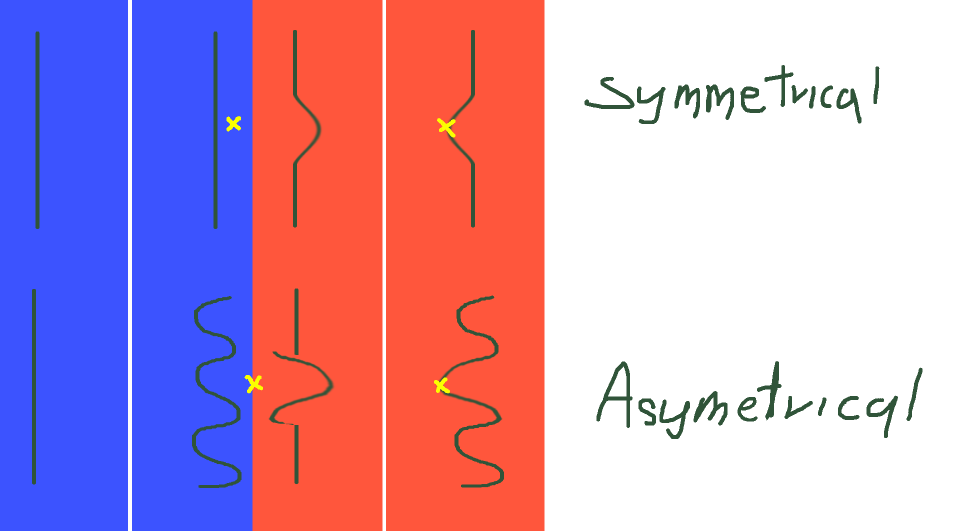
When the mirror tool is turned on, the Distort Move brush messes up the drawing in a way that it takes what is drawn on the side that you are applying the brush on and copies it to the other side.
This does not affect anything if the art is completely symmetrical, however, if the art is asymmetrical, then you either have to deal with the issue or you have to turn the mirror tool off and work without it, which would take more time and cause unintended asymmetry.
It would be great if this brush were changed so that it could be used with the mirror tool properly.
So far I have found no workarounds around this issue.
The only tool in Krita that is similar to the Distort Move brush is the Transform Liquify, but this also does not work with the mirror tool.
If there is a workaround, please let me know.
(sorry if this is alrady known or has been already posted, but i just wanted to put it here just in case)
If I haven’t completely misunderstood everything here, then I have to tell you, I’m sorry I can’t give you the answer you’re looking for, but you should have been able to recognize the solution yourself if you analyzed it logically.
Have you ever thought about how Krita, the mirror tool or the brush are supposed to know which result you would prefer in each case? How are they supposed to determine this?
The brush works exactly as it should, and neither Krita, the mirror tool nor the brush can know that you would want a different result for the asymmetrical part of your image, all three do exactly what they were made for, work.
The thing is, the software can’t read your mind and adjust itself accordingly. And no matter which brush you use there, they will all show identical behavior (apart from the special Distort/Move functionality).
I was talking about wanting the brush to work something like this:
This is a recording in another art program that i use to draw on my phone.
The blue line is the mirror tool and in the video i am using a brush similar to the Distort Move brush in Krita.
In this program, insted of copying the part of the drawing that the brush is applied to and pasting it to the other side, it applies the same “force” as if i was using two brushes at the same time and moving them in a way that their movements are the same exept mirrored.
The normal mirror mode just mirrors the painted pixels, because that’s much faster to compute.
If you want the brush to actually paint mirrored, you have to use the Multibrush Tool, then you can apply deformation etc. mirrored.
 Hello
Hello 