 Hello @Theus and welcome to the forum!
Darker than what and where, respectively, in comparison to what?
As shot in the dark, I guess it is the old story of color-management and the fact it is not understood so far … :
If it’s this misunderstood issue, the Krita Handbook categories linked above are a brief introduction to color, and even if you’re thinking, “Whaaat, such a wall of text!”, it’s a brief but accurate and easy to understand explanation of what you’re probably experiencing.
If so, you will find many questions similar to yours in the forum search, and the answers to them, I once wrote this post about it, in response to one of those questions, which already number in legions:
If this is not your issue, then please explain briefly but precisely what your problem is. Tell us which version of Windows you are using and which version of Krita you are using, and also where you got your Krita from. So did you get it from the Microsoft Store, the Epic Store or Steam, or did you download it from Krita’s website, and if from Krita’s website, is it the portable version or the version with installer? Was it a location I forgot to name, which?
Has the problem been there for a while, or has it just recently appeared?
Michelist
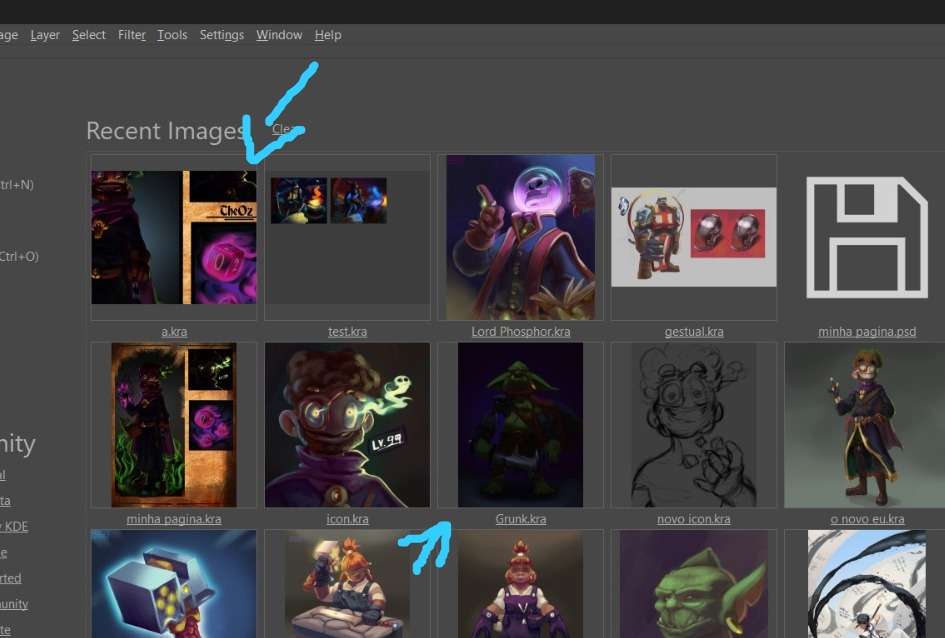
I guess the recent images view does only use the embedded thumbnail of the kra file and since it doesn’t load the entire file, is not aware of the color profile.
As long as the colors are correct when actually opened, that’s not much of an issue, though.
This topic was automatically closed 30 days after the last reply. New replies are no longer allowed.