Hi there.
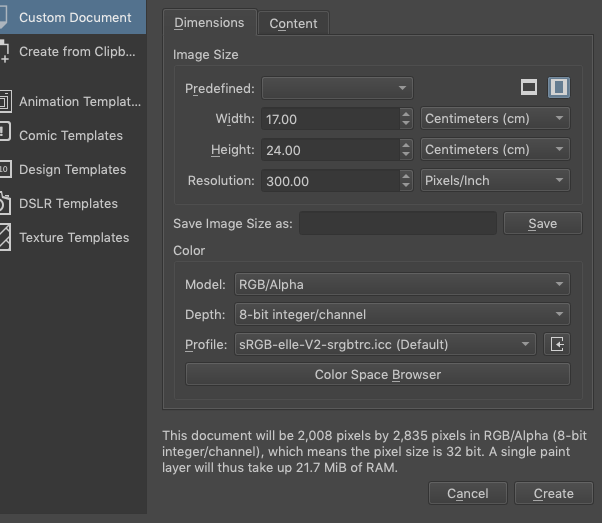
I have set my document to be 17cm x 24 cm.
But when I look at it with the rulers on, it is 20cm x 28cm.
Why it that?
Thanks for any help.
Hi there.
I have set my document to be 17cm x 24 cm.
But when I look at it with the rulers on, it is 20cm x 28cm.
Why it that?
Thanks for any help.
The screen 1:1 zoom respects the dpi of the monitor to check the document is print size click on the button in the bottom rightmost part of the status bar. It is just besides the zoom sliders. I’ll post a screenshot when I am on a computer
Hm, can’t reproduce this, with version 5.1 at least.
You mean the rulers in Krita, not actual rulers you hold against the screen right?
I mean the rulers in Krita, yes.
Can you do Image → Properties → Dimensions tab and say what the Width, Height and Resolution are?
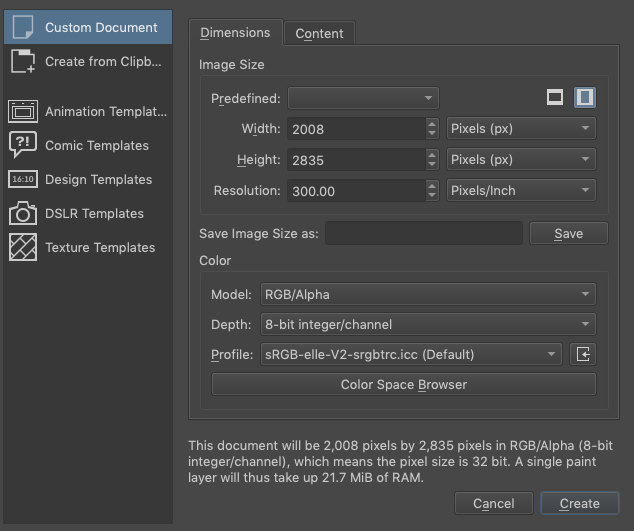
Also, can you make a new document of exactly the same type and show a screenshot of the Create New Document window just before you press the Create button?
Did you find that button I mentioned and check if you get accurate print size?
Yes.
Width: 2008 Height: 2835 Res. is 300dpi.
Width and height are in pixels I think, but it converts to 17x24 cm, see image.
Yes, I found this button. But when checking with the Krita rulers, the size is still 20 x 28 - I suppose in centimeter. Can’t see if it is in centimeters.
BUT I now exported the image as a JPEG and opened it in Photoshop - and there it is 17 x 24 cm !
So maybe the Krita ruler is not in centimeter…?
You can right click on the ruler and change the measuring unit. Default is pixels, I think.
Oh! I did, and now it is in centimeters! And 17 x 24 it is! Hooray 
Thank you so much!
I wonder what it was before. x3
Oh wait, when it was on pixels that would explain why you saw a 20 and a 28, that’s roughly the pixels in hundreds.
This topic was automatically closed 3 days after the last reply. New replies are no longer allowed.