I think I have a bug related to the Drop Shadow layer style when the pixel data is off the edge of the canvas. As you’ll see in figure B there’s a gap from the top edge of the canvas. However, if I close the file and open it again, the drop shadow is correct as seen in Figure A. If I make any changes to the layer that makes the layer style render again, the error shows up.

2 Likes
From a purely intuitive point of view, I think that rendering B is the correct rendering, contrary to your assumption. I think this because Krita should only consider the “on canvas content” for rendering the image, and at this moment rendering B is the correct one. How is Krita supposed to know and how to decide that the off-canvas content is not an auxiliary drawing or no longer needed content?
Also, I suspect that the initial rendering when you load the image from disk is due to Krita “rendering and painting” all the content first and then applying the set canvas size to the initial rendering.
If you need the image size of B as the final result, with the shadow from rendering A, then you will need to have it calculated larger and then cropped.
As I said, this is, what I feel is logically correct, it could be misinterpreted.
Michelist
1 Like
I’d agree with @Michelist about logical correctness but it is strange that it changes in the way you describe.
Edit:Add: I’ve just tried it and it always shows a drop shadow from off-canvas content, before a Save and after a Save/Close/reOpen and any changes to parameters.
Except for when it’s first created and the painted object is then moved so its edge goes off-canvas. It’s still strange.
I’d disagree with this. If I have an object off the edge of the canvas, I’d want it to drop the shadow of the whole layer, not just the visible pixel data. If I didn’t want it, I’d delete the pixel data myself.
Or at the very least, have an option to enable/disable it in the layer style settings.
Exactly there is the issue, or the misconception if you prefer that term, how should Krita know that YOU want this behavior, where it usually had to suppress off-canvas content? You know you want it that way, because you have this conception in YOUR mind of how this mechanism should work in this situation for you, where Krita usually does not have to pay attention to off-canvas content (and can not read minds). Off-Canvas content is off-canvas for this reason, so to not pay attention to it.
Michelist
(( Just for the record, I would really like Krita to allow you to apply filters, fills, etc. beyond the canvas limit. I’m constantly working on layers that will be displaced, so part of the layer in outside the canvas does not receive the adjustments I make (like curves, etc.) But, for example, the brushstrokes/selections go beyond the canvas limit ))
Maybe this is an argument to get into the habit of using the canvas larger than needed and cropping it at the end?
Michelist
1 Like
If I make a layer style (or remove then add or change a layer style) on an image with off-canvas content, it shows e.g. the drop shadow from the off-canvas content and any further painted off-canvas content.
I’m using the 5.1.5 appimage with RGB/A 8-bit default.
I understand your issue And ideally it should not change the layer style based on whether you save and reopen the file. Once the layer style is applied and showed it should stay consistent.
Other members may have their own opinion which might be correct or wrong. I would suggest that if something seems off or not working as expected then it can be reported as bugs. Of course asking on this forum first is always good since it might happen that it is not a bug sometimes. However in my personal opinion this is not such situation.
I tried to reproduce the bug and I got the broken shadow first time when I made the layer style but on reopening the file and adding more content to the layer I couldn’t make it render with the error. Can you tell what changes you did to the layer for it to regenerate the layer style?
The bug happens due to krita taking only canvas content when rendering the layer styles. I think we should report this to bugs.kde.org. may I request you to file a report for this?
1 Like
I think I have seen this feature request here. I will try to search for it. It is really helpful in some scenarios and I have encountered it many times but I understand that filters are demanding sometimes and people have very very large contents outside of the canvas. For this reason I use filter masks now so that when I move the content the filter gets reapplied to the content that comes within the canvas boundary.
May be a possible solution would be a toggle or check box to apply filter to whole layer content rather than content shown inside the canvas boundary would be helpful that way we have full control when to apply a particular filter where.
3 Likes
If I want Krita to ignore off canvas content, I’d use a transparency mask or just delete it. We obviously disagree on this point, but I don’t have any control of what I want Krita to do at the moment which is the problem.
I was never in a situation where I’d need off-canvas things to react to the layer style, but if you really need off-canvas objects to cast shadows automatically, it can be done with a creative use of a clone layer, transform mask and some filter masks.
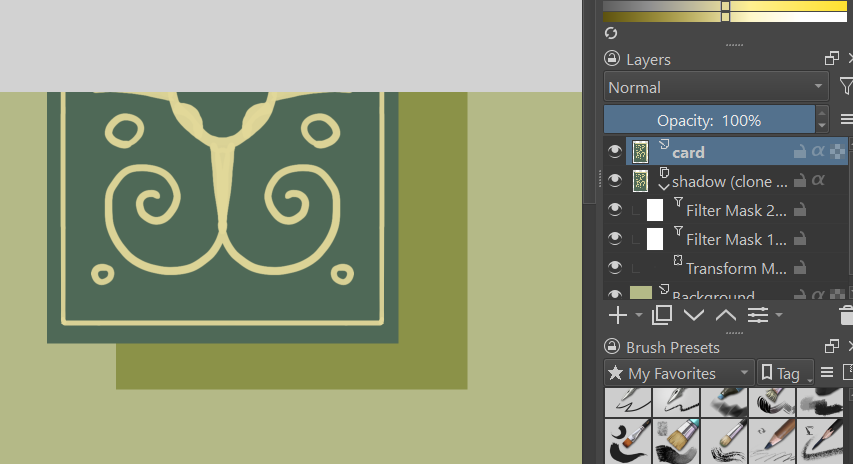
It’s not as easy or fast to use as layer styles, but it works.
Another way would be what Michelist suggested - making a bigger canvas and cropping it at the end.
2 Likes
I agree that we disagree on this point. Maybe it’s because I’ve learned that it’s better to adapt to a situation than to fight against something I can’t change¹.
Michelist
¹Or at least if I can’t change it right away.
1 Like
I think it is better to rest the debate with the disagreeing part and move on  It is not adding to the discussion. Let us focus on solving this issue.
4 Likes
I reported this bug here - 475557 – layer styles do not take in to account content beyond canvas boundary when adding them, but do so when document is reopened.
1 Like
@denmanrooke Strangely enough, now I can’t reproduce the problem, and as @wolthera says on the bug report she can’t too.
Can you check if you can reproduce it again?
I can’t reproduce it anymore either. Possibly it was fixed in 5.2? I had previously been on 5.1.5
1 Like
Yes it might be fixed already  . I too had tried in 5.1.5. For now let us close the bug report and we can re open it when we encounter it again.
This topic was automatically closed 4 days after the last reply. New replies are no longer allowed.