@AhabGreybeard Well, I’m not requesting to NOT add the CSP brush cursor color behavior as a possible additional option.
My request is rather about not removing the current brush cursor color options in case that the CSP brush cursor color behavior option might be added at some point in the future.
Not exchanging one for the other, but keeping the old (current) cursor color options too (being able to choose a brush cursor custom color) exactly as they are now, and not deleting them from the program or somehow changing them to work differently… 
1 Like
As my initial post probably was not formulated clear or extensive enough (and english is not my first language) and was consequently somewhat misunderstood by @AhabGreybeard , I want to elaborate a little bit and also want to make sure to clear up possible misunderstandings:
-
Dear Krita users who previously used CSP and who requested for the brush cursor color in Krita to resemble the color behavior of the Brush Size / Brush Shape cursor in Clip Studio Paint Pro: I am not OPPOSING your request, I am just arguing against the current brush cursor custom color options, as they currently exist in Krita, to be deleted, changed (“updated”) or disabled in favor for including the CSP brush cursor color behavior. I am NOT against the CSP brush cursor color behavior being added as an ADDITIONAL option while at the same time keeping the brush cursor custom color options / behavior, as it currently exists, is included and is established in Krita.
-
Before changing to Krita, I worked with Clip Studio Paint Pro, Photoshop Elements and Affinity Photo. I suffer of migraine and regularly got migraine symptoms like irritation, distraction, auras and headaches when working extended time with those other three painting programs and painting with fast brush movements and / or large brush diameters, on a large screen and using the circular brush size cursor (which I need to use to have satisfying control over the brush). I came to the conclusion that the cursor constantly changing colors and brightness in those programs lead to a “flickering lights effect”, which is a common trigger for migraine. I researched which painting programs would allow me to choose and fix the color of the circular brush size cursor to a single dark color, preferably black, to avoid the migraine triggering “flickering lights effect”. I found out that Krita is the ONLY painting program available which allows to choose a custom color for the cursor. I tried out Krita and found out that although the circular brush size cursor still changes colors when using any color besides black, the circular brush size cursor does not change colors and simply remains fully black all the time when choosing the custom color black. I then tried out painting extensively with Krita with the custom color black chosen for the circular brush size cursor with the obvious result that I don’t get any migraine symptoms / headaches WHATSOEVER, no matter how long I paint, how fast my hand movements are or how large the brush diameter is. 12% of the population suffer of migraine, “flickering lights” are a common trigger for migraine (responsible or co-responsible for about 40% of migraine attacks), and Krita with its current brush cursor custom color option (and black chosen as custom color) is the ONLY available solution for migraine patients who want to avoid any migraine triggering “flickering lights effect” brush cursor behavior while painting digitally. I am sure that there are a lot of migraine patients who use digital painting programs like PS and CSP and regularly suffer headaches / migraine attacks due to not understanding that they expose themselves to the migraine triggering “blinking” or “flickering lights effect” due to the cursor behavior of constantly changing color and brightness back and forth when painting in those programs. How many migraine patients might be there who, while suffering already from a migraine attack, try to calm down through painting in CSP or PS, and instead of easing their symptoms actually worsen them.
-
I researched the topic online and found out that there are other people who paint in CSP or PS, and who complain online that they are not happy with the brush cursor color behavior in CSP and PS, who would be much better served with the brush cursor custom color options as they are currently implemented and available in Krita, and who would probably like me change to using Krita instead of CSP or PS, if they actually knew of the current Krita brush cursor custom color options.
Here are some examples:
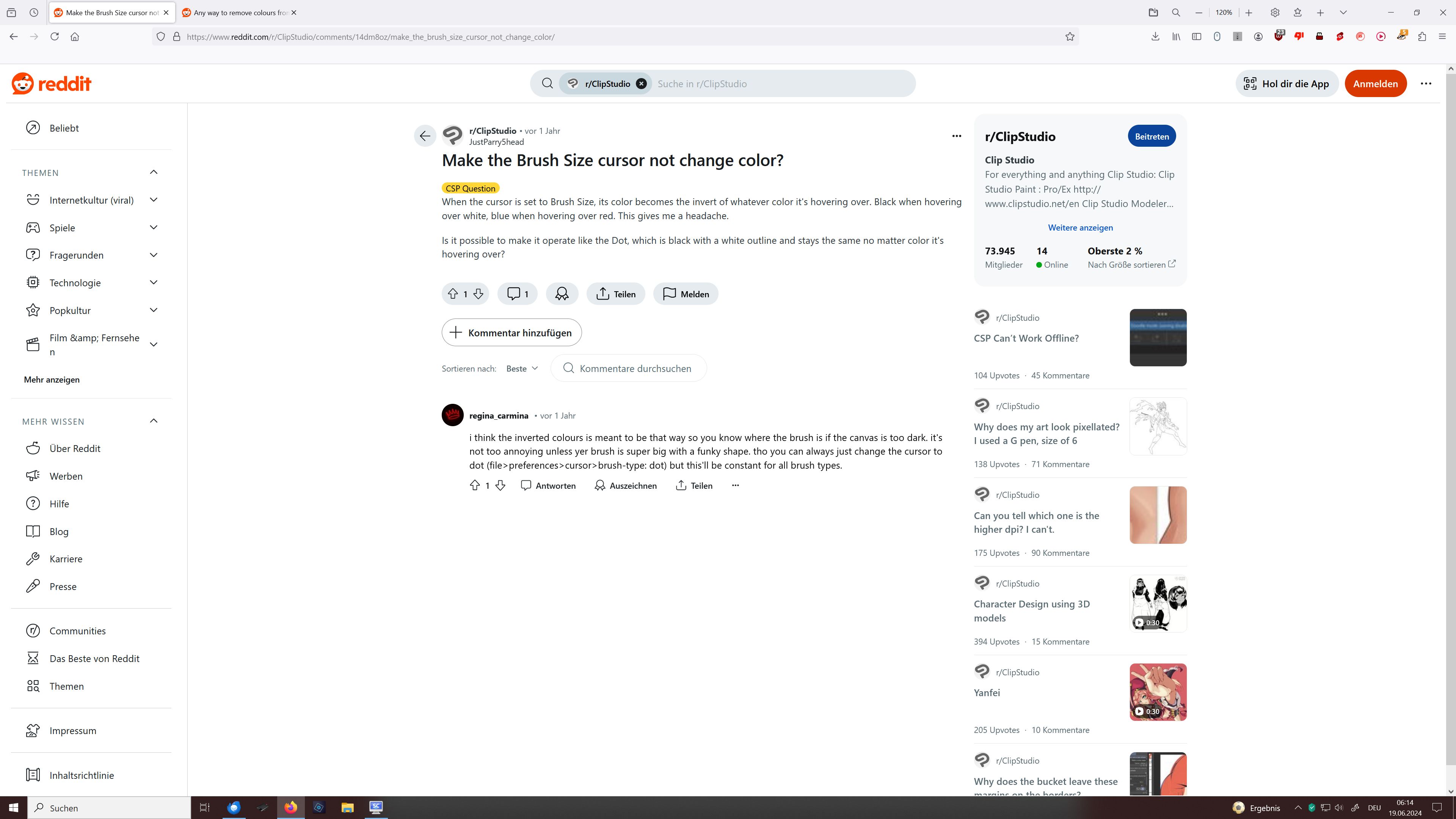
Screenshot 1: Clip Studio Paint Pro user and possible migraine patient complaining about headache through color changing Brush Size cursor in CSP:
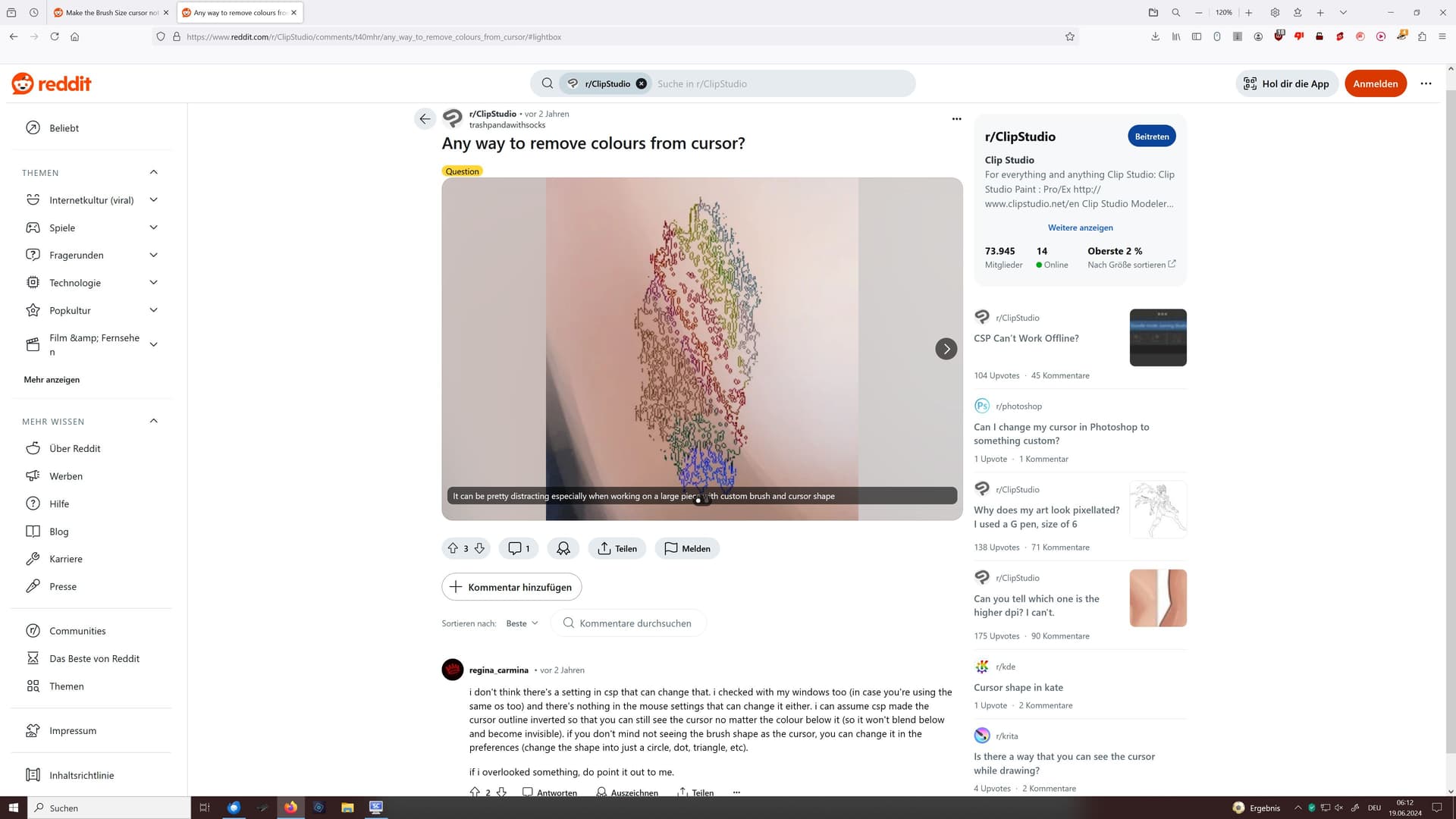
Screenshot 2: Clip Studio Paint Pro user feeling distracted through color changing Brush Shape cursor in CSP:
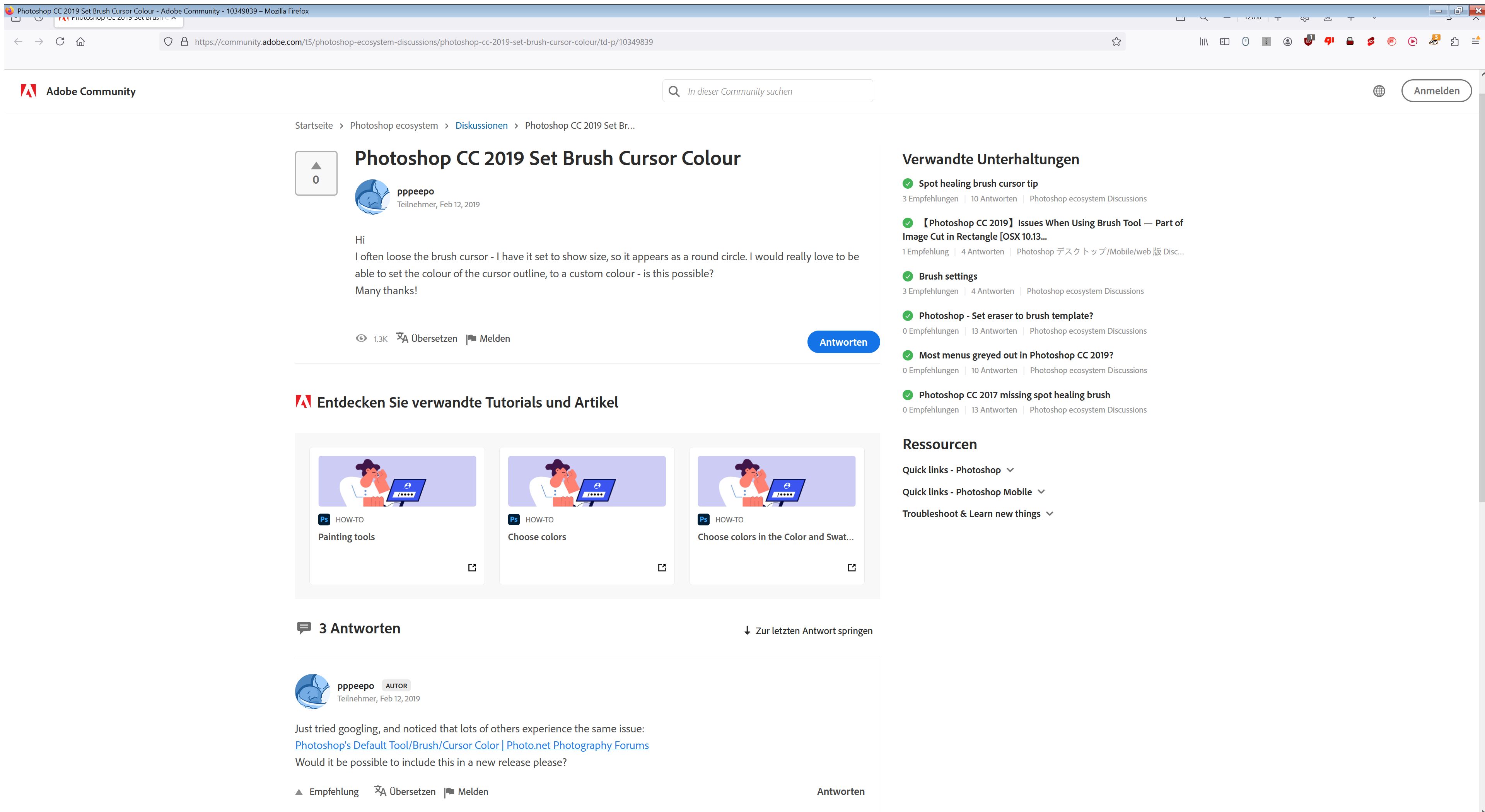
Screenshot 3: Photoshop user wants to be able to choose a custom color for Brush Size cursor to make it easier spottable in PS:
To summarize, if users want Krita to be like another program, it should be optional and not inflicted on those of us who like Krita because it is Krita.
2 Likes
@Erisian Well said! 
1 Like
@sooz Hi, I just saw that you merged my request thread with this one, leading to the votes being merged also. In fact my thread in a way rather asked for the contrary of the request of this thread, so the votes of my request thread being added to the request of this thread is not really right… 
I see your point @kronos but this way, the developers get to see everyone’s thoughts in one thread. We try to keep on top of things like this so that relevant comments will not get missed. Your comments are very important to this feature request.
1 Like
I’m quite sure the developers would read the discussion before they choose to start implementing a new feature. It’s not like a feature request is a ticket they’re obliged to implement as is.
But I’d edit the post to remark your concern anyway.
2 Likes
@sooz Hi, no problem. I see your point.
1 Like
Nice edit, @Y.H.Lai.
@Y.H.Lai Hi, in case the Krita brush outline cursor is either “changed” to behave like the CSP one, or “updated” with the result that the cursor outline dynamically changes color when “black” is chosen, the simple solution would be to add the additional option to choose a fixed brush cursor outline color that never changes no matter the color of the canvas it is moving over. Then people like me with migraine, or people with epilepsy, who are sensitive to the “flickering lights” effect, will have the option to avoid said triggering effect, described in my old posts above, through making the brush outline cursor color to a fixed black (just a simple fully black thin circle outline, not additionally rimmed inside and outside with white circle outlines because that also would lead to a “flickering lights” effect if the cursor is moved quickly back and forth over the screen especially if the cursor diameter is big and/or the screen is large). It would also help people with eye problems like the one I quoted above, who would be able to see and follow the cursor better if it was in a fixed striking color like pink or red.
1 Like
Yeah i am an epileptic so i avoid flickering lights like the plague. I never thought about the cursor. I will start using this option.
But their might be a way to have good readability even so. Out of the top of my head i would try something like reading the pixel color underneath, convert it to monochrome. Then split the range in 3 parts, dark, mid and light. If its light use gray if it is mid use black and if is dark use white. But the outcome would have to be tested to see if it worked and not cause migraines\seizures. I think it would flicker way less despite the high contrast for readability which is a cause pains regardless.
I honestly think rainbow effects are worse that flickering lights, gradients are insidious when they popup you cant react as fast against them. But flickering lights really do high damage.
1 Like
@EyeOdin Hi, I tested every cursor appearance option I could think of, and the only solution for me personally to avoid any level of “headache”, “feeling weird” or seing “strange lights”, while at the same time having maximum control over the painting process, is the round thin brush cursor outline which remains completely black all the time. Yes, you will have a bit less visibility of the cursor when you paint in very dark areas, but I happily accept that for the advantage to avoid any migraine symptoms even if I paint for hours without pause in front of a large screen and with fast movements. Yes, I bet there are a lot of people with migraine, epilepsy and similar illnesses who get symptoms and never think of the brush cursor behavior being the cause of that through creating a “flickering lights” effect.
I assume what the “flickering lights” effect really is, are repeated sudden non-expected changes to your visual field or even small parts of your visual field, which your brain is inable to adapt to fast enough. You might expect them, that doesn’t mean that your brain expects them or is able to handle them. If in your painting program, when for example using the color picker, a white small window will pop up in that moment of usage and display the keyboard shortcut, that certainly constitutes a “flickering lights” effect and if you can’t get rid of that because you can’t disable this in the options / preferences of the painting program, you surely have a triggering effect as a migraine / epilepsy patient. I believe I got such a problem in the past suddenly after a Windows Update in PSE or CSP and was inable to get rid of it. That in addition with the “blinking” cursor behavior of course spelled disaster.
Different migraine, epilepsy, etc. patients might have different levels of sensitivity to the symptoms triggering “flickering lights” effect. I am surely highly sensitive to it. The only logical way imo to comletely eliminate any “flickering lights” effect in the brush cursor behavior while maintaining a maximum possible level of control over the painting process imo is likely the completely black thin circle outline that never changes its color in any even the smallest degree but remains completely black all the time. I tried a darker grey during my tests and it lead to symptoms after an extended period of concentrated painting without pause, because the “flickering lights” effect was reduced, but not completely eliminated, and presumably accumulated over the time of painting until it lead to perceptible symptoms. From my personal experience, I assume with confidence that with the thin line round brush outline cursor that remains fully black all the time, any migraine, epilepsy, etc. patient, no matter the degree of sensitivity to the “flickering lights” effect, has the maximum possible level of security to avoid any “flickering lights” effect of the cursor and therefore can paint with confidence and calmness for hours without pause and without nervousness, stress or fear to eventually end up with migraine / epilepsy symptoms in the end after hours of painting. A slightly reduced visibility of the cursor in darker areas of the canvas is imo a small price to pay for having such a complete degree of security. The only possible logical level above that to avoid any “flickering lights” effect would imo be to use the invisible brush cursor, but using that for many users might strongly reduce control and overview during the painting process regarding brush position and brush size, which might lead for them to an increased level of stress and increased level of concentration necessary to maintain a certain level of control, especially if you paint with a pen and tablet separate from the screen (meaning not directly painting with a pen at a screen which is itself the tablet, like Wacom Cintiq), and during extended periods of painting that increased level of stress might in itself constitute a symptom trigger, and also will most likely not only reduce the fun during painting but also most likely will reduce the achieved quality of the painting result.