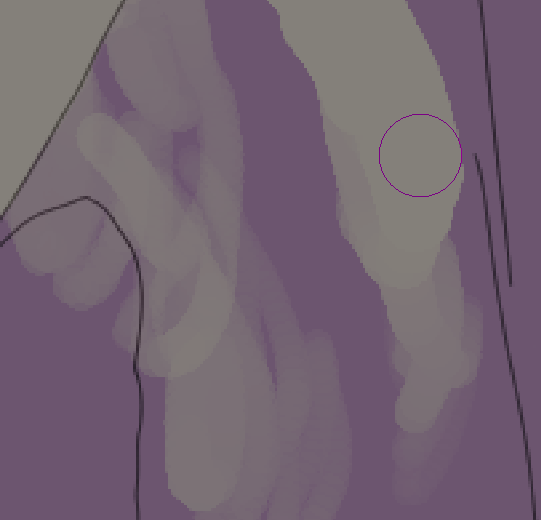
These are the same brushstrokes, with the same settings and pressure applied, and yet vastly different outcomes. This started happening after my most recent appimg update, but I’m not sure how to report this?
It seems like the eraser doesn’t take full pressure values, and instead “caps” at around 50%, and does not respond any further. I have to press down really hard just to erase over the same spot 50 times in 50 different strokes, otherwise I can’t get the “clean” stroke like on the right.
The left is several strokes overlapping; the right is one, single stroke. Again, the opacity AND flow – so everything that has the settings tied to “pressure” – seems to be totally capped, and only if I use the eraser button on my MPP pen. This does not occur on mouse input or when manually selecting an eraser.
I’m wondering where I should look for the source of this one… or what to even put into the report. I don’t see anything too obvious in the logs but I can attach everything I’ve been monitoring. Past few days have been incredibly busy, but I managed to catch this single instance of things breaking in the prealpha updates at least
Can you go to the Tablet Tester in krita then draw a line with the stylus with the eraser pen button held to see what the P=xy.z% reading say about the pressure range you can obtain?
When you use the stylus with the eraser button pressed, are you sure that the selected brush preset is the eraser brush preset that you expect to have, i.e. a ‘solid’ one?
I have a Wacom tablet/stylus which has an eraser tip at the ‘back end’ of the stylus.
Using the 6.0.3-29-May build of Krita Plus and the 6.1.0-28-May build of Krita Next, on Linux Mint, the tablet tester shows the full range of pressure from the detected eraser tip of the stylus.
This is confirmed by using the Eraser Soft brush preset with varying amounts of pressure for the ‘eraser end’.
If you switch back to using version 5.3.2.1, do you get the full pressure range from the eraser tip?
Testing on 5.3.2.1 creates the same issue. Resetting kritarc, disabling all plugins, did not help so far. Returning to 1bc5daf did not help either, curiously enough. Is there any part of config files that could be related to this somehow? I’m thinking of checking later if a full wipe would help, but it’s gonna take me a while.
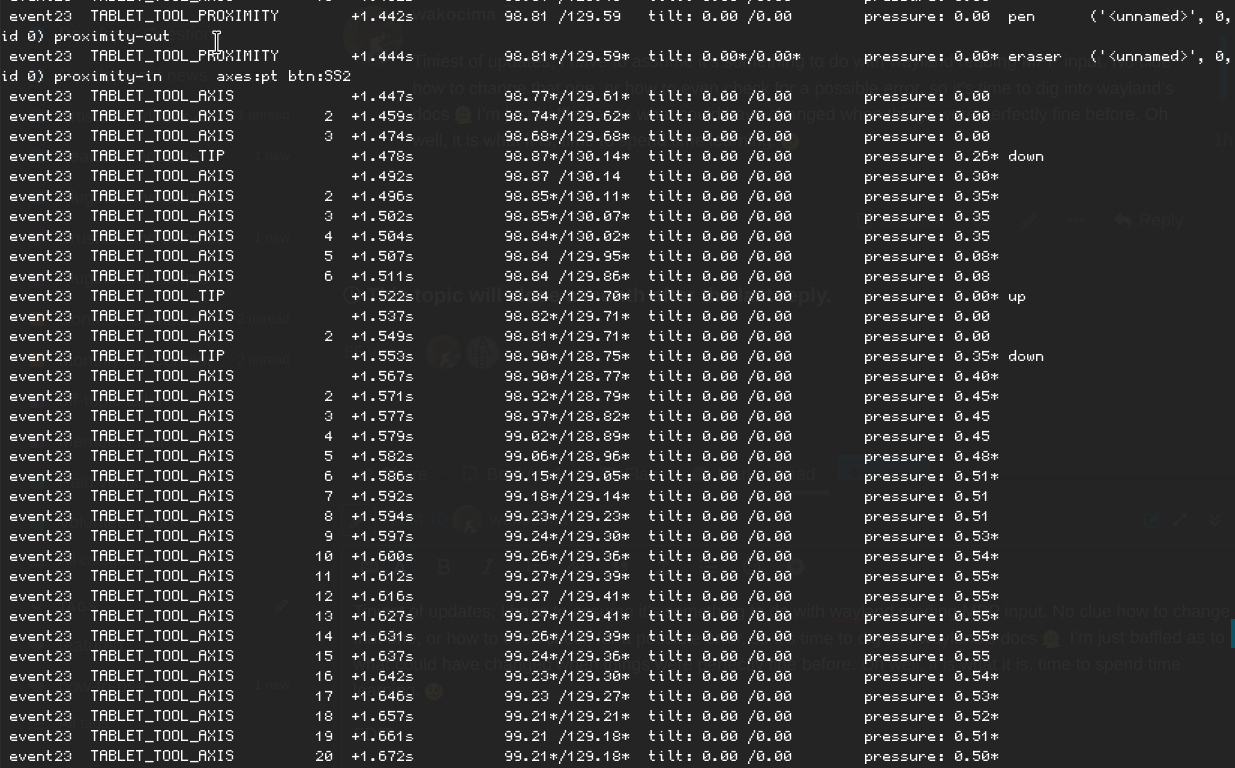
Your tablet tester recording shows that you can’t go above about 60% pressure level.
In that situation, I’d suspect the tablet driver. I don’t know what the arrangement is on CachyOS.
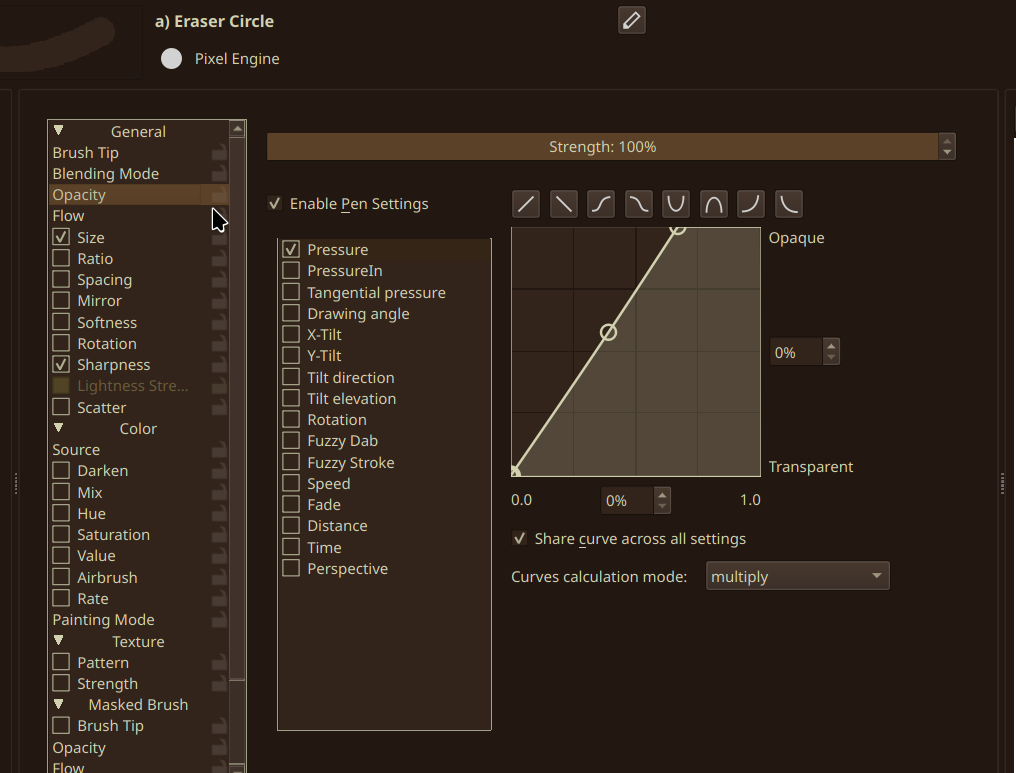
You’re using the Eraser Circle brush preset. That, unmodified, does not have Opacity or Flow controlled by pressure. It only has Size controlled by pressure. So a limited pressure input should still give total erasure but with a limit to the size of the stroke width.
Eraser Soft is what I’d use to test response to pressure control.
You’re using a document that has two layers with alpha inheritance enabled.
I’d suggest that you make a new document for test purposes that has only one paint layer above the standard white Background layer then test again with that to simplify the situation.
There is nothing I can do about the driver, really. This is a 2-in-1 with Renaisser 520C, and it has worked properly before.
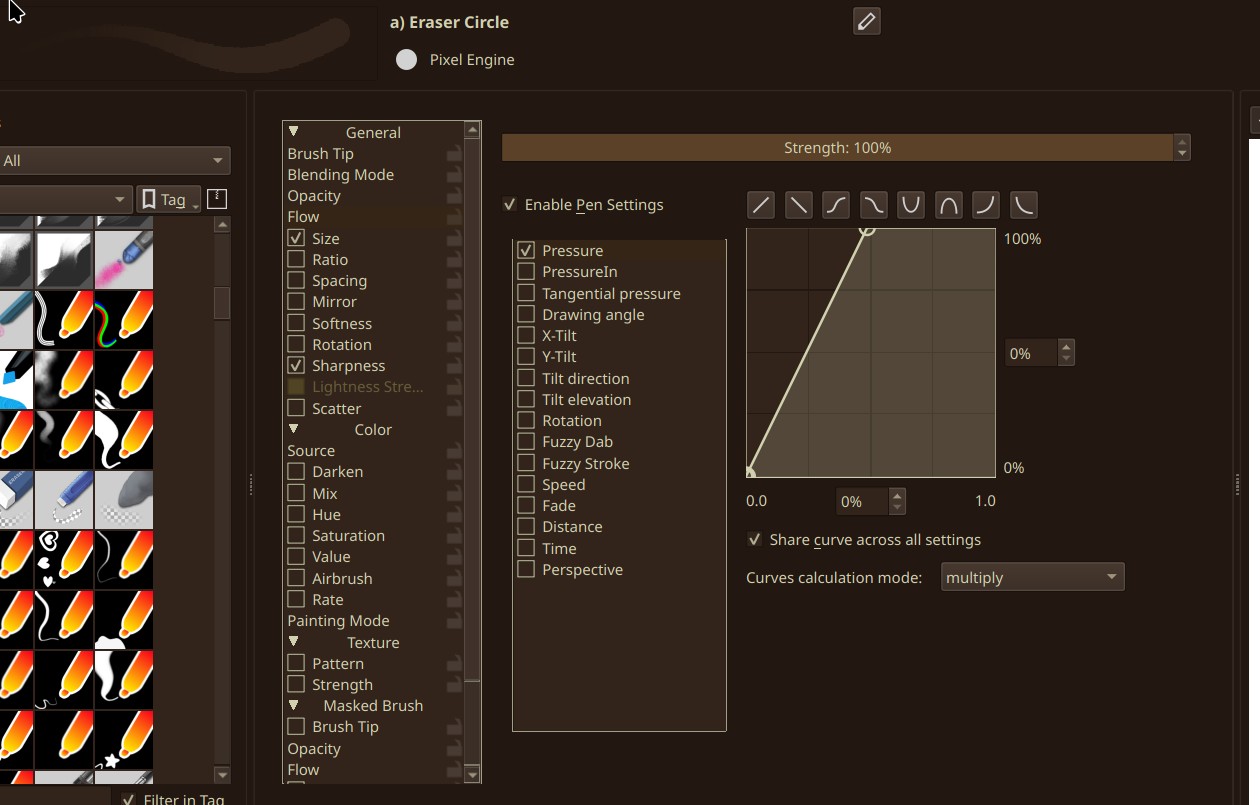
Eraser Circle has been edited. All my tools are tweaked to my liking, and it does have flow/opacity tied to pressure. If we’re very nitpicky, here’s the settings:
I’ve tested this on different documents. It does not change anything.
I understand these are the most common things to check, and I promise you, I’ve already done those (no offence!). I’m merely confused what could have changed between my previous sessions and now – I have not done any pacman updates, the only change was updating the AppImage, so it’s the only thing I can point to. I’m not sure if a file could’ve gotten corrupted perhaps? But like I mentioned, I’m not sure where to start looking. o7
If I enable pen pressure control of Opacity and Flow with the curves that you display above, then I can get complete erasing with high pressure, but my eraser tip can supply 100% pressure.
The only configuration change I can think of is in kritarc for the global pressure curve characteristics. However, according to your previous video capture, your Global Pressure Curve does not limit the range of pressure output to the brush presets. It just makes maximum pressure signal (100%) be output at a slightly lower physical stylus pressure.
(I have a similar Global Pressure Curve.)
As far as I can tell, the only difference between your situation and mine is that your stylus, when erasing, does not provide greater than about 60% pressure signal.
There is nothing in krita that can affect the signal coming out of the tablet/stylus.
It seems like a tablet driver/interface and OS problem
Hm. Odd. Like I said, incredibly weird since nothing’s been updated – but you’re completely right. I’ve gone through several other checkers, and they all return the 60% value cap. Might be just arch being arch once more, but I’ll update the thread if I manage to find a solution to this, since I don’t really have anything to go off of online my hardware combo is just too unusual to find anything concrete. Oh well, thanks for the help anyway, you’ve been golden as per usual
Tiniest of updates; I have to assume it’s something to do with wayland reading MPP input. No clue how to change that one, or how to even check for a possible error, so it’s time to dig into wayland’s docs I’m just baffled as to what could have changed when things were perfectly fine before. Oh well, it is what it is, time to spend time learning.
EDIT:
Still no clue on the fix, but libinput DOES register the lower button as “eraser”, which automatically hampers the pressure:
It would seem that eraser issues are not uncommon, though, as David Revoy did have somewhat-of-a-similar issue:
This is repeated in a reddit post I managed to dig up:
This tells me that it must come down to kernel??
I’m considering reporting this to wayland perhaps? Or libinput.
My current sole workaround for this:
Mapping BUTTON TOOL RUBBER to KEY_E, and binding E in Krita to “toggle eraser preset”. Absolutely crusty and does not solve the underlying issue, but at least I can work around this for now. Whew.
If anyone has come across anything similar, please please please, let me know in this thread so I know everything I should include in my reports, as I’m a bit out of ideas outside of just including the libinput log.
EDIT 2: The pressure cap also appears in the KDE Plasma tablet tester. Again, I have to assume this is wayland/kernel acting up and nothing else.
Reply to prolong the thread close for a bit & do a final update (for now):
The workaround works nearly flawlessly, but I do sometimes notice slight input lag – which might be related to how the “rubber” gets detected
Compiling all the info I can dig up on any “eraser” wayland error I can, since focusing only on MPP within 2-in-1’s seems to be a mistake in this case (?)
Will sit down & dig into the Win11 drivers for this laptop. I’ve been putting off setting up the small Win11 dual boot, because I hate that system, but maybe I’ll find something to point me in any direction at all
Most likely this is a part of the issue that Deevad had back in 2022~ish, since the reports do seem to be pretty much 1 to 1 in just the, like, general weird behavior part
Very reluctant to go back to a previous system snapshot as I’m, honestly, not really into “this might break your laptop” while I’m not at home
Basically will be looking further into this. The issue overall seems under-or-not-at-all reported, but similar things have happened before. Praying that it’s just a simple issue of the wrong linux drivers or something along those lines.


 my hardware combo is just too unusual to find anything concrete. Oh well, thanks for the help anyway, you’ve been golden as per usual