Tiniest of updates; I have to assume it’s something to do with wayland reading MPP input. No clue how to change that one, or how to even check for a possible error, so it’s time to dig into wayland’s docs  I’m just baffled as to what could have changed when things were perfectly fine before. Oh well, it is what it is, time to spend time learning.
EDIT:
Still no clue on the fix, but libinput DOES register the lower button as “eraser”, which automatically hampers the pressure:
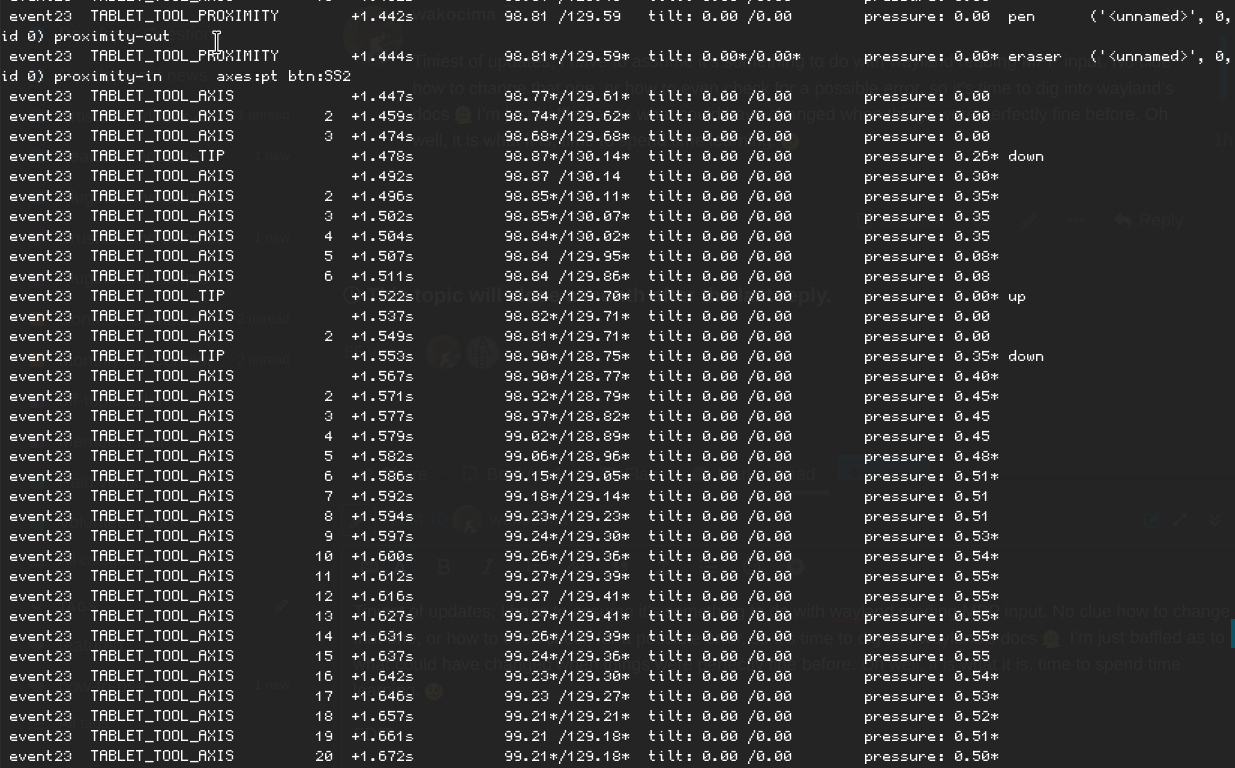
It would seem that eraser issues are not uncommon, though, as David Revoy did have somewhat-of-a-similar issue:
This is repeated in a reddit post I managed to dig up:
This tells me that it must come down to kernel??
I’m considering reporting this to wayland perhaps? Or libinput.
My current sole workaround for this:
Mapping BUTTON TOOL RUBBER to KEY_E, and binding E in Krita to “toggle eraser preset”. Absolutely crusty and does not solve the underlying issue, but at least I can work around this for now. Whew.
If anyone has come across anything similar, please please please, let me know in this thread so I know everything I should include in my reports, as I’m a bit out of ideas outside of just including the libinput log.
EDIT 2: The pressure cap also appears in the KDE Plasma tablet tester. Again, I have to assume this is wayland/kernel acting up and nothing else.