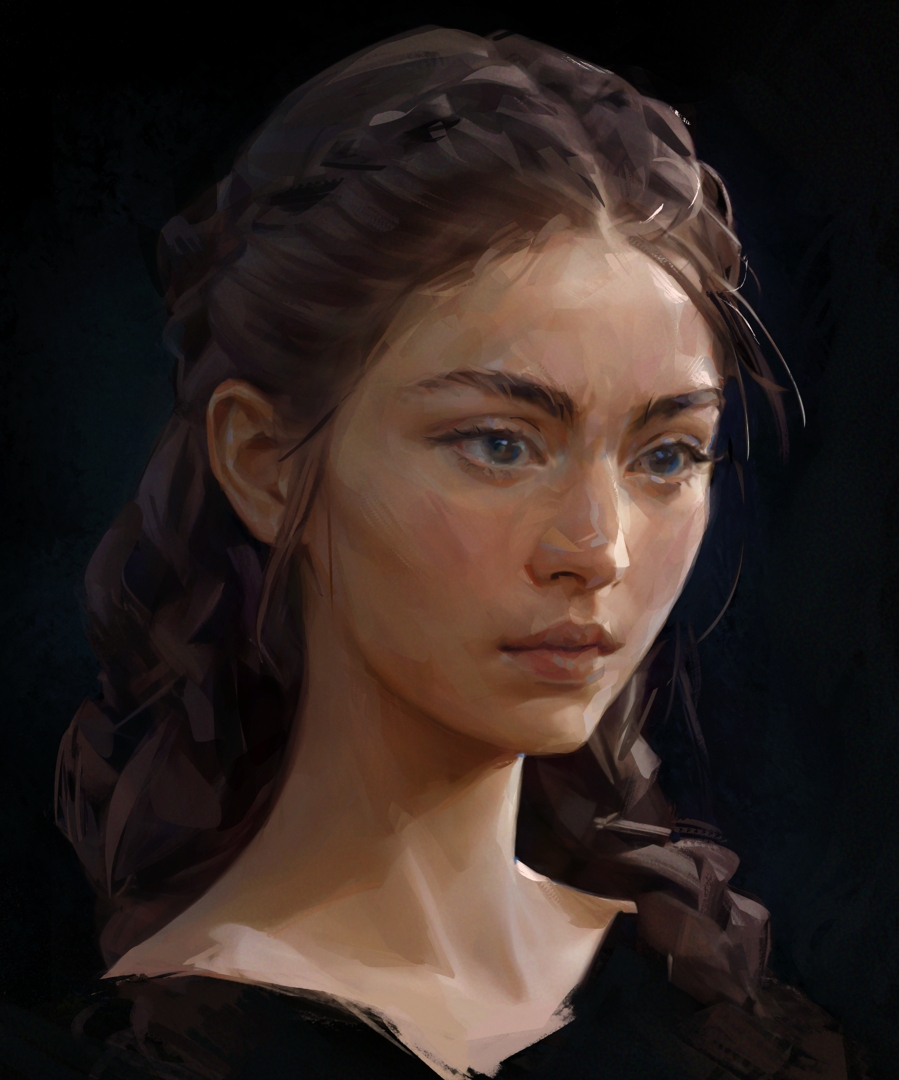
I forgot I painted this. It’s one of several uninspired floating heads I’ve done this year, but hey I’m kinda proud of it. When I rediscovered this I wasn’t expecting it to look any good!
I’ve been unhappy with my digital work for a while. Early this year I started to explore how to combine sharp transitions with softness and this was one of the earlier tries – well, actually this is a second take. The original was done on PS and no longer exists, it’s gone with several other experiments saved on my beautiful new hard drive that suddenly died one day. All I have left to show are a couple of tiny crunched web thumbnails and the odd survivor lucky to have been saved on the wrong folder.
Two months ago I painted over the upscaled jpeg thumb of this one. I couldn’t resist to change my approach to nearly everything and used the chance to get more comfy with Krita too, taking my first dive into the brush engine to create a couple of scratchy rake ones while painting it.
Krita brushes feel wonderful! They’re so easy to control and combine with freehand selection to give a sort of wet clay sculpt look to things, and they blend like a dream.
You know what makes it pop for me? That you mixed in these specks of cold color throughout the painting. This increases the “density” of the painting and makes it more interesting. The sharp transitions play into this too, of course. Very nice.
My current (now past) self is always a terrible judge of quality! Whenever possible I let things sit quiet for a while so I can evaluate them with fresh eyes, otherwise I’ll grow so sick of staring at them I’ll sincerely believe they’re the worst.
That’s a relief. I’ve been struggling with eyes, the way I used to do them cause them to look too sharp when I go simpler on the shading. I kept wavering on the detail levels trying to make them fit everything else.
I love to sneak cool grays into the skin but sometimes I think I overuse them. I want to go more velvetish on shading but they lean metallic and end pulling the rest into that direction, which is my automatic shading mode. We shouldn’t encourage that!
All of them.
At some point at least; I’m just figuring out what I like. I kept returning to these:
Shading and Blending
main brushes for both uses
Basic-3 Flow
Basic-4 Flow Opacity
Airbrush Soft blending help, lines that aren’t lines
Tweaked “Texutre Round” from BBB bundle sketch, blending
Charcoal
Plus I’m not sure which wet brush, but used very little anyway. I usually color pick and use regular brushes instead
Minimal Texture Details
background
Some brush from Memileo’s impasto bundle. (Not linking because I’ll for another artwork and don’t want to spam their notifications) character
Still working on them because the line ones are very good for my needs when they don’t misbehave, which is 95% of the time.
I rely heavily on the freehand selection not only to contain the shading to areas but for things that look like thin brush lines:
(edit: replaced the recording with a better quality demo)
I wish it supported stabilizer!
@Gertsa_Ivan I’m using an app called Input Remapper to make switching tools frictionless, activating the lasso tool, eraser and more using only short and long clicks from the pen buttons. This app is for Linux, on Windows I used one I wrote myself that did something very similar.
I 100% recommend using this kind of aid if you want to go lasso. Without that switching between brush/eraser/lasso all the time feels clunky.
Bonus: Grain Texture
There’s a subtle grain filter over the entire painting to add a bit of grip to it. It’s barely there but I find it makes all the difference in the world, blunting that squeaky clean digital artwork feel. I like the filter effect better than leaning on charcoal-like brushes, it’s softer and I dig the color shift. Reminds me of printed media.
For this I’ve been using G’MIC filters. I’ll create a new pass through group, add a paint layer then use the following code in the “Custom Code” filter.
# Fill with 50% gray
fx_colorful_blobs 2,127,127,127,255,1,nan,nan,121.517,126.64,255,0,0,"nan,nan,nan,nan",nan,nan,85,25,0,255,0,"nan,nan,nan,nan",nan,nan,60,75,0,0,255,"nan,nan,nan,nan",nan,nan,50,50,255,255,0,"nan,nan,nan,nan",nan,nan,50,50,255,0,255,"nan,nan,nan,nan",nan,nan,50,50,0,255,255,"nan,nan,nan,nan",nan,nan,50,50,255,255,255,"nan,nan,nan,nan",nan,nan,50,50,0,0,0,"nan,nan,nan,nan",nan,nan,50,50,255,128,64,"nan,nan,nan,nan",nan,nan,50,50,255,64,128,"nan,nan,nan,nan",nan,nan,50,50,128,64,255,"nan,nan,nan,nan",nan,nan,50,50,64,128,255,"nan,nan,nan,nan"

# Add noise. Replace 600 with the desired scale, suggested max side/(10 to 20)
fx_simulate_grain 0,1,0.613, 600 ,259.58,1,26.6,21.4,0,20,72,0,0
Set it to overlay, reduce the opacity, add a transparency mask and remove the excess with an airbrush. I often clone the layer and use another modes like color burn, color dodge or whatever too, tweaking their opacity and the transparency mask on the original until I get something I like.
Oh on mac, I use Karabiner to use my keyboard nearly as a corne keyboard (rather the 46 keys model), but except a simultaneous key I use to reset rotation, all other keys are remaps that would work on a native keyboard.
I have set it up so I can do nearly everything with my right hand in a touch typing position, as I hold the stylus with the left hand.
Sounds good, thanks for sharing. If someone finds proper tools for Windows we’re set!
In my case I’m remapping everything I can to the pen not only because it’s very fluid but to spare my hands. They’ve always been prone to pain, keeping one stiff over a keyboard or express keys takes a toll and I’m not getting any younger.
So I use the pen buttons, 1 click to activate the brush or toggle the eraser, 1 holding click activates the lasso tool, releasing returns to brush. 2 clicks toggles selection visibility and there are more shortcuts for things like color picking, deselect, undo, etc. Everything I use often, as many clicks and hold combinations as I’m able to remember evoking various actions mapped to 2 buttons.