Hi
Can’t understand much difference between export and “save as” … when is it best to use which? They both seem to have the same options and file type choices in the end …
Hi
Can’t understand much difference between export and “save as” … when is it best to use which? They both seem to have the same options and file type choices in the end …
“Save as” also changes the name of the document.
Michelist
They have the same file type options to give maximumm flexibility for the user to do anything they like.
Save As is useful if you want to make a different ‘branch’ of your image development by giving the document (and saved file) a different name in addition to the current name.
Export is what I use for producing .png and .jpg because it has no effect on the current document or the main .kra file.
Technically it should but it really doesn’t. It only really does that on the first save after that the name will be locked.
Hmm, not here on my side, it changes the document-title on every “save as”? I’ve tested it right before I posted it to be sure.
It is on Windows 10 with 5.0.6 
Michelist
Edit: And the initial document was also a pic I created this way.
If you editing 111.kra and save as aaa.png , the current edit document in krita will become aaa.png
export 111.kra to aaa.png will just create a new aaa.png file, so it is much recommand to prevent data loss when saving plain image IMO.
It happens it is just hidden I never understood this. Imagine board can show you the other name easily and helps to correct it too.
I stumbled upon this when I tried to do an update to a script based on the document name as an identifier of the document but the path is better either way. What krita reads (I think) is not what is in display. It is weird.
But this flexibility totally renders the export function useless because it is just ease of use option to the path it will save if you hit the save keys again. Not to mention confusing to new users to even discover what is even the krita file format they should be saving with.
Yes, you are right. I just looked into the “save as” files and the metadata still has the original name noted. Sometimes you have to get up and do a deeper look to see behind things.
Thanks, learned something again!
Michelist
The difference between “export” and “save as” is a convention that has been around for, like, thirty years.
The thing we maybe should remove from Krita is having a separate name for the image apart from the filename, but we cannot do that because of backward compatibilty. It dates back to the time a single Krita file could contain multiple, named images.
I find Export to be very useful.
While I’m working on a document, I’ll Export as .jpg/.png then open the .jpg/png file to see if it looks ok and if there are any problem areas. Then I’ll scale it down in size to see if it still looks ok and maybe modify the .kra document if there are problem areas. Then I’ll close the .jpg and probably delete it.
Different people have different workflows and the overall flexibility is important for different personal choices of workflow.
Then they should put time and effort into learning this. It’s not difficult.
There are logical differences in the behavior of the program. It is useful to use export within one session, because when you close the main file, you will definitely receive a warning about the need to save the source file, which does not happen after “save as”, because you proceed to work on a new copy of the file. Accordingly, if a format other than is used for “save as”.kira or .psd. an inexperienced user risks losing the original layers and settings.
Within one session, these functions separately remembers the last used save format, which is extremely convenient if you export multiple times within one session.
I agree with this, i always use export, instead of save as when i want to export my work as PNG. If something is easy to use it’s already useful to me.
I am trying to understand the relation between export and people not knowing which format to use to save, cause i honestly see no relation between these points.
When explaining to new users how they can save their work to post online i always explain with using export and i have never seen anyone confused about using it.
Usually the confusion they have is because they want to “download the image” from krita and don’t understand how to do that.
When using export, you don’t risk accidentally continuing working on a .png instead of a .kra.
‘Save as’ creates a new document but it switches the file you are seeing in krita → It will switch it from .kra (the old one) to .png (the new one), so for example If you didn’t finish your drawing, and keep on working after saving the .png, you risk frogetting to change the file type to .kra again (so you will loose the layers since your last .kra save)
Same way, ‘export’ creates a new document, but it doesn’t change the one you are working on, so you don’t need to worry about forgetting to change it back to .kra again.
Many people made the mistake of modifying the original image, instead of saving the image with another name (the correct one) and in the default extension used by the graphics program: psd, (in Photoshop), xcf, (in Gimp), kra, (in Krita).
Why is it an error? Because maybe you need the original image for one reason or another… and if you’ve modified it, obviously it will be lost. Believe me: I’ve had cases of customers who sent the only image they had, without keeping any backup!
So, I think these differences in the way of saving were meant to avoid these errors. Just now I tested opening a jpg picture in Gimp. I made a simple cut and gave Ctrl+S. It would open that Save as screen, to save the file in xcf format… so that the original jpg image is preserved.
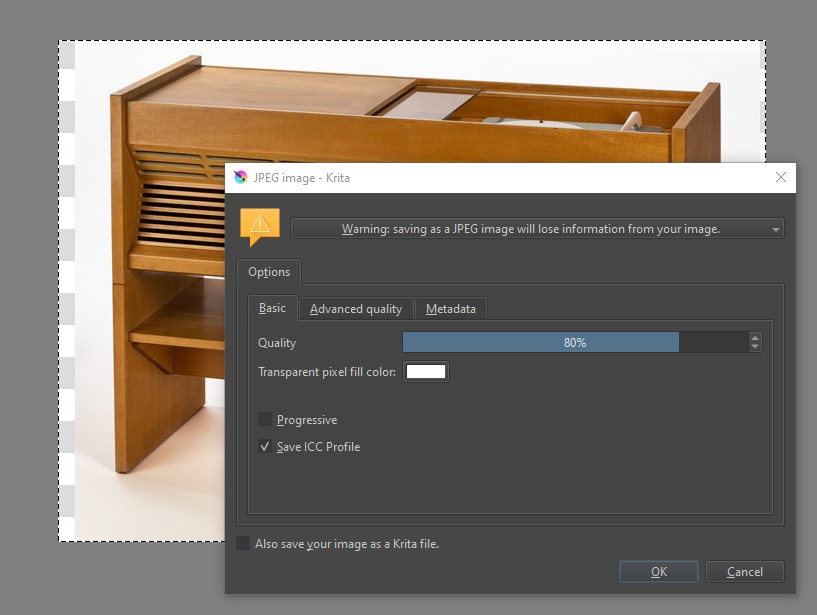
I tried to do the same in Krita: when I gave Ctrl+S an alert frame appeared, see:
I remember that in the old versions of Photoshop if I modified the jpg file and saved it… the program accepted it. Then they changed it.
There is a warning right in that dialog box saying that you will lose information if you save it as jpg. This is a good balance I think. Explaining users the risk but allowing them to continue. Sometime I just want to save as jpg and be done with it.
There seems information that is being ignored here for these arguments to be even real:
This is the convention between all editing software out there for the last 10 years I can assure.
Except in 2D applications for some reason. which is a real oddity. But even within the realm of painting applications alone, that is quite small compared to the rest, it is not really a constant nor a rule. I have checked most popular programs before and I would classify it more being pretty popular choice more than a convention even within that realm.
Thing is the warnings should be avoided and can be. With this organization the menus a person that has never touched Krita or any other editing software can think “oh I did not save, I have to save” but what happens when they save is they enter into a fallacy because what they usually end up doing is saving in a non native file format because they choose a more known file format instead of the native, ergo they have more problems to find it because what they are actually doing is an “export” not a “save”.
Because even if you present choices to a new user they don’t know their weight or consequences. Even if you got to learn the program there are certain things that are unavoidable constants between all programs and saving and exporting files is one of those things.
So by consequence you hear all these reports of people saving in PSD, JPEGs and loosing data. This because they need to guess this information or stop to read a warning they probably don’t want to read because they want to save. Even the prompt itself is weird to exist in all honesty.
I have worked in a printing shop and I have seen users mess up for themselves countless times and even royally so. They don’t need extra help with confusing menus because they lead into a false sense of security on their saves. The thing is I am speaking of is just organization and with it you don’t even need to make a warning. I must say never noticed a warning on any other editing program like this one before out of memory when doing a save usually the choices are done before hand.
As for the complexity of it for a user, it is literally the same…
As for flexibility… just place KRA and KRZ into export also and the difference between save paths is preserved. you literally loose nothing more than a “ahh okay” and then they realize why it is, because “save” is KRA only and you should be “saving” with KRA as the program is telling you too.
As is… you get questions like this thread pondering the differences of these options because they are the same. And also the need of extra support at large due to unfortunate accidents.
And in all honestly I find the “user do better” argument appalling in any scenario. People have various skill levels on any program. Advanced users should not be drawn back by the new users. And new users should not be bared from entry by the advanced users. There must be a balance on both sides. A low skill floor and a high skill ceiling.
KRA and KRZ are already in the Export choices.
They’re not explicit though and are listed as ‘Krita Document’ and ‘Krita Archival Image Format’, as is the case with a few other filetypes.
People spend hours making serious effort to paint an image with a complex structure and do that many times for different paintings.
Why won’t they spend a few minutes learning about different file types and the difference between ‘Save’, ‘Save As’ and ‘Export’?
I am really trying to understand your point but i am having a lot of trouble understanding. As i don’t really understand how the things you are saying are related and in some points seem contradictory.
I am trying to understand what is the problem with the current menu organization for save and export, i can completely agree that krita has a lot of menu organization problems but this doesn’t feel like one to me.
But is this really a problem of the menu? Or lack of knowledge of the user? This problem happens with other programs too. In krita at least there is a warning telling the user they will lose layer information though i doubt many read it but it’s there.
You say the user needs to guess this information but doesn’t this warning tell them exactly this? At the same time you say warnings need to be avoided, but in this case how would this information be presented? Krita warning is already non intrusive and doesn’t block the user from doing what they are doing.
I agree that’s what happens but what is your suggestion then? Go the gimp route of making save only save the native format? I can assure you that would bring way too many complaints, and even more confused new users.
In my opinion a solution where you can check to save the .kra file when saving a file as another format would be better… doesn’t this exist already? I faintly remember something like this. But anyway have that easy to see and to toggle and have on by default and this problem is reduced.
But what do you mean by organization? To me it doesn’t feel like it’s the save as or export menu. But the file format list, that many options are given alongside the krita formats.
The only solution i can think of that would guide users better is have a new save option that is like “save work in progress file” or save file to continue later" and only give krita formats or even just save as kra and have a “archive work” to save as krz but then if something like this is added people would come here asking what is the difference between these and save as and export lol.
Well not exactly the same, they do the same thing in different ways as already explained in the thread. Maybe tooltips would help in this case but i feel like many users doesn’t even know tooltips are a thing due to the time they take to appear.
But yeah i am a bit confused by your post as in the end you say that krita shouldn’t be held back by new users lack of knowledge but yet your whole post seem to talk about that.
I like the sound of those options…
…a solution where you can check to save the .kra file when saving a file as another format would be better…have that easy to see and to toggle and have on by default and this problem is reduced.
Go the gimp route of making save only save the native format …
I came across that in my Gimp painting days and I quickly figured it out, I’m guessing that others would too (Infinite Painter, Sketchbook and ArtRage do this and I haven’t read any complaints about that.)
Saving as both the native format and the other well known format at the same time sounds good to me.
It does that already but the option is turned off by default.
There were howls of anguish from many Gimp users when that happened.
One user said that it ruined his many years of ‘muscle memory’.
I looked at it and said, “It seems sensible, I’ll get used to it.”