hello please help, i cant export the animation in any way except image sequence
(update, anything except GIF and APNG file i cant export, that means mp4, ogg, matroska or anything except GIF and APNG isnt exportable and i need MP4) PLEASE HELP
(update, anything except GIF and APNG file i cant export, that means mp4, ogg, matroska or anything except GIF and APNG isnt exportable and i need MP4) PLEASE HELP
 Hello @Earth_Nation, and welcome to the forum!
The issue may be that you are trying to save it to an online location. Please create a folder on your PC to a location Krita has access-rights, then try to render your animation again.
If that does not work, then please report back with a brief explanation what you did so far and where you are stuck. Please include a screenshot of the settings-dialog in Krita where you set up the animation parameters.
Because I don’t animate, there may be other users that have to support you further, but we will see.
Michelist
Add/Edit: I moved your topic to an appropriate category.
Helloz, thanks for the reply, I created a folder while trying to export (before making this post) and it is in the same folder as the .kat(I think that’s the name of krita projects??) File with the animation, maybe I should export it in a folder outside of where the main document of the animation is?
There are file access problems for ffmpeg when you’ve used a OneDrive location for rendering.
So the best place to render to is a folder (maybe called Rendering) on your Desktop.
Even then, some people have OneDrive configured to automatically and continuously make mirrors/backups of their data, including any files on the Desktop. That causes the same problem.
The safest thing to do is disable OneDrive operation while rendering.
The next safest thing to do is to make sure that wherever (on your computer) that you have as the rendering destination is not included in any OneDrive backup activity.
Edit:Add Waves to @Michelist
I have never seen a *.KAT-File, as I said I don’t animate myself, but that is not the issue.
Your screenshot shows that you are saving your animation directly to an online location, namely OneDrive, and this is a condition that usually does not work. So, please create a local folder on your hard-drive, HDD/SSD does not matter, but don’t save it online while rendering, you can move it after you have rendered it. And when you are asked to provide information, you should provide the information you were asked for in order to be able to support you. So, if it does not render to your hard-drive than please report back and provide the screenshot and the description of what you have done so far.
Additionally, do you use the version 5.2.0 or one of the nightly version, and if a nightly version which exactly? Including the full git-number.
Additionally, please obey the hints @AhabGreybeard gave.
Michelist
Hello @AhabGreybeard! 
Damn, this version 5.2.0 version isn’t that simple???, my onedrive is disabled from the time I bought this PC so I don’t have it, but I’ll try it another time with a new folder on the desktop
Ight , I’ll check when I’ll come home and resolve it
I’m doing support, and online support, for many years now, here for over two years, and most times I’m not so wrong.
But I admit, I’m far from perfect!
Michelist
On my slow, old, creaking and wheezing Windows 10 computer using version 5.2.0, I’ve just rendered an 870 frame 640 x 400 animation to a folder called Rendered on my desktop.
I rendered to .mp4 using the built-in ffmpeg provided by krita using the OpenH264 codec.
The .mp4 video file was created with no problems.
I did the same with a little bigger animation provided from a user, 2560x1440 pixel ~2700 frames, and it worked flawlessly. So, now we know for sure, Krita 5.2.0 is able to render an animation to MP4 without issues.
Michelist
hey now i moved all the files from the disabled onedrive(probably it was turned on at the start and it got some files backed up and from now it all went to that folder) now every file content is located on my pc and one drive is empty
anything to relate?(from what i replied to michelist)
No, I meant the dialog where you set up the parameters to render your animation. That is the dialog you get via ‘‘File’’ → ‘‘Render Animation…’’
→↓
For me, the above settings worked to render the animation.
And no, we didn’t need proof that you’ve now emptied your OneDrive folder, nor did we need a screenshot of Krita’s welcome window, the appearance of which is familiar to anyone trying to help others here.
You have gone through the dialog I asked for at least four times now, you should know what I am talking about.¹
The screenshot I’m interested in is the one of this window, preferably expanded so that the folder paths are fully visible, as in my screenshot.
Please check if the rendered files in your folder
C:/Users/alexd/Desktop/animation folder/first thing ever/
are numbered consecutively and start at Frame0000.png. So no frames have been “skipped” ? 0, 1, 2, 3, 4, ?, 6, 7, ?, 9, 10, …, I suspect these may be numbered inconsecutively. To check this, simply select all files and add 1 and compare this result with the number of your frames in the animation.
But I guess with everything coming now, I am out of my depth with my knowledge.
Michelist
Add:
¹At least if you would take the trouble to read the posts addressed to you thoroughly as well. If necessary also several times, if you should have an illness from the surrounding field of the attention deficit illnesses (ADHD etc.). After all, this is not a problem, but if you want support, you should also show that you are proactively helping to solve the problem. Because we don’t have a problem here, you want help.
To be honest, I’m starting to feel like I’m being taken for a ride here.
sorry for not understanding too much, only today i transferred apps and im still not so experienced in using this specific application, from what i feel and know i dont suffer from any know mental issues. moreover im not a specialist in technical issue or anything related to onedrive or else, i was desperately trying to find somehow to help you get more clues on how to resolve this situation, probably loneliness if not adhd but that is irrelevant so now,
heres the pic of how i usually export
also its not exported as image sequence as you mentioned by frame0000.png(ive tried before yes that method always works but i want to export it as mp4 right away)
sorry if something isnt correlated or missing, ill try my best to offer as much info as possible
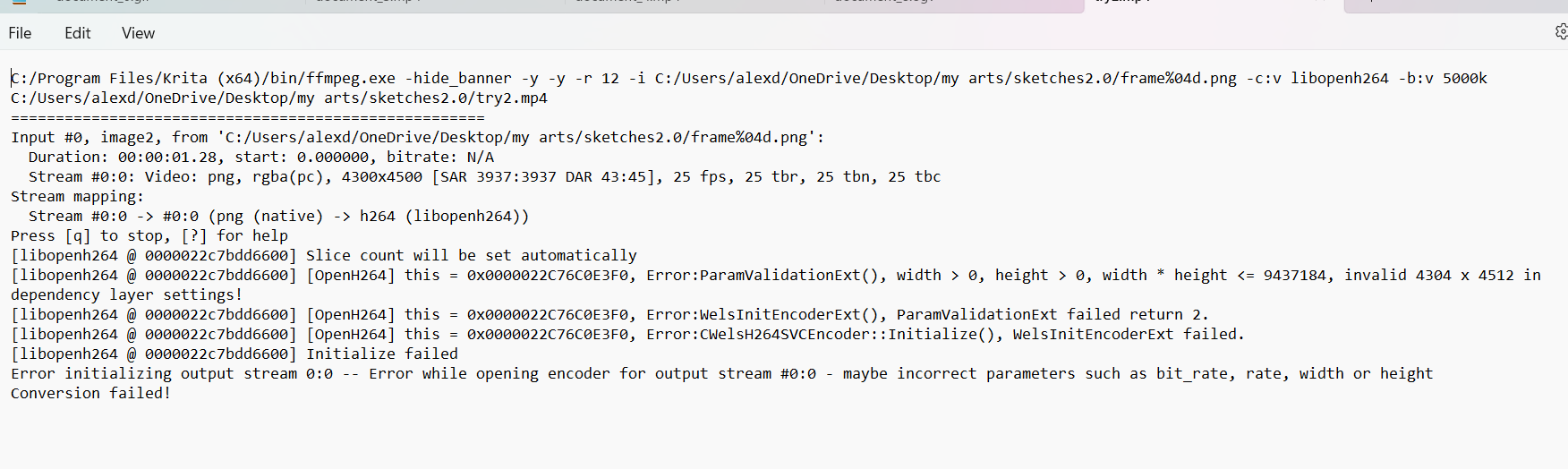
The animation canvas size is 4300 x 4500 and that is a very large size.
Do you have a monitor capable of displaying a video file with that image size?
Not many people do so I wonder why you wanted that size.
I also wonder if that could be giving any problems, as may be indicated by the last line of the ffmpeg log file and the line earlier than that.
You could make a copy of the .kra file then do Image → Scale Image to New Size and take it down to 25% of the current size. Then try rendering it again.
Note about OneDrive: It’s not the content of the OneDrive folder that matter, it’s whether or not the OneDrive service is running and active for the location you render the video to.
You don’t want OneDrive (or anything) to be prodding and poking files while ffmpeg is trying to prod and poke them.
Sorry I was used to make arts on big canvases on my precedent application named medibang paint pro, and it was running fine, I guess probably because it’s half of the usual size I do and it’s like 53 sketches trying to render at once its too big of a size
I’ll try your variant and make it smaller, I’ll make it twice as small


