Hi,
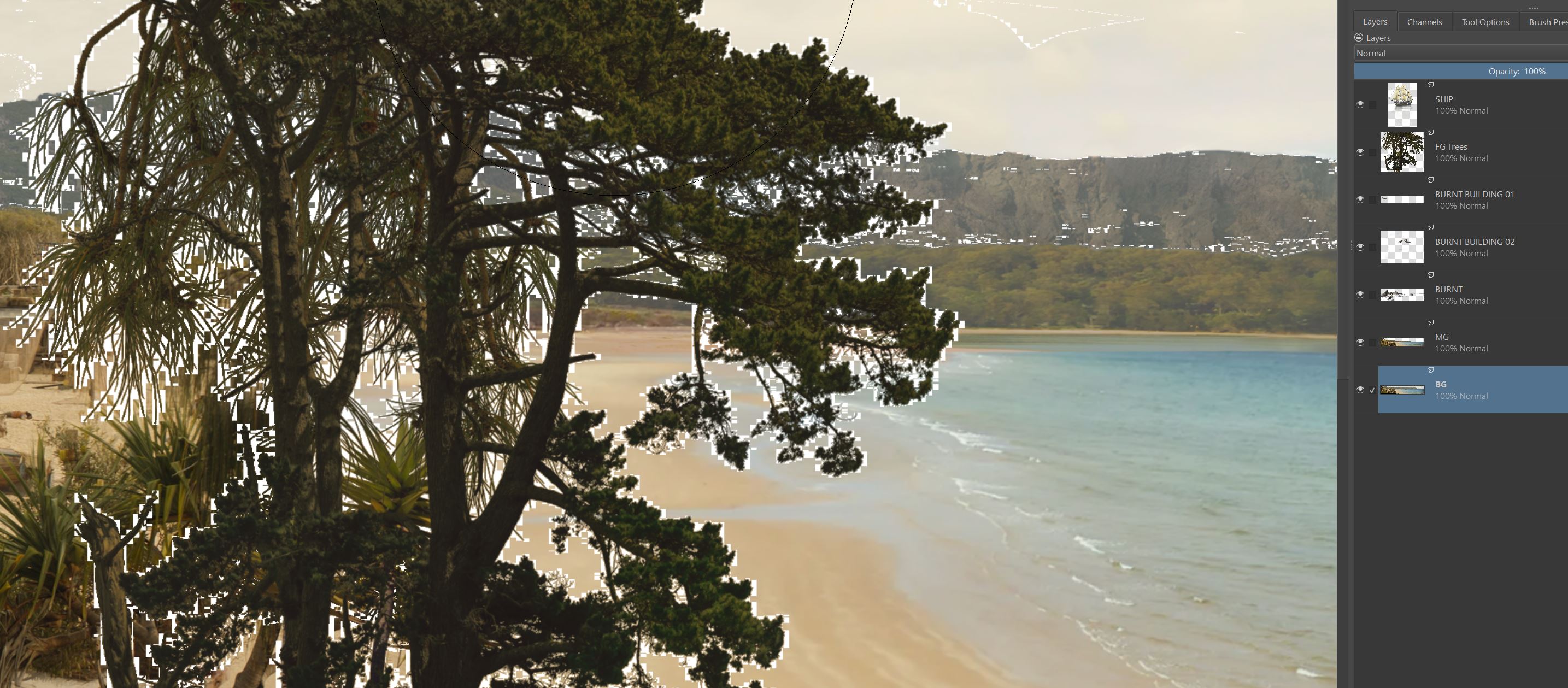
I’m currently using Krita for matte painting on a feature film (Amazon Studios) and I’m getting a terrible white fringe around my layers. I’m ok using PSDs in Fusion when they’re 16 bit but when I’m needing 32-bit float I can only use exr layered files. Unfortunately, .tiff layered files don’t separate in Fusion.
Does anyone have a workaround for this or is this considered a low-priority bug?
This is the only thing in Krita apart from the speed for transforming/scaling layers that’s making it hard to use on film work.
Is there a magic tick box somewhere I can click?
Hi, @Andych56!
Could you try the following:
- Go to Image->Image Background and Transparency
- Select fully opaque black color as the background
If it doesn’t help, please share the failing file with me (you can send it in PM if it should be kept private).
Hi Dmitry,
Thanks for the reply.
I followed your instructions and I was already set on black.
Saving out from the Krita file to a PSD has no fringe it only happens on the exr export.
I could open the exr and re-select the layer and delete the fringe, it wouldn’t appear the next time opening the file.
The unseen pixels that aren’t properly erased before exr export must turn to a solid white. This isn’t the case with a psd.
I’ve had this problem on my last project but I thought it may have been sorted out from version 5.2.3.
Reselecting and deleting is a work around but where there is half transparent areas they get mostly deleted with this method.
You could easily recreate this at your end to see if there’s another fix.
On another note, is there any plans to improve the speed of transforming/scaling/rotating of layers?
I really feel the lag on bigger images.
Still an amazing program though 
You could easily recreate this at your end to see if there’s another fix.
Could you sent me some test .kra file in PM so I could test what happens there?
PSDs are usually saved as 32-bit integet, but EXR is saved as 16/32-bit float, so the are quite different in nature.
On another note, is there any plans to improve the speed of transforming/scaling/rotating of layers?
Yes, for now just use “Accurate with Instant Preview” mode. It is the fastest option available.
Hi, @Andych56!
I’ve got your file in the PM. I understand what’s wrong with the file, but I don’t yet understand why it causes an artifact.
For now, there are two workarounds available for you:
-
Right click on the layer → Split Alpha → Alpha into a Mask, then click on a mask the click Write as Alpha. It will clean up the dirty transparent pixels.
-
Filters->Adjustments->Curves, select “Alpha” channel, add apoint that transforms point 50 to 51, press Apply… The artifacts will go away.
Great, thanks for the work around for now
Hi, @Andych56!
I have looked into your problem a little bit. The quick answer is: the originally imported EXR file is not correct.
How did you create it? Did you use Krita for that? Could you share instructions?
Hi, @Andych56!
If you created an original EXR file in Krita, could you please check this build of Krita (it is still building) and recreate the EXR file:
Pipeline · Graphics / Krita · GitLab
PS:
Btw, I remembered that we have a special filter for cleaning the effects like that:
Filters->Other->Reset Transparent
Hey Dmitry,
Great news! The build of 5.3 worked with export/save to EXR. I used my original .kra file and saved an EXR from the 5.3 build, and there was no fringe. I went back and did the same thing in 5.2.6, and I got the white fringe again. FYI, I’m not using any other app except Krita for creating EXR files that are directly saved from a .kra file.
Awesome job fixing that mate, much appreciate it.
Great! Thanks a lot for testing! I’m going to merge the patch then! 