Working to learn importing .abr files. Two confusions:(1) Where is the “home directory for brushes” found, what is its name? (2) Another program is grabbing my F5 key. How can I open the Brush Settings Editor in an alternate way.
Just a beginner thrashing with terminology. Thanks for helping.
You can import ABR’s via ‘‘Settings’’ >> ‘‘Manage Resource Libraries…’’, or put them into the folder “brushes” in the resource folder.
To get to the resource folder and the brush tip folder it contains called “brushes”, you can access it in Krita via ‘‘Settings’’ >> ‘‘Manage Resources…’’ >> ‘‘Open Resource Folder’’, this will open your file manager in the resource folder.
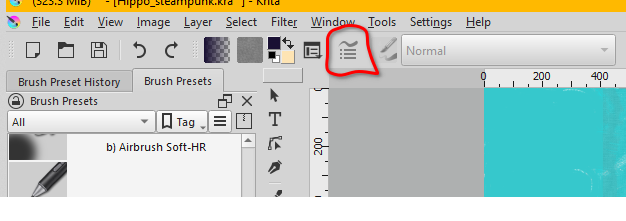
You can (also) open the Brush Editor by clicking on the button outlined in red in the screenshot.
You could also reassign the shortcut with a different key combination via ‘‘Settings’’ >> ‘‘Configure Krita’’ >> ‘‘Keyboard Shortcuts’’.

Michelist
3 Likes
Michelist, here is my explanation of how my problem developed. I don’t know if this is what you intended to ask. If it isn’t feel free to discard it.
I downloaded .abr brush files, recalling that somewhere there were instructions for modifying the .abr files as Krita brushes.
I began looking in the manual for guidance. The “Brushes” section of the Manual said:
“Extract the .abr file into Krita’s home directory for brushes”
As a newbie, I had no idea where the home directory for brushes might be, so I thought I could find another way to get there. The next possibly useful instruction was: " Open the Brush Settings Editor (F5 key)." When I pressed F5, an advertisement popped up, I could not remove it. Not Krita’s fault. That left me with no way (I thought) to reach the Brush Settings Editor. So therefore, I came to this forum asked the question and got the answer I needed.
I don’t think the Manual writers could have anticipated my problem. Overall, I find Krita contains an avalanche of commands and options. I look on YouTube and elsewhere to find piecemeal videos, some very good, about parts of Krita , but I haven’t found any ground-up synthesis that takes me in tow and helps to create a basic image. For example, I am still grappling with how to control the background color. I’m close, but not there.
For example,I did better learning Photoshop from David Pogue’s “Missing Manual” softback than I have learning Krita from the sources I have found so far. The Krita Manual seems more like a dictionary of features than a tutorial. I deeply respect the Manual writers, its a very hard job. I suggest they might discuss training structure both in hard copy and video as they continue.
Just to give me some credibility, I am retired from Microsoft Press, but while there I wrote and edited end-user manuals. I also have a MA in Adult Education. I think Krita is a tremendous project and I want to see it spread and grow.
That’s it. Probably more than you wanted, but I felt it should be out there.
Thank you Sooz, I do have that icon. Just too dense to spot it!
1 Like
I, and possibly others who have such a problem, would be interested to know in what way you were able to solve your problem? Could you possibly add this to your solution post? So others could also benefit from your solution.
Michelist
This topic was automatically closed 3 days after the last reply. New replies are no longer allowed.