Hello @all,
At first glance I knew current Krita wouldn’t be capable of reproducing this kind of brush 100%. So I felt compelled to give a try in making a brush to test myself and Krita brush editor.
After giving some though and trying some experiments, probable the better approach is using a RGBA brush.
Here is mine, it is far from perfect but maybe it help others to achieve better results.

The outer edge is black because I left the brush’s border (almost) pure black. If you change the brush tip to a milder grey the edge will be a darken version of the chosen color (AFAIK).
Edit: I found out that enabling the property Lightness Strength can result in an edge the same color as the stroke, but darker. I enabled Pen Pressure, from the range of 25% to 50%.

Here the brush tip: Brush Tip
And my settings for this brush:
Opacity = OFF
Flow = OFF
Size = ON (Default curve from the brush b) Basic-2 Opacity)

Attention to this initial rotation
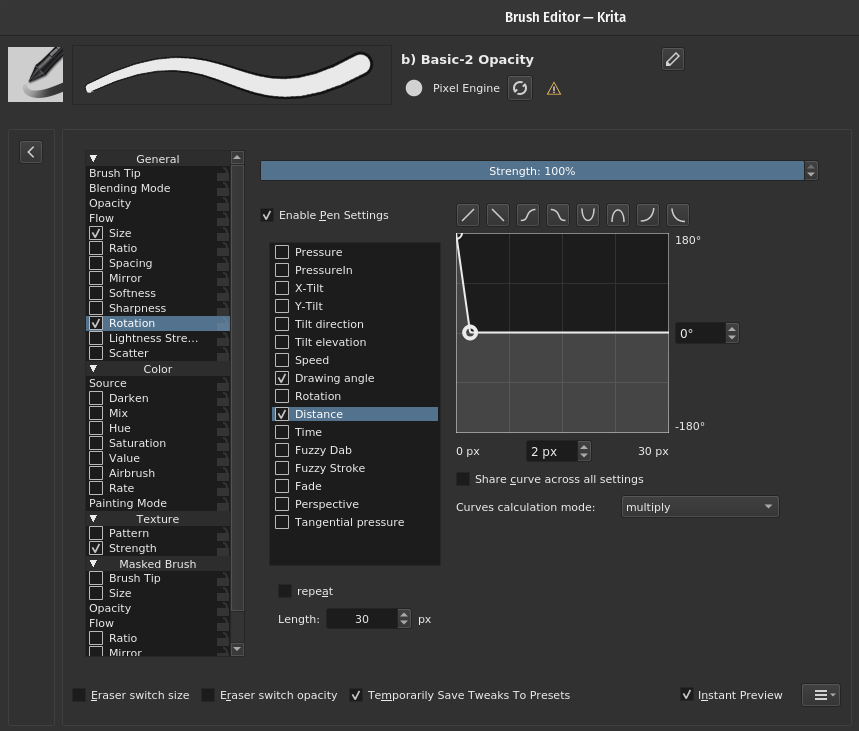
This is to make the moment you start a stroke to have the back of the stroke with the darker edge.
Hope this helps.
Cheers.